







Question: Displaying the score ranges and the corresponding letter grades Using the following table as a guide, write a program that asks the user to enter
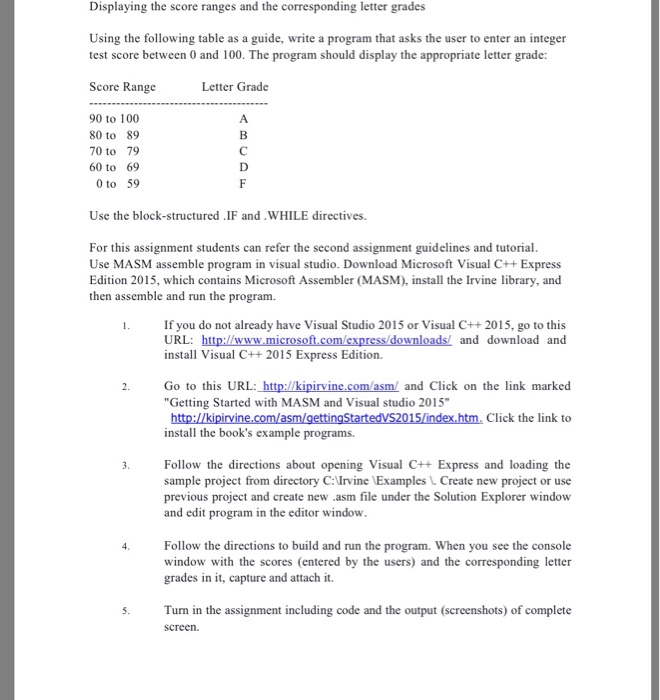
Displaying the score ranges and the corresponding letter grades Using the following table as a guide, write a program that asks the user to enter an integer test score between 0 and 100. The program should display the appropriate letter grade: Score Range Letter Grade 90 to 100 80 to 89 70 to 79 60 to 69 0 to 59 Use the block-structured .IF and .WHILE directives. For this assignment students can refer the second assignment guidelines and tutorial Use MASM assemble program in visual studio. Download Microsoft Visual C++Express Edition 2015, which contains Microsoft Assembler (MASM), install the Irvine library, and then assemble and run the program. If you do not already have Visual Studio 2015 or Visual C++2015, go to this URL: http://www.microsoft.com/express/downloads/ and download and install Visual C++ 2015 Express Edition. 2. Go to this URL:http://kipirvine.com/asm/ and Click on the link marked "Getting Started with MASM and Visual studio 2015" install the book's example programs. Follow the directions about opening C+ Express and loading the sample project from directory C:Irvine Examples L Create new project or use previous project and create new .asm file under the Solution Explorer window and edit program in the editor window program. When you see the console Follow the directions to build and run the window with the scores (entered by the users) and the corresponding letter grades in it, capture and attach it. Turn in the assignment including code and the output (screenshots) of complete screen
Step by Step Solution
There are 3 Steps involved in it

Get step-by-step solutions from verified subject matter experts
 Study Help