







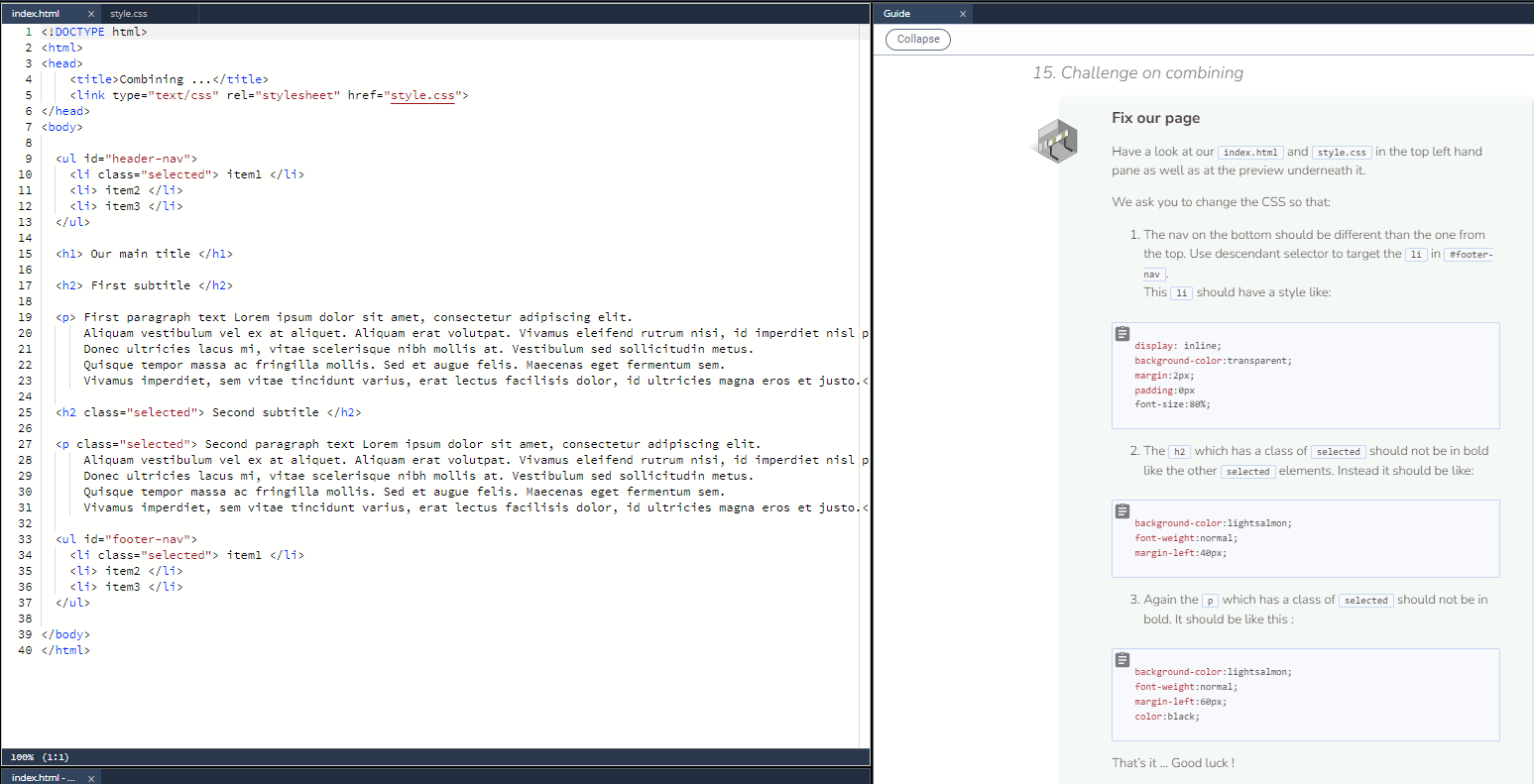
Question: Have a look at our index.html and style.css in the top left hand pane as well as at the preview underneath it . We ask
Have a look at our index.html and style.css in the top left hand pane as well as at the preview underneath it
We ask you to change the CSS so that:
The nav on the bottom should be different than the one from the top. Use descendant selector to target the li in #footernav.
This li should have a style like:
display: inline;
backgroundcolor:transparent;
margin:px;
padding:px
fontsize:;
The h which has a class of selected should not be in bold like the other selected elements. Instead it should be like:
backgroundcolor:lightsalmon;
fontweight:normal;
marginleft:px;
Again the p which has a class of selected should not be in bold. It should be like this :
backgroundcolor:lightsalmon;
fontweight:normal;
marginleft:px;
color:black;
:
h Our main title :
p First paragraph text Lorem ipsum dolor sit amet, consectetur adipiscing elit.
Aliquam vestibulum vel ex at aliquet. Aliquam erat volutpat. Vivamus eleifend rutrum nisi, id imperdiet nisl p
Donec ultricies lacus mi vitae scelerisque nibh mollis at Vestibulum sed sollicitudin metus.
Quisque tempor massa ac fringilla mollis. Sed et augue felis. Maecenas eget fermentum sem.
Vivamus imperdiet, sem vitae tincidunt varius, erat lectus facilisis dolor, id ultricies magna eros et justo.
Second paragraph text Lorem ipsum dolor sit amet, consectetur adipiscing elit.
Aliquam vestibulum vel ex at aliquet. Aliquam erat volutpat. Vivamus eleifend rutrum nisi, id imperdiet nisl p
Donec ultricies lacus mi vitae scelerisque nibh mollis at Vestibulum sed sollicitudin metus.
Quisque tempor massa ac fringilla mollis. Sed et augue felis. Maecenas eget fermentum sem.
Vivamus imperdiet, sem vitae tincidunt varius, erat lectus facilisis dolor, id ultricies magna eros et justo.
:
Step by Step Solution
There are 3 Steps involved in it
1 Expert Approved Answer
Step: 1 Unlock

Question Has Been Solved by an Expert!
Get step-by-step solutions from verified subject matter experts
Step: 2 Unlock
Step: 3 Unlock
 Study Help