







Question: Hi, I was given instructions to do this in my lab but I'm new to this and have no idea how to even begin. The
Hi, I was given instructions to do this in my lab but I'm new to this and have no idea how to even begin. The instruction says:
In order to communicate with the web service, you have to send JSON request packets and it will give response which is also in a JSON format. The database is MongoDB [2] NoSQL database that is located in the server with the web service. For this lab part of the setup, you dont need to do anything. Everything including the backend webservice and database connection is setup and ready to use. All you need to do is to focus on the Raspberry PI and Android communication to the web service as described below. We already made this required connection between the web service and the database. So, you will not need to deal with the web service database connection. After finishing sending temperature and pressure value to the web service, you are expected to develop an Android smartphone application. This application will present sensor values by getting the values from the web service.
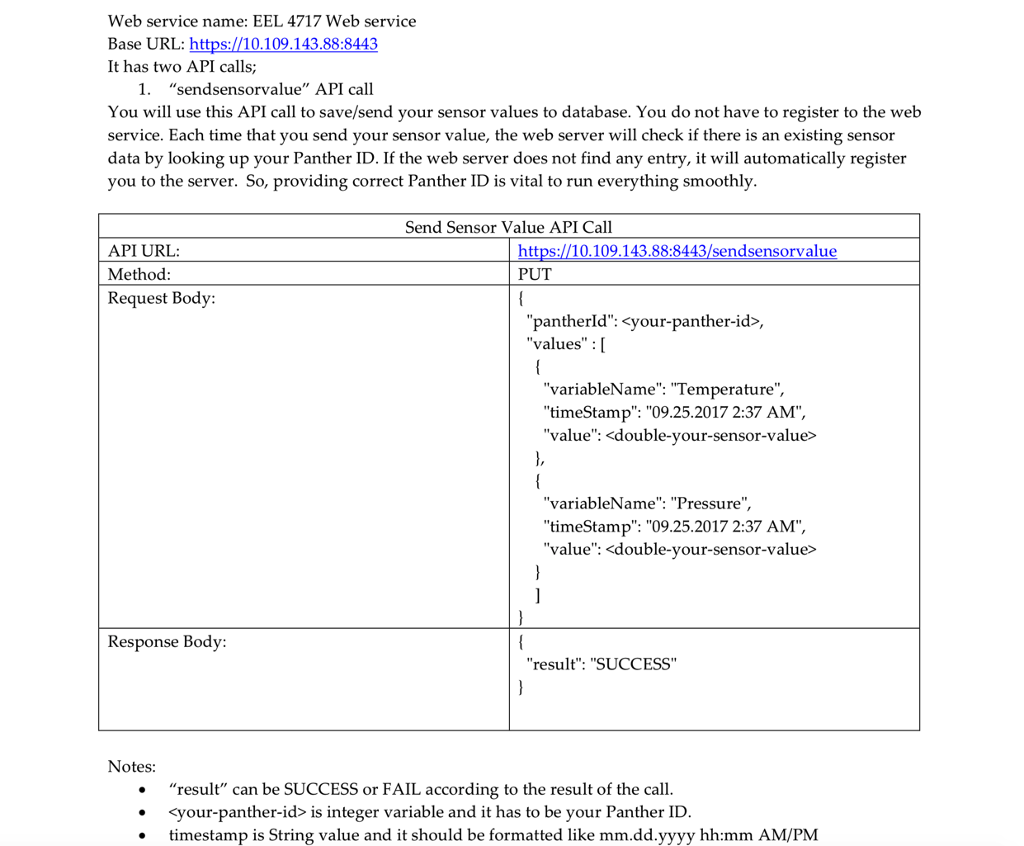
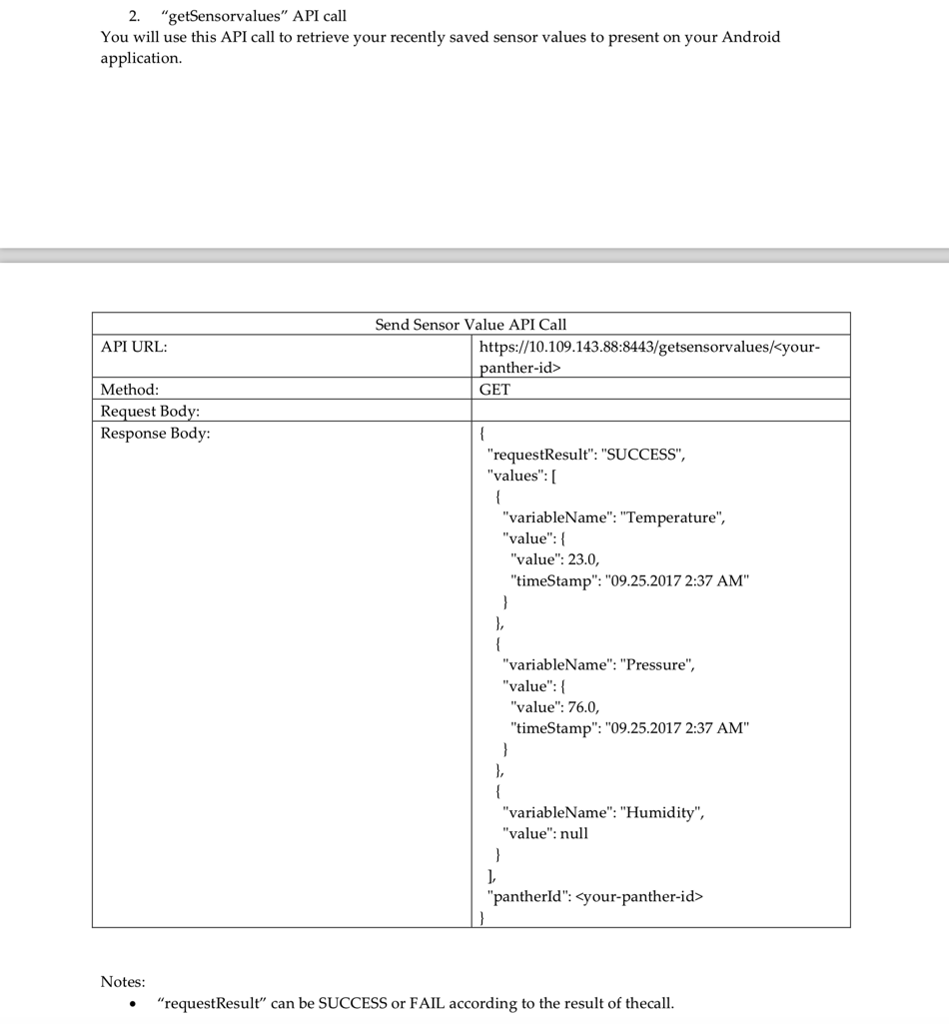
Note that the web service is an application programming interface (API) based web service and it has one PUT call and one GET call. You can get more information in Appendix A. In order to communicate with the web service from the Raspberry Pi side and Android application side, you should use web service client libraries, you can use any of them that support PUT and GET calls. You are strongly suggested to you use the Retrofit [3] library.
I'm using this code from adafruit to print out my reading's in python:
Adafruit_BME280.py code:
# Copyright (c) 2014 Adafruit Industries # Author: Tony DiCola # # Based on the BMP280 driver with BME280 changes provided by # David J Taylor, Edinburgh (www.satsignal.eu). Additional functions added # by Tom Nardi (www.digifail.com) # # Permission is hereby granted, free of charge, to any person obtaining a copy # of this software and associated documentation files (the "Software"), to deal # in the Software without restriction, including without limitation the rights # to use, copy, modify, merge, publish, distribute, sublicense, and/or sell # copies of the Software, and to permit persons to whom the Software is # furnished to do so, subject to the following conditions: # # The above copyright notice and this permission notice shall be included in # all copies or substantial portions of the Software. # # THE SOFTWARE IS PROVIDED "AS IS", WITHOUT WARRANTY OF ANY KIND, EXPRESS OR # IMPLIED, INCLUDING BUT NOT LIMITED TO THE WARRANTIES OF MERCHANTABILITY, # FITNESS FOR A PARTICULAR PURPOSE AND NONINFRINGEMENT. IN NO EVENT SHALL THE # AUTHORS OR COPYRIGHT HOLDERS BE LIABLE FOR ANY CLAIM, DAMAGES OR OTHER # LIABILITY, WHETHER IN AN ACTION OF CONTRACT, TORT OR OTHERWISE, ARISING FROM, # OUT OF OR IN CONNECTION WITH THE SOFTWARE OR THE USE OR OTHER DEALINGS IN # THE SOFTWARE. import logging import time
# BME280 default address. BME280_I2CADDR = 0x77
# Operating Modes BME280_OSAMPLE_1 = 1 BME280_OSAMPLE_2 = 2 BME280_OSAMPLE_4 = 3 BME280_OSAMPLE_8 = 4 BME280_OSAMPLE_16 = 5
# Standby Settings BME280_STANDBY_0p5 = 0 BME280_STANDBY_62p5 = 1 BME280_STANDBY_125 = 2 BME280_STANDBY_250 = 3 BME280_STANDBY_500 = 4 BME280_STANDBY_1000 = 5 BME280_STANDBY_10 = 6 BME280_STANDBY_20 = 7
# Filter Settings BME280_FILTER_off = 0 BME280_FILTER_2 = 1 BME280_FILTER_4 = 2 BME280_FILTER_8 = 3 BME280_FILTER_16 = 4
# BME280 Registers
BME280_REGISTER_DIG_T1 = 0x88 # Trimming parameter registers BME280_REGISTER_DIG_T2 = 0x8A BME280_REGISTER_DIG_T3 = 0x8C
BME280_REGISTER_DIG_P1 = 0x8E BME280_REGISTER_DIG_P2 = 0x90 BME280_REGISTER_DIG_P3 = 0x92 BME280_REGISTER_DIG_P4 = 0x94 BME280_REGISTER_DIG_P5 = 0x96 BME280_REGISTER_DIG_P6 = 0x98 BME280_REGISTER_DIG_P7 = 0x9A BME280_REGISTER_DIG_P8 = 0x9C BME280_REGISTER_DIG_P9 = 0x9E
BME280_REGISTER_DIG_H1 = 0xA1 BME280_REGISTER_DIG_H2 = 0xE1 BME280_REGISTER_DIG_H3 = 0xE3 BME280_REGISTER_DIG_H4 = 0xE4 BME280_REGISTER_DIG_H5 = 0xE5 BME280_REGISTER_DIG_H6 = 0xE6 BME280_REGISTER_DIG_H7 = 0xE7
BME280_REGISTER_CHIPID = 0xD0 BME280_REGISTER_VERSION = 0xD1 BME280_REGISTER_SOFTRESET = 0xE0
BME280_REGISTER_STATUS = 0xF3 BME280_REGISTER_CONTROL_HUM = 0xF2 BME280_REGISTER_CONTROL = 0xF4 BME280_REGISTER_CONFIG = 0xF5 BME280_REGISTER_DATA = 0xF7
class BME280(object): def __init__(self, t_mode=BME280_OSAMPLE_1, p_mode=BME280_OSAMPLE_1, h_mode=BME280_OSAMPLE_1, standby=BME280_STANDBY_250, filter=BME280_FILTER_off, address=BME280_I2CADDR, i2c=None, **kwargs): self._logger = logging.getLogger('Adafruit_BMP.BMP085') # Check that t_mode is valid. if t_mode not in [BME280_OSAMPLE_1, BME280_OSAMPLE_2, BME280_OSAMPLE_4, BME280_OSAMPLE_8, BME280_OSAMPLE_16]: raise ValueError( 'Unexpected t_mode value {0}.'.format(t_mode)) self._t_mode = t_mode # Check that p_mode is valid. if p_mode not in [BME280_OSAMPLE_1, BME280_OSAMPLE_2, BME280_OSAMPLE_4, BME280_OSAMPLE_8, BME280_OSAMPLE_16]: raise ValueError( 'Unexpected p_mode value {0}.'.format(p_mode)) self._p_mode = p_mode # Check that h_mode is valid. if h_mode not in [BME280_OSAMPLE_1, BME280_OSAMPLE_2, BME280_OSAMPLE_4, BME280_OSAMPLE_8, BME280_OSAMPLE_16]: raise ValueError( 'Unexpected h_mode value {0}.'.format(h_mode)) self._h_mode = h_mode # Check that standby is valid. if standby not in [BME280_STANDBY_0p5, BME280_STANDBY_62p5, BME280_STANDBY_125, BME280_STANDBY_250, BME280_STANDBY_500, BME280_STANDBY_1000, BME280_STANDBY_10, BME280_STANDBY_20]: raise ValueError( 'Unexpected standby value {0}.'.format(standby)) self._standby = standby # Check that filter is valid. if filter not in [BME280_FILTER_off, BME280_FILTER_2, BME280_FILTER_4, BME280_FILTER_8, BME280_FILTER_16]: raise ValueError( 'Unexpected filter value {0}.'.format(filter)) self._filter = filter # Create I2C device. if i2c is None: import Adafruit_GPIO.I2C as I2C i2c = I2C # Create device, catch permission errors try: self._device = i2c.get_i2c_device(address, **kwargs) except IOError: print("Unable to communicate with sensor, check permissions.") exit() # Load calibration values. self._load_calibration() self._device.write8(BME280_REGISTER_CONTROL, 0x24) # Sleep mode time.sleep(0.002) self._device.write8(BME280_REGISTER_CONFIG, ((standby
def _load_calibration(self):
self.dig_T1 = self._device.readU16LE(BME280_REGISTER_DIG_T1) self.dig_T2 = self._device.readS16LE(BME280_REGISTER_DIG_T2) self.dig_T3 = self._device.readS16LE(BME280_REGISTER_DIG_T3)
self.dig_P1 = self._device.readU16LE(BME280_REGISTER_DIG_P1) self.dig_P2 = self._device.readS16LE(BME280_REGISTER_DIG_P2) self.dig_P3 = self._device.readS16LE(BME280_REGISTER_DIG_P3) self.dig_P4 = self._device.readS16LE(BME280_REGISTER_DIG_P4) self.dig_P5 = self._device.readS16LE(BME280_REGISTER_DIG_P5) self.dig_P6 = self._device.readS16LE(BME280_REGISTER_DIG_P6) self.dig_P7 = self._device.readS16LE(BME280_REGISTER_DIG_P7) self.dig_P8 = self._device.readS16LE(BME280_REGISTER_DIG_P8) self.dig_P9 = self._device.readS16LE(BME280_REGISTER_DIG_P9)
self.dig_H1 = self._device.readU8(BME280_REGISTER_DIG_H1) self.dig_H2 = self._device.readS16LE(BME280_REGISTER_DIG_H2) self.dig_H3 = self._device.readU8(BME280_REGISTER_DIG_H3) self.dig_H6 = self._device.readS8(BME280_REGISTER_DIG_H7)
h4 = self._device.readS8(BME280_REGISTER_DIG_H4) h4 = (h4
h5 = self._device.readS8(BME280_REGISTER_DIG_H6) h5 = (h5 > 4 & 0x0F)
''' print '0xE4 = {0:2x}'.format (self._device.readU8 (BME280_REGISTER_DIG_H4)) print '0xE5 = {0:2x}'.format (self._device.readU8 (BME280_REGISTER_DIG_H5)) print '0xE6 = {0:2x}'.format (self._device.readU8 (BME280_REGISTER_DIG_H6))
print 'dig_H1 = {0:d}'.format (self.dig_H1) print 'dig_H2 = {0:d}'.format (self.dig_H2) print 'dig_H3 = {0:d}'.format (self.dig_H3) print 'dig_H4 = {0:d}'.format (self.dig_H4) print 'dig_H5 = {0:d}'.format (self.dig_H5) print 'dig_H6 = {0:d}'.format (self.dig_H6) '''
def read_raw_temp(self): """Waits for reading to become available on device.""" """Does a single burst read of all data values from device.""" """Returns the raw (uncompensated) temperature from the sensor.""" while (self._device.readU8(BME280_REGISTER_STATUS) & 0x08): # Wait for conversion to complete (TODO : add timeout) time.sleep(0.002) self.BME280Data = self._device.readList(BME280_REGISTER_DATA, 8) raw = ((self.BME280Data[3] > 4 return raw
def read_raw_pressure(self): """Returns the raw (uncompensated) pressure level from the sensor.""" """Assumes that the temperature has already been read """ """i.e. that BME280Data[] has been populated.""" raw = ((self.BME280Data[0] > 4 return raw
def read_raw_humidity(self): """Returns the raw (uncompensated) humidity value from the sensor.""" """Assumes that the temperature has already been read """ """i.e. that BME280Data[] has been populated.""" raw = (self.BME280Data[6]
def read_temperature(self): """Gets the compensated temperature in degrees celsius.""" # float in Python is double precision UT = float(self.read_raw_temp()) var1 = (UT / 16384.0 - float(self.dig_T1) / 1024.0) * float(self.dig_T2) var2 = ((UT / 131072.0 - float(self.dig_T1) / 8192.0) * ( UT / 131072.0 - float(self.dig_T1) / 8192.0)) * float(self.dig_T3) self.t_fine = int(var1 + var2) temp = (var1 + var2) / 5120.0 return temp
def read_pressure(self): """Gets the compensated pressure in Pascals.""" adc = float(self.read_raw_pressure()) var1 = float(self.t_fine) / 2.0 - 64000.0 var2 = var1 * var1 * float(self.dig_P6) / 32768.0 var2 = var2 + var1 * float(self.dig_P5) * 2.0 var2 = var2 / 4.0 + float(self.dig_P4) * 65536.0 var1 = ( float(self.dig_P3) * var1 * var1 / 524288.0 + float(self.dig_P2) * var1) / 524288.0 var1 = (1.0 + var1 / 32768.0) * float(self.dig_P1) if var1 == 0: return 0 p = 1048576.0 - adc p = ((p - var2 / 4096.0) * 6250.0) / var1 var1 = float(self.dig_P9) * p * p / 2147483648.0 var2 = p * float(self.dig_P8) / 32768.0 p = p + (var1 + var2 + float(self.dig_P7)) / 16.0 return p
def read_humidity(self): adc = float(self.read_raw_humidity()) # print 'Raw humidity = {0:d}'.format (adc) h = float(self.t_fine) - 76800.0 h = (adc - (float(self.dig_H4) * 64.0 + float(self.dig_H5) / 16384.0 * h)) * ( float(self.dig_H2) / 65536.0 * (1.0 + float(self.dig_H6) / 67108864.0 * h * ( 1.0 + float(self.dig_H3) / 67108864.0 * h))) h = h * (1.0 - float(self.dig_H1) * h / 524288.0) if h > 100: h = 100 elif h
def read_temperature_f(self): # Wrapper to get temp in F celsius = self.read_temperature() temp = celsius * 1.8 + 32 return temp
def read_pressure_inches(self): # Wrapper to get pressure in inches of Hg pascals = self.read_pressure() inches = pascals * 0.0002953 return inches
def read_dewpoint(self): # Return calculated dewpoint in C, only accurate at > 50% RH celsius = self.read_temperature() humidity = self.read_humidity() dewpoint = celsius - ((100 - humidity) / 5) return dewpoint
def read_dewpoint_f(self): # Return calculated dewpoint in F, only accurate at > 50% RH dewpoint_c = self.read_dewpoint() dewpoint_f = dewpoint_c * 1.8 + 32 return dewpoint_f
BME280_Example.py code:
from Adafruit_BME280 import *
sensor = BME280(t_mode=BME280_OSAMPLE_8, p_mode=BME280_OSAMPLE_8, h_mode=BME280_OSAMPLE_8)
degrees = sensor.read_temperature() pascals = sensor.read_pressure() hectopascals = pascals / 100 humidity = sensor.read_humidity()
print 'Temp = {0:0.3f} deg C'.format(degrees) print 'Pressure = {0:0.2f} hPa'.format(hectopascals) print 'Humidity = {0:0.2f} %'.format(humidity)
He wants us to use this appendix:
 How do I even begin this process so that I can send and get my sensor readings from my raspberry pi and bme280 sensor?
I was told to implement a web client to my sensor application using "https.client" python
Any help or advice will be greatly appreciated. Thank you.
Web service name: EEL 4717 Web service Base URL: https://10.109.143.88:8443 It has two API calls; 1. "sendsensorvalue" API call You will use this API call to save/send your sensor values to database. You do not have to register to the web service. Each time that you send your sensor value, the web server will check if there is an existing sensor data by looking up your Panther ID. If the web server does not find any entry, it will automatically register you to the server. So, providing correct Panther ID is vital to run everything smoothly Send Sensor Value API Call API URL: Method: Request Body https://10.109.143.88:8443/sendsensorvalue PUT "pantherld":
Step by Step Solution
There are 3 Steps involved in it

Get step-by-step solutions from verified subject matter experts
 Study Help