







Question: How can i do this? Please help Instructions for 1510 Project . . o o Create a folder and name It PROJECT LASTNAME Place Lab
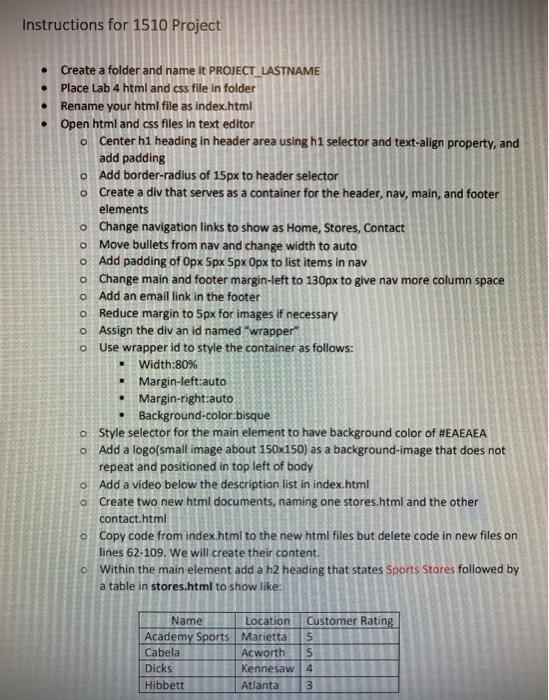
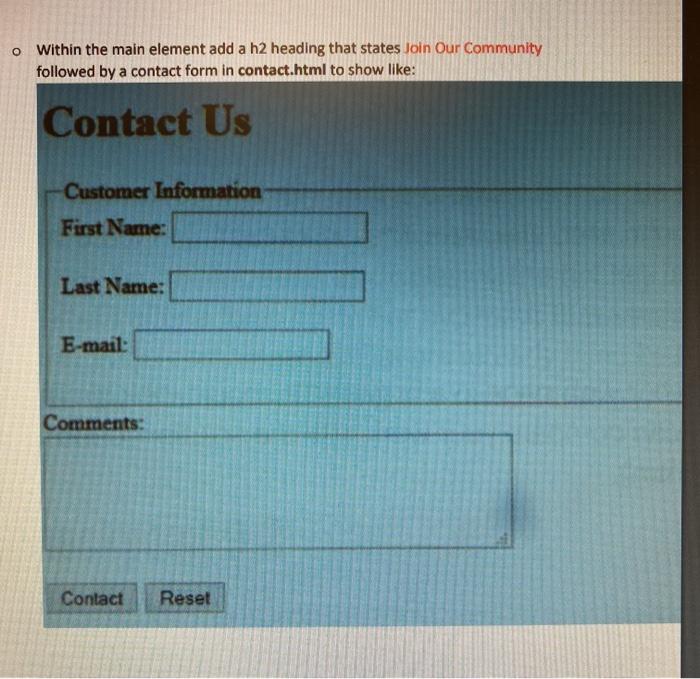
Instructions for 1510 Project . . o o Create a folder and name It PROJECT LASTNAME Place Lab 4 html and css file in folder Rename your html file as index.html Open html and css files in text editor o Center h1 heading in header area using h1 selector and text-align property, and add padding o Add border-radius of 15px to header selector o Create a div that serves as a container for the header, nav, main, and footer elements o Change navigation links to show as Home, Stores, Contact Move bullets from nav and change width to auto o Add padding of Opx 5px 5pxOpx to list items in nav o Change main and footer margin-left to 130px to give nav more column space o Add an email link in the footer Reduce margin to 5px for images if necessary o Assign the div an id named "wrapper" o Use wrapper id to style the container as follows: Width:80% Margin-left:auto Margin-right:auto Background-color:bisque Style selector for the main element to have background color of #EAEAEA o Add a logo(small image about 150x150) as a background-image that does not repeat and positioned in top left of body o Add a video below the description list in index.html o Create two new html documents, naming one stores.html and the other contact.html o Copy code from index.html to the new html files but delete code in new files on lines 62-109. We will create their content. o Within the main element add a h2 heading that states Sports Stores followed by a table in stores.html to show like: Name Location Customer Rating Academy Sports Marietta 5 Cabela Acworth Dicks Kennesaw 4 Hibbett Atlanta 3 wununla o Within the main element add a h2 heading that states Join Our Community followed by a contact form in contact.html to show like: Contact Us Customer Information First Name: Last Name: E-mail: Comments: Contact Reset Instructions for 1510 Project . . o o Create a folder and name It PROJECT LASTNAME Place Lab 4 html and css file in folder Rename your html file as index.html Open html and css files in text editor o Center h1 heading in header area using h1 selector and text-align property, and add padding o Add border-radius of 15px to header selector o Create a div that serves as a container for the header, nav, main, and footer elements o Change navigation links to show as Home, Stores, Contact Move bullets from nav and change width to auto o Add padding of Opx 5px 5pxOpx to list items in nav o Change main and footer margin-left to 130px to give nav more column space o Add an email link in the footer Reduce margin to 5px for images if necessary o Assign the div an id named "wrapper" o Use wrapper id to style the container as follows: Width:80% Margin-left:auto Margin-right:auto Background-color:bisque Style selector for the main element to have background color of #EAEAEA o Add a logo(small image about 150x150) as a background-image that does not repeat and positioned in top left of body o Add a video below the description list in index.html o Create two new html documents, naming one stores.html and the other contact.html o Copy code from index.html to the new html files but delete code in new files on lines 62-109. We will create their content. o Within the main element add a h2 heading that states Sports Stores followed by a table in stores.html to show like: Name Location Customer Rating Academy Sports Marietta 5 Cabela Acworth Dicks Kennesaw 4 Hibbett Atlanta 3 wununla o Within the main element add a h2 heading that states Join Our Community followed by a contact form in contact.html to show like: Contact Us Customer Information First Name: Last Name: E-mail: Comments: Contact Reset
Step by Step Solution
There are 3 Steps involved in it

Get step-by-step solutions from verified subject matter experts
 Study Help