







Question: I NEED HELP ON THIS ASAP!!!!!!!! PLEASE HELP! I'LL RATE AS HIGH AS I CAN!!!!!! oject: lympus Assume you have just been hired by Olympus
I NEED HELP ON THIS ASAP!!!!!!!! PLEASE HELP! I'LL RATE AS HIGH AS I CAN!!!!!!
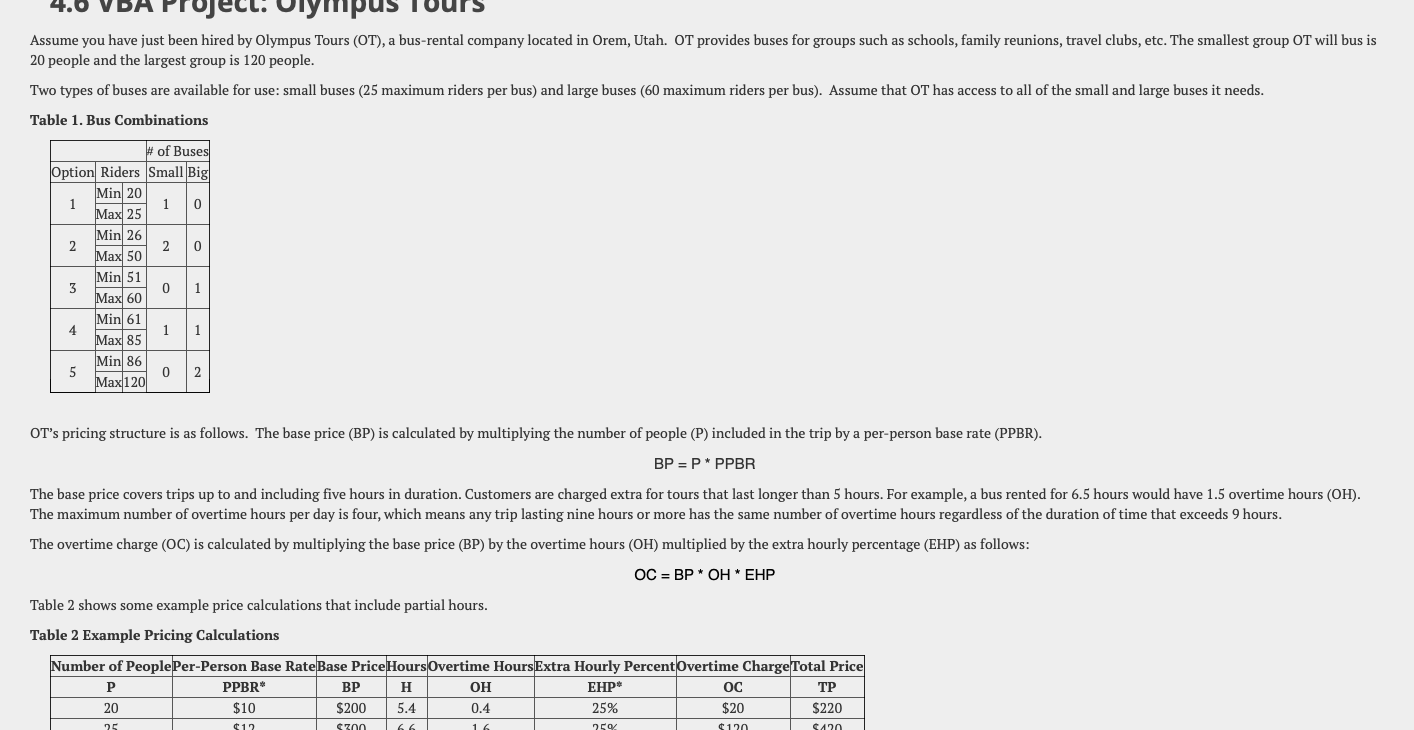
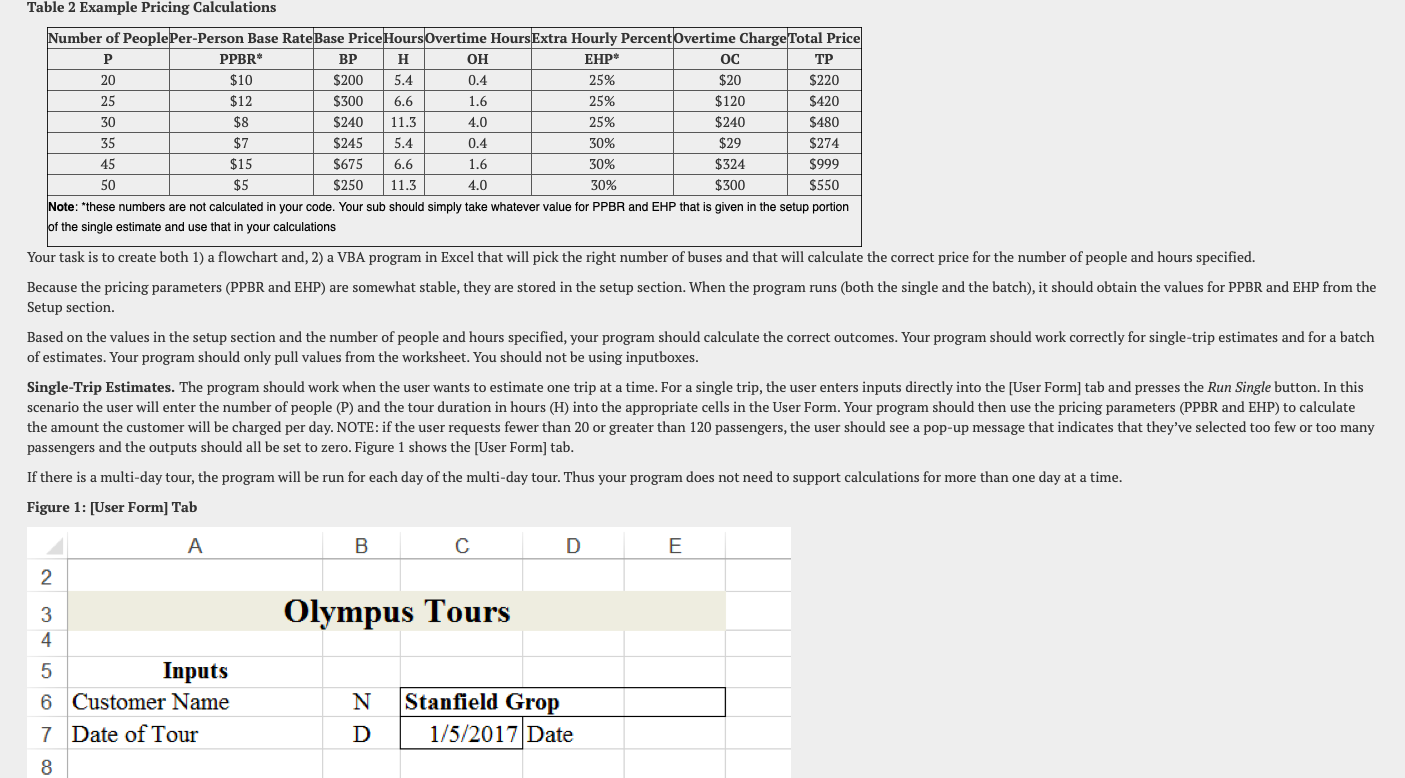
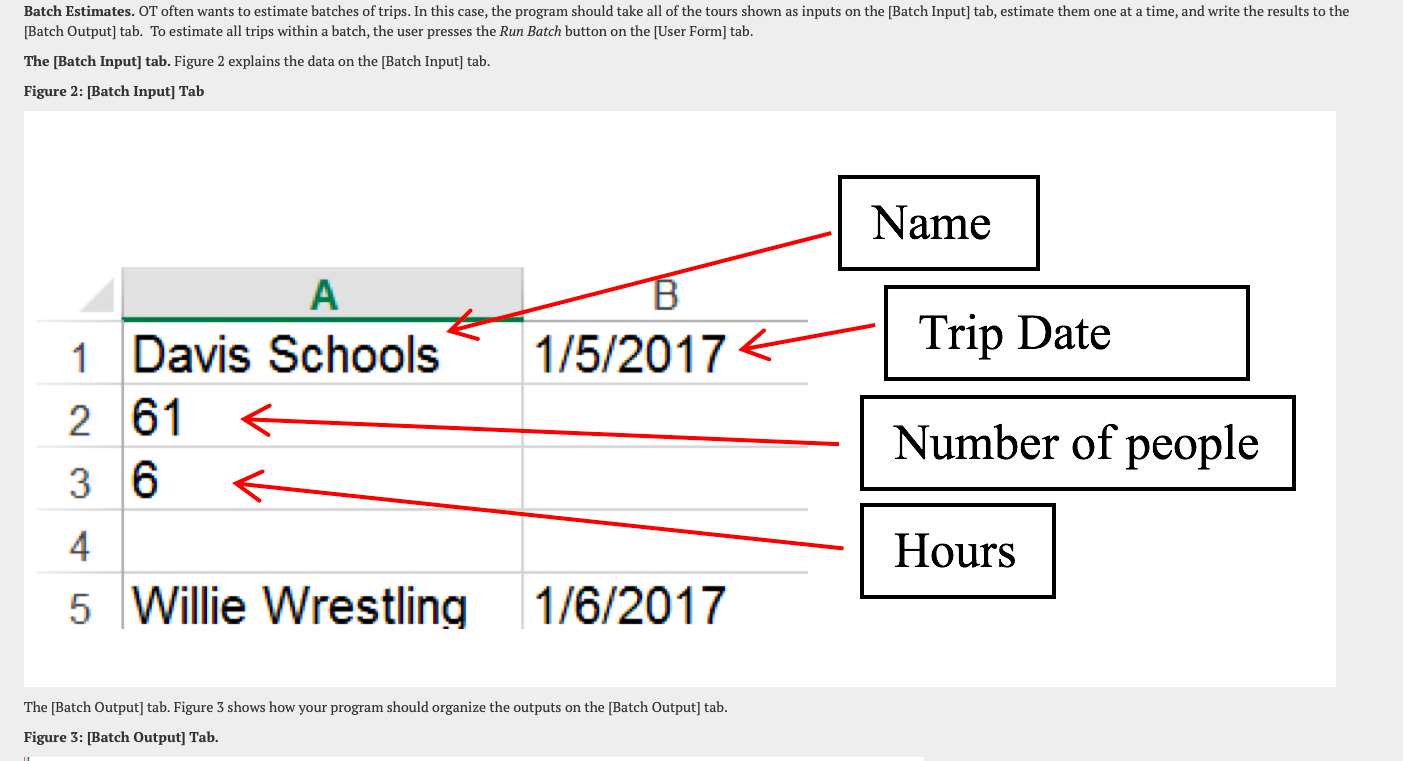
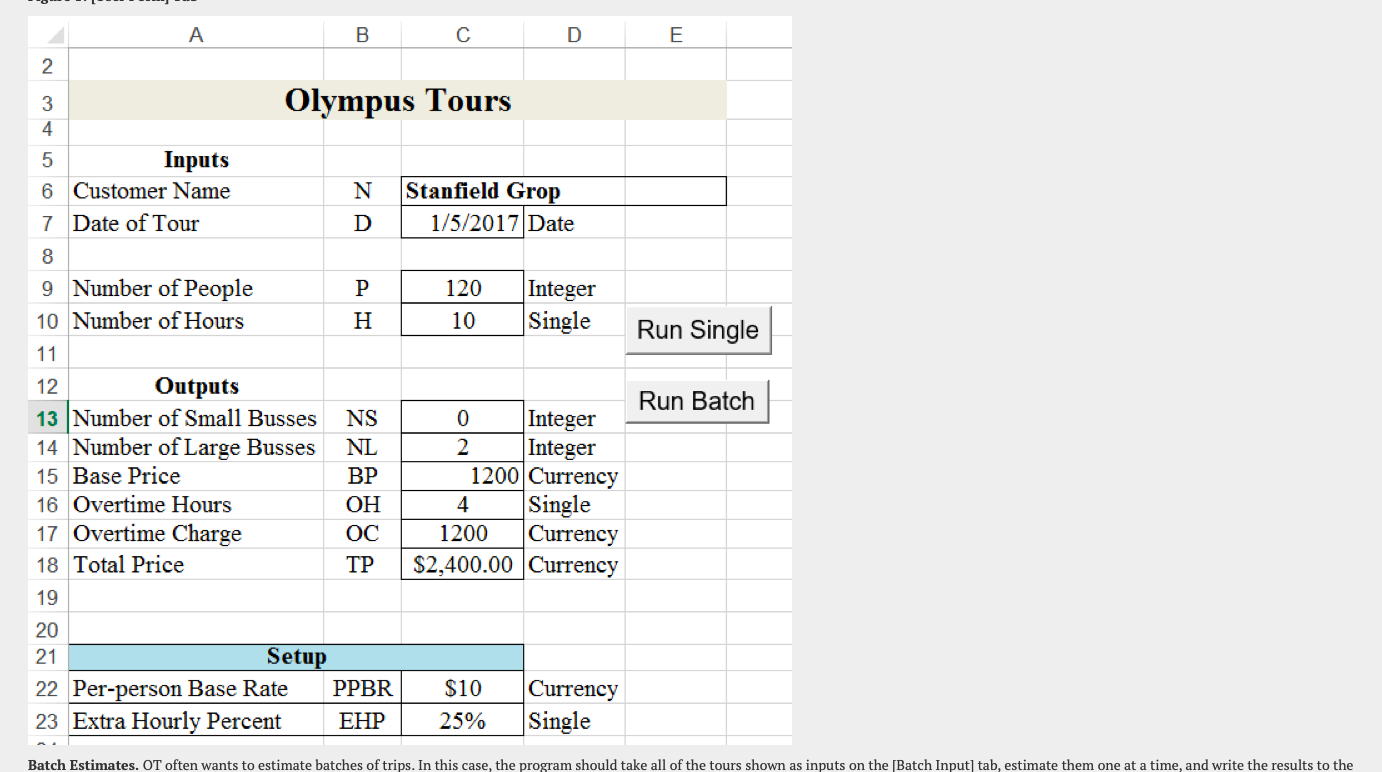
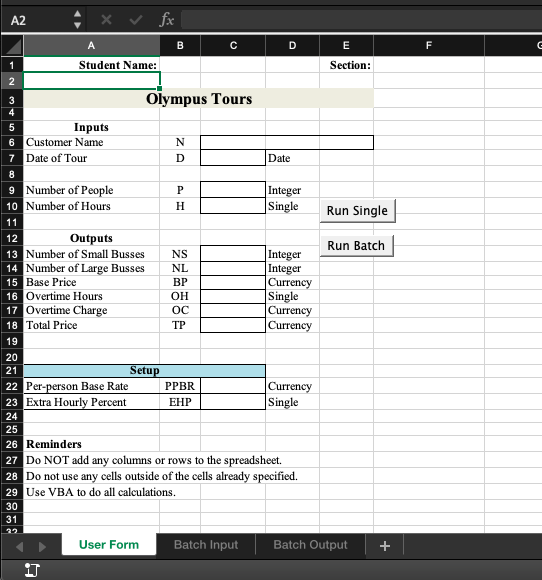
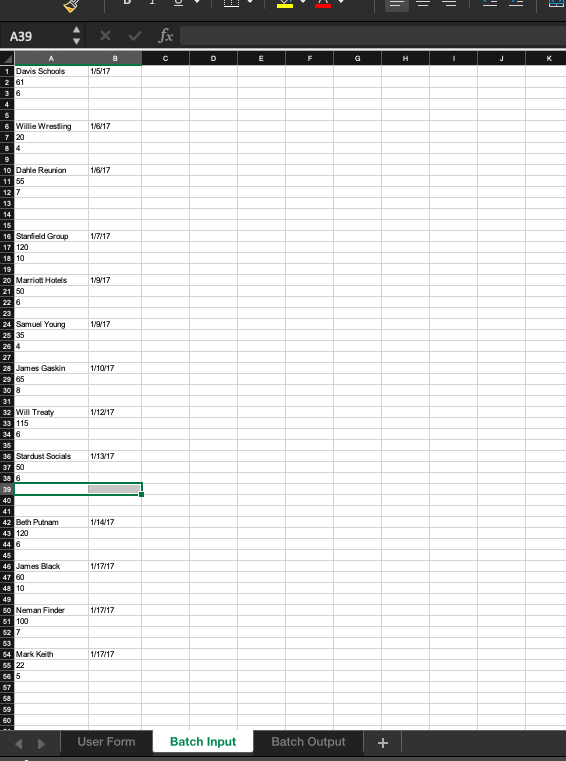
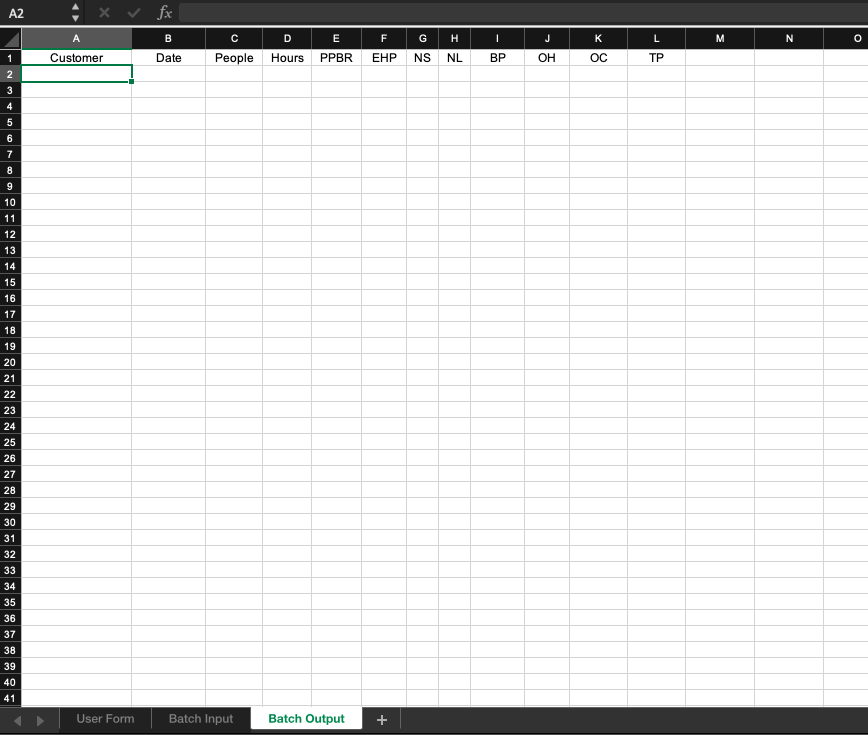
oject: lympus Assume you have just been hired by Olympus Tours (OT), a bus-rental company located in Orem, Utah. OT provides buses for groups such as schools, family reunions, travel clubs, etc. The smallest group OT will bus is 20 people and the largest group is 120 people. Two types of buses are available for use: small buses (25 maximum riders per bus) and large buses (60 maximum riders per bus). Assume that OT has access to all of the small and large buses it needs. Table 1. Bus Combinations # of Buses Option Riders Small Big Min 20 1 1 0 Max 25 Min 26 2 2 0 Max 50 Min 51 0 1 Max 60 1 1 Min 61 Max 85 Min 86 Max120 5 0 2 OT's pricing structure is as follows. The base price (BP) is calculated by multiplying the number of people (P) included in the trip by a per-person base rate (PPBR). BP =P* PPBR The base price covers trips up to and including five hours in duration. Customers are charged extra for tours that last longer than 5 hours. For example, a bus rented for 6.5 hours would have 1.5 overtime hours (OH). The maximum number of overtime hours per day is four, which means any trip lasting nine hours or more has the same number of overtime hours regardless of the duration of time that exceeds 9 hours. The overtime charge (OC) is calculated by multiplying the base price (BP) by the overtime hours (OH) multiplied by the extra hourly percentage (EHP) as follows: OC = BP * OH * EHP Table 2 shows some example price calculations that include partial hours. Table 2 Example Pricing Calculations Number of People Per-Person Base Rate Base Price Hours Overtime Hours Extra Hourly PercentOvertime Charge Total Price PPBR BP H OH EHP OC 20 $10 5.4 0.4 25% $20 $220 P $200 25 $12 $300 66. 259 120 C420 $220 Table 2 Example Pricing Calculations Number of People Per-Person Base Rate Base Price Hours Overtime Hours Extra Hourly PercentOvertime Charge Total Price P PPBR BP H OH EHP OC 20 $10 $200 5.4 0.4 25% $20 25 $12 $300 6.6 1.6 25% $120 $420 30 $8 $240 11.3 4.0 25% $240 $480 35 $7 $245 5.4 0.4 30% $29 $274 45 $15 $675 6.6 1.6 30% $324 $999 50 $5 $250 11.3 4.0 30% $300 $550 Note: these numbers are not calculated in your code. Your sub should simply take whatever value for PPBR and EHP that is given in the setup portion of the single estimate and use that in your calculations Your task is to create both 1) a flowchart and, 2) a VBA program in Excel that will pick the right number of buses and that will calculate the correct price for the number of people and hours specified. Because the pricing parameters (PPBR and EHP) are somewhat stable, they are stored in the setup section. When the program runs (both the single and the batch), it should obtain the values for PPBR and EHP from the Setup section. Based on the values in the setup section and the number of people and hours specified, your program should calculate the correct outcomes. Your program should work correctly for single-trip estimates and for a batch of estimates. Your program should only pull values from the worksheet. You should not be using inputboxes. Single-Trip Estimates. The program should work when the user wants to estimate one trip at a time. For a single trip, the user enters inputs directly into the [User Form] tab and presses the Run Single button. In this scenario the user will enter the number of people (P) and the tour duration in hours (H) into the appropriate cells in the User Form. Your program should then use the pricing parameters (PPBR and EHP) to calculate the amount the customer will be charged per day. NOTE: if the user requests fewer than 20 or greater than 120 passengers, the user should see a pop-up message that indicates that they've selected too few or too many passengers and the outputs should all be set to zero. Figure 1 shows the [User Form] tab. If there is a multi-day tour, the program will be run for each day of the multi-day tour. Thus your program does not need to support calculations for more than one day at a time. Figure 1: [User Form] Tab A B D E Olympus Tours COON 5 Inputs 6 Customer Name 7 Date of Tour N D Stanfield Grop 1/5/2017 Date Batch Estimates. OT often wants to estimate batches of trips. In this case, the program should take all of the tours shown as inputs on the [Batch Input] tab, estimate them one at a time, and write the results to the [Batch Output] tab. To estimate all trips within a batch, the user presses the Run Batch button on the [User Form] tab. The [Batch Input) tab. Figure 2 explains the data on the [Batch Input) tab. Figure 2: [Batch Input] Tab Name B 1/5/2017 Trip Date A 1 Davis Schools 2 61 3 6 Number of people Hours 4 5 Willie Wrestling 1/6/2017 The [Batch Output] tab. Figure 3 shows how your program should organize the outputs on the (Batch Output] tab. Figure 3: [Batch Output] Tab. A B D E 2 Olympus Tours N 3 4 5 Inputs 6 Customer Name 7 Date of Tour 8 9 Number of People 10 Number of Hours Stanfield Grop 1/5/2017 Date D 120 PH Integer Single 10 Run Single 11 Run Batch 12 Outputs 13 Number of Small Busses NS 14 Number of Large Busses NL 15 Base Price BP 16 Overtime Hours OH 17 Overtime Charge OC 18 Total Price 19 20 21 Setup 22 Per-person Base Rate PPBR 23 Extra Hourly Percent EHP 0 Integer 2 Integer 1200 Currency 4 Single 1200 Currency $2,400.00 Currency $10 25% Currency Single Batch Estimates. OT often wants to estimate batches of trips. In this case, the program should take all of the tours shown as inputs on the [Batch Input) tab, estimate them one at a time, and write the results to the A2 fx B D F C E Section: Run Single Run Batch 1 Student Name: 2 3 Olympus Tours 4 5 Inputs 6 Customer Name N 7 Date of Tour D Date 8 9 Number of People P Integer 10 Number of Hours H Single 11 12 Outputs 13 Number of Small Busses NS Integer 14 Number of Large Busses NL Integer 15 Base Price BP Currency 16 Overtime Hours OH Single 17 Overtime Charge Currency 18 Total Price Currency 19 20 21 Setup 22 Per-person Base Rate PPBR Currency 23 Extra Hourly Percent EHP Single 24 25 26 Reminders 27 Do NOT add any columns or rows to the spreadsheet. 28 Do not use any cells outside of the cells already specified. 29 Use VBA to do all calculations. 30 OC 31 User Form Batch Input Batch Output + E al = = = = li A39 fx D E H J K 1/5/17 1 Davis Schools 2 61 3 6 4 5 6 Willie Wrestling 7 20 1/8/17 1/8/17 9 10 Dale Reunion 11 55 127 13 14 1/7/17 1/9/17 1/9/17 1/10/17 1/12/17 1/13/17 15 16 Starfield Group 17 120 18 10 19 20 Marriott Hotels 21 50 226 23 24 Samuel Young 25 35 25 4 27 28 James Gaskin 29 65 30 8 31 32 Will Treaty 33 115 34 6 35 36 Stardust Socials 37 50 38 6 39 40 41 42 Beth Putram 43 120 446 45 46 James Black 47 00 48 10 49 50 Neman Finder 51 100 52 7 53 54 Mark Keith SS 22 56 5 57 58 59 60 1/14/17 1/17/17 1/17/17 1/17/17 User Form Batch Input Batch Output + A2 fx B D E F H I J K L M N 0 1 Customer Date People Hours PPBR EHP NS NL BP OH OC TP 2 3 4 5 6 7 8 9 10 11 12 13 14 15 16 17 18 19 20 21 22 23 24 25 26 27 28 29 30 31 32 33 34 35 36 37 38 39 40 41 User Form Batch Input Batch Output oject: lympus Assume you have just been hired by Olympus Tours (OT), a bus-rental company located in Orem, Utah. OT provides buses for groups such as schools, family reunions, travel clubs, etc. The smallest group OT will bus is 20 people and the largest group is 120 people. Two types of buses are available for use: small buses (25 maximum riders per bus) and large buses (60 maximum riders per bus). Assume that OT has access to all of the small and large buses it needs. Table 1. Bus Combinations # of Buses Option Riders Small Big Min 20 1 1 0 Max 25 Min 26 2 2 0 Max 50 Min 51 0 1 Max 60 1 1 Min 61 Max 85 Min 86 Max120 5 0 2 OT's pricing structure is as follows. The base price (BP) is calculated by multiplying the number of people (P) included in the trip by a per-person base rate (PPBR). BP =P* PPBR The base price covers trips up to and including five hours in duration. Customers are charged extra for tours that last longer than 5 hours. For example, a bus rented for 6.5 hours would have 1.5 overtime hours (OH). The maximum number of overtime hours per day is four, which means any trip lasting nine hours or more has the same number of overtime hours regardless of the duration of time that exceeds 9 hours. The overtime charge (OC) is calculated by multiplying the base price (BP) by the overtime hours (OH) multiplied by the extra hourly percentage (EHP) as follows: OC = BP * OH * EHP Table 2 shows some example price calculations that include partial hours. Table 2 Example Pricing Calculations Number of People Per-Person Base Rate Base Price Hours Overtime Hours Extra Hourly PercentOvertime Charge Total Price PPBR BP H OH EHP OC 20 $10 5.4 0.4 25% $20 $220 P $200 25 $12 $300 66. 259 120 C420 $220 Table 2 Example Pricing Calculations Number of People Per-Person Base Rate Base Price Hours Overtime Hours Extra Hourly PercentOvertime Charge Total Price P PPBR BP H OH EHP OC 20 $10 $200 5.4 0.4 25% $20 25 $12 $300 6.6 1.6 25% $120 $420 30 $8 $240 11.3 4.0 25% $240 $480 35 $7 $245 5.4 0.4 30% $29 $274 45 $15 $675 6.6 1.6 30% $324 $999 50 $5 $250 11.3 4.0 30% $300 $550 Note: these numbers are not calculated in your code. Your sub should simply take whatever value for PPBR and EHP that is given in the setup portion of the single estimate and use that in your calculations Your task is to create both 1) a flowchart and, 2) a VBA program in Excel that will pick the right number of buses and that will calculate the correct price for the number of people and hours specified. Because the pricing parameters (PPBR and EHP) are somewhat stable, they are stored in the setup section. When the program runs (both the single and the batch), it should obtain the values for PPBR and EHP from the Setup section. Based on the values in the setup section and the number of people and hours specified, your program should calculate the correct outcomes. Your program should work correctly for single-trip estimates and for a batch of estimates. Your program should only pull values from the worksheet. You should not be using inputboxes. Single-Trip Estimates. The program should work when the user wants to estimate one trip at a time. For a single trip, the user enters inputs directly into the [User Form] tab and presses the Run Single button. In this scenario the user will enter the number of people (P) and the tour duration in hours (H) into the appropriate cells in the User Form. Your program should then use the pricing parameters (PPBR and EHP) to calculate the amount the customer will be charged per day. NOTE: if the user requests fewer than 20 or greater than 120 passengers, the user should see a pop-up message that indicates that they've selected too few or too many passengers and the outputs should all be set to zero. Figure 1 shows the [User Form] tab. If there is a multi-day tour, the program will be run for each day of the multi-day tour. Thus your program does not need to support calculations for more than one day at a time. Figure 1: [User Form] Tab A B D E Olympus Tours COON 5 Inputs 6 Customer Name 7 Date of Tour N D Stanfield Grop 1/5/2017 Date Batch Estimates. OT often wants to estimate batches of trips. In this case, the program should take all of the tours shown as inputs on the [Batch Input] tab, estimate them one at a time, and write the results to the [Batch Output] tab. To estimate all trips within a batch, the user presses the Run Batch button on the [User Form] tab. The [Batch Input) tab. Figure 2 explains the data on the [Batch Input) tab. Figure 2: [Batch Input] Tab Name B 1/5/2017 Trip Date A 1 Davis Schools 2 61 3 6 Number of people Hours 4 5 Willie Wrestling 1/6/2017 The [Batch Output] tab. Figure 3 shows how your program should organize the outputs on the (Batch Output] tab. Figure 3: [Batch Output] Tab. A B D E 2 Olympus Tours N 3 4 5 Inputs 6 Customer Name 7 Date of Tour 8 9 Number of People 10 Number of Hours Stanfield Grop 1/5/2017 Date D 120 PH Integer Single 10 Run Single 11 Run Batch 12 Outputs 13 Number of Small Busses NS 14 Number of Large Busses NL 15 Base Price BP 16 Overtime Hours OH 17 Overtime Charge OC 18 Total Price 19 20 21 Setup 22 Per-person Base Rate PPBR 23 Extra Hourly Percent EHP 0 Integer 2 Integer 1200 Currency 4 Single 1200 Currency $2,400.00 Currency $10 25% Currency Single Batch Estimates. OT often wants to estimate batches of trips. In this case, the program should take all of the tours shown as inputs on the [Batch Input) tab, estimate them one at a time, and write the results to the A2 fx B D F C E Section: Run Single Run Batch 1 Student Name: 2 3 Olympus Tours 4 5 Inputs 6 Customer Name N 7 Date of Tour D Date 8 9 Number of People P Integer 10 Number of Hours H Single 11 12 Outputs 13 Number of Small Busses NS Integer 14 Number of Large Busses NL Integer 15 Base Price BP Currency 16 Overtime Hours OH Single 17 Overtime Charge Currency 18 Total Price Currency 19 20 21 Setup 22 Per-person Base Rate PPBR Currency 23 Extra Hourly Percent EHP Single 24 25 26 Reminders 27 Do NOT add any columns or rows to the spreadsheet. 28 Do not use any cells outside of the cells already specified. 29 Use VBA to do all calculations. 30 OC 31 User Form Batch Input Batch Output + E al = = = = li A39 fx D E H J K 1/5/17 1 Davis Schools 2 61 3 6 4 5 6 Willie Wrestling 7 20 1/8/17 1/8/17 9 10 Dale Reunion 11 55 127 13 14 1/7/17 1/9/17 1/9/17 1/10/17 1/12/17 1/13/17 15 16 Starfield Group 17 120 18 10 19 20 Marriott Hotels 21 50 226 23 24 Samuel Young 25 35 25 4 27 28 James Gaskin 29 65 30 8 31 32 Will Treaty 33 115 34 6 35 36 Stardust Socials 37 50 38 6 39 40 41 42 Beth Putram 43 120 446 45 46 James Black 47 00 48 10 49 50 Neman Finder 51 100 52 7 53 54 Mark Keith SS 22 56 5 57 58 59 60 1/14/17 1/17/17 1/17/17 1/17/17 User Form Batch Input Batch Output + A2 fx B D E F H I J K L M N 0 1 Customer Date People Hours PPBR EHP NS NL BP OH OC TP 2 3 4 5 6 7 8 9 10 11 12 13 14 15 16 17 18 19 20 21 22 23 24 25 26 27 28 29 30 31 32 33 34 35 36 37 38 39 40 41 User Form Batch Input Batch Output
Step by Step Solution
There are 3 Steps involved in it

Get step-by-step solutions from verified subject matter experts
 Study Help