







Question: INTRO JAVA Class Herding Elephants. Please read the instructions and finish the given code. Given codes are below the screen shots. Thank you so much.
INTRO JAVA Class Herding Elephants.
Please read the instructions and finish the given code.
Given codes are below the screen shots.
Thank you so much.
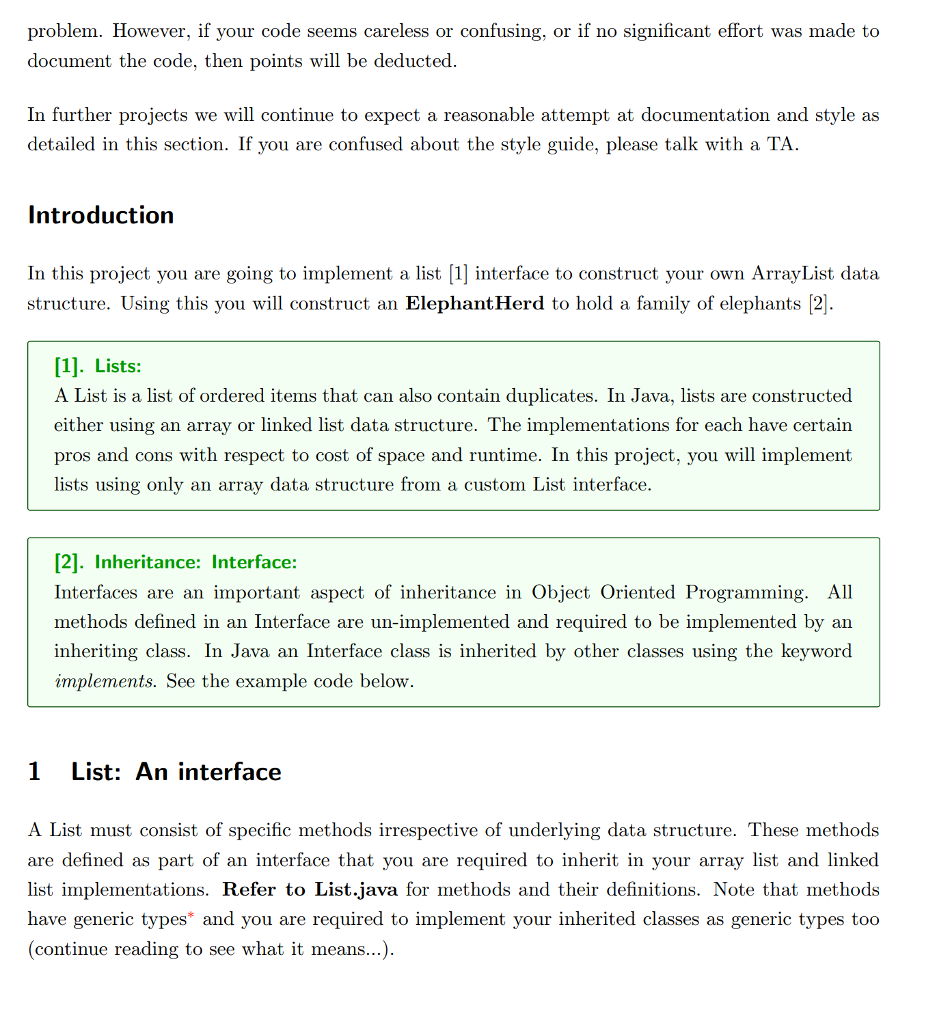
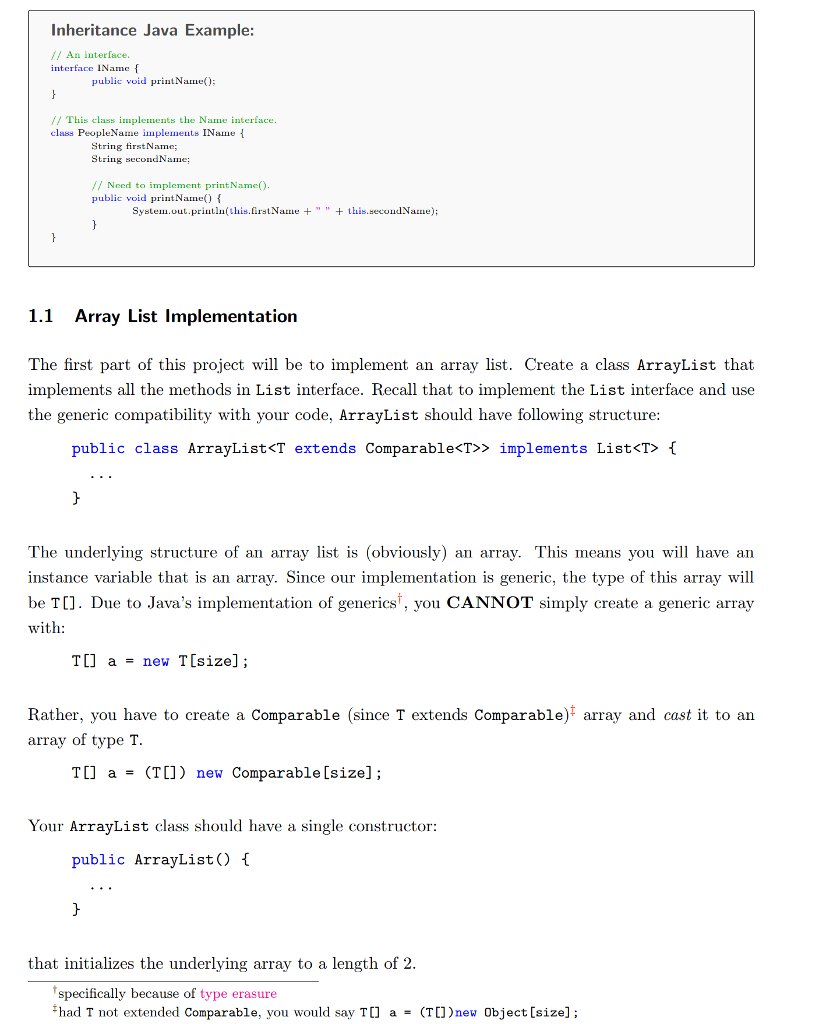
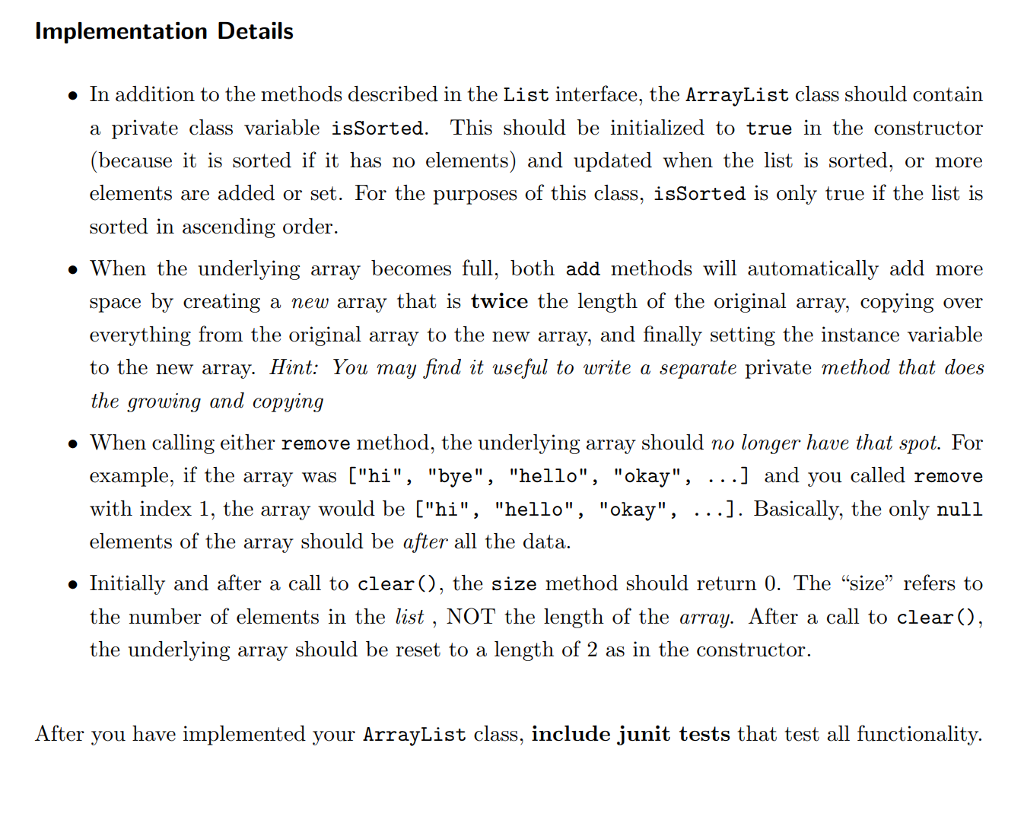
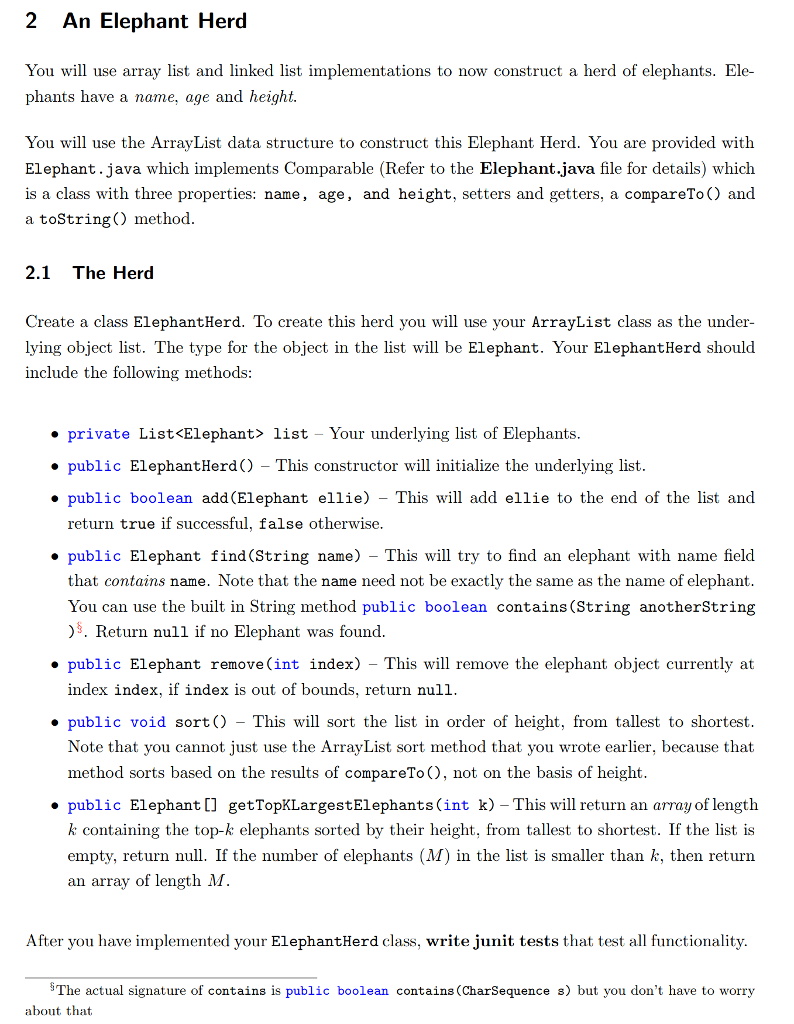
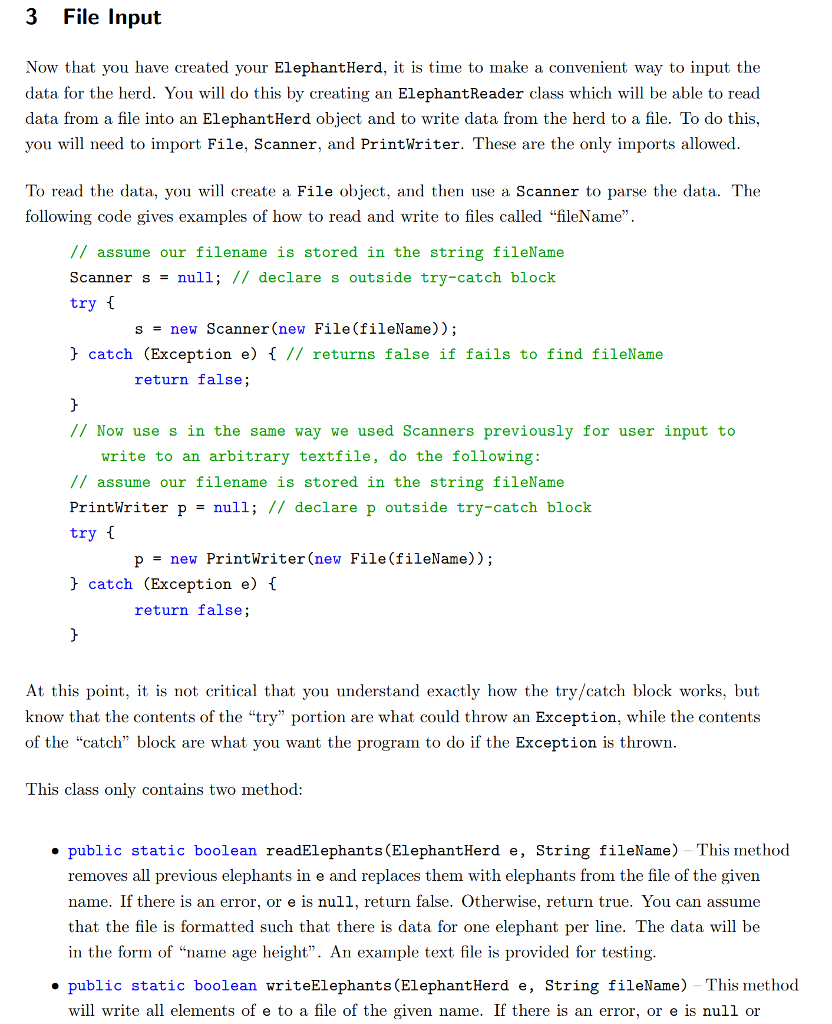

List.java
public interface List
/* * Add an element at specific index. This method should * also shift the element currently at that position (if * any) and any subsequent elements to the right (adds * one to their indices). If element is null, or if index * index is out-of-bounds (index = size_of_list), * it will NOT add it and return false. Otherwise it will * add it and return true. See size() for the definition * of size of list. Also updates isSorted variable to false. */ boolean add(int index, T element);
/* * Remove all elements from the list. */ void clear();
/* * Return true if element is in the list and false * otherwise. If isSorted is true, uses the ordering * of the list to increase the efficiency of the search. */ boolean contains(T element);
/* * Return the element at given index. If index is * out-of-bounds, it will return null. * */ T get(int index);
/* * Return the first index of element in the list. If element * is null or not found in the list, return -1. If isSorted is * true, uses the ordering of the list to increase the efficiency * of the search. */ int indexOf(T element);
/* * Return true if the list is empty and false otherwise. */ boolean isEmpty();
/* * Same as indexOf(), except it will return the last index * of element. If isSorted is true, uses the ordering * of the list to increase the efficiency of the search. */ int lastIndexOf(T element);
/* * Replace the element at index with element and return the * element that was previously at index. If index is * out-of-bounds or element is null, do nothing with element * and return null. */ T set(int index, T element);
/* * Return the number of elements in the list. For example, if * 4 elements added to a list, size will return 4, while the * last index in the list will be 3. Updates isSorted. */ int size();
/* * Sort the elements of the list. If order is true, sort the * list in increasing (alphabeticaly) order. If order is * false, sort the list in decreasing (reverse alphabetical) * order. Note: only set isSorted to true if sorted in ASCENDING * order. * If isSorted is true, and the order is true, do NOT resort. * Hint: Since T extends Comparable, you will find it useful * to use the public int compareTo(T o) method. */ void sort(boolean order);
/* * Remove the first instance of element from the list. This * method should also shifts any subsequent elements to the * left (subtracts one from their indices). If successful, * return true. If element is not found in the list, return * false. */ boolean remove(T element);
/* * Remove whatever is at index index in the list and return * it. If index is out-of-bounds, return null. Shift the * indices as in the other remove. */ T remove(int index);
/* * Note that this method exists for debugging purposes. * It calls the toString method of the underlying elements in * the list in order to create a String representation of the list. * The format of the toString should appear as follows: * Element1 * Element2 * . * . * . * Elementn * Watch out for extra spaces or carriage returns. Each element * should be printed on its own line. */ String toString(); } // End of interface definition.
Elephant.java
public class Elephant implements Comparable
String name;
int age;
double height;
public Elephant(String initName, int initAge,double initHeight){
this.name = initName;
this.age = initAge;
this.height = initHeight;
}
public void setName(String newName){
this.name=newName;
}
public void setAge(int newAge){
this.age=newAge;
}
public void setHeight(double newHeight){
this.height=newHeight;
}
public String getName(){
return this.name;
}
public int getAge(){
return this.age;
}
public double getHeight(){
return this.height;
}
public String toString(){
return name + " "+ age + " " + height;
}
public int compareTo(Elephant other){
return this.name.compareTo(other.name);
}
}
Elephant.text
Billy 28 12 Tina 16 14 Jewel 10 13 Shaunzi 3 11 Marsha 28 12 Will 17 14 George 10 13 Sam 3 10 Hope 23 11 Milly 16 14 Fred 10 13 Harry 1 6 Ellie 6 3.33 Charlie 8 9.8 Chloe 10 12.2 Lucy 6 1.6 Jack 32 14 Jake 5 9.3 Lola 1 4.4 Cody 45 8.8887 Maggie 5 4 Molly 6 12.0 Sophie 9 13.1 Toby 99 14.2 Finn 67 15.3 Riley 5 9 Kyle 4 9 Alex 8 8 Frank 19 7 Abby 15 6 Chuck 3 6.6 Bobby 7 9 Vinny 6 10
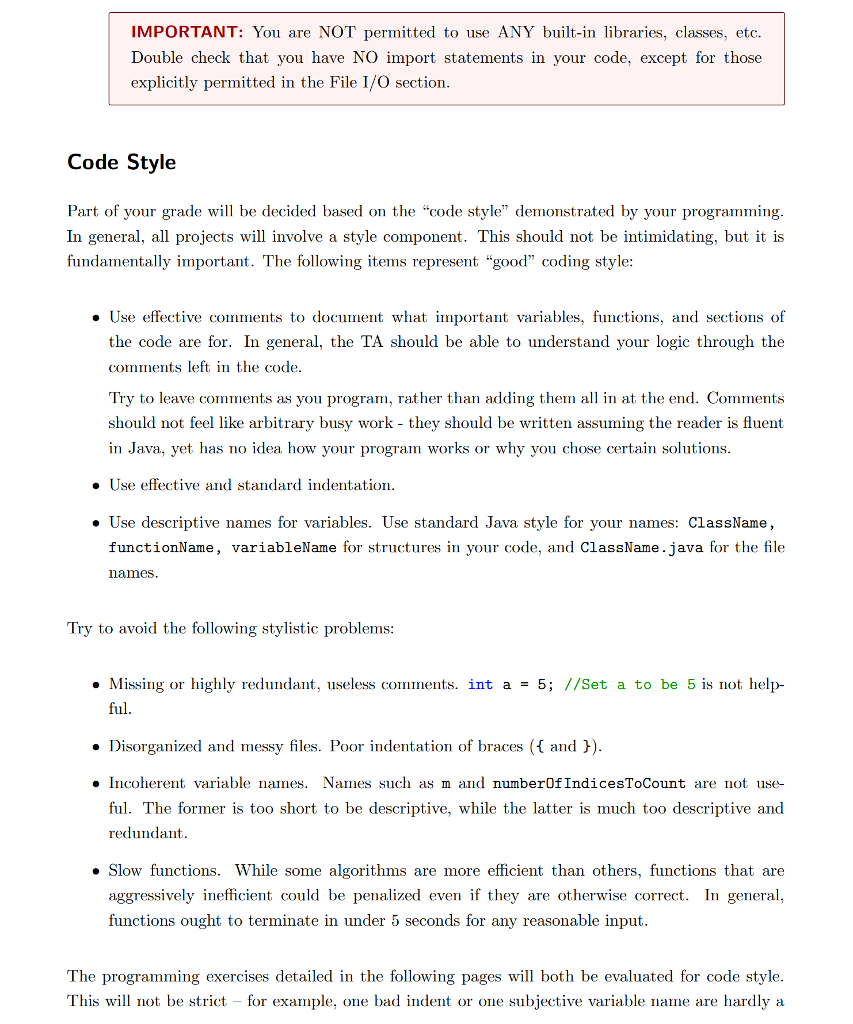
are NOT permitted to use IMPORTANT: You Double check that you have NO import statements in your code, except for those explicitly permitted in the File I/O section ANY built-in libraries, classes, etc Code Style Part of your grade wil be decided based on the "code style" demonstrated by your programming In general, all projects will involve a style component. This should not be intimidating, but it is fundamentally important. The following items represent "good" coding style Use effective comments to document what important variables, functions, and sections of the code are for. In general, the TA should be able to understand your logic through the comments left in the code Try to leave comments as you program, rather than adding them all in at the end. Comments should not feel like arbitrary busy work - they should be written assuming the reader is fluent in Java, yet has no idea how your program works or why you chose certain solutions . Use effective and standard indentation . Use descriptive names for variables. Use standard Java style for your names: ClassName, functionName, variableName for structures in your code, and ClassName.java for the file ames Try to avoid the following stylistic problems Missing or highly redundant, useless comments. int a -5; //Set a to be 5 is not help- ful . Disorganized and messy files. Poor indentation of braces ( and ) Incoherent variable names. Names such as m and numberOf IndicesToCount are not use ful. The former is too short to be descriptive, while the latter is much too descriptive and redundant Slow functions. While some algorithms are more efficient than others, functions that are aggressively inefficient could be penalized even if they are otherwise correct. In general, functions ought to terminate in under 5 seconds for any reasonable input The programming exercises detailed in the following pages wil both be evaluated for code style This will not be strict for example, one bad indent or one subjective variable name are hardly a are NOT permitted to use IMPORTANT: You Double check that you have NO import statements in your code, except for those explicitly permitted in the File I/O section ANY built-in libraries, classes, etc Code Style Part of your grade wil be decided based on the "code style" demonstrated by your programming In general, all projects will involve a style component. This should not be intimidating, but it is fundamentally important. The following items represent "good" coding style Use effective comments to document what important variables, functions, and sections of the code are for. In general, the TA should be able to understand your logic through the comments left in the code Try to leave comments as you program, rather than adding them all in at the end. Comments should not feel like arbitrary busy work - they should be written assuming the reader is fluent in Java, yet has no idea how your program works or why you chose certain solutions . Use effective and standard indentation . Use descriptive names for variables. Use standard Java style for your names: ClassName, functionName, variableName for structures in your code, and ClassName.java for the file ames Try to avoid the following stylistic problems Missing or highly redundant, useless comments. int a -5; //Set a to be 5 is not help- ful . Disorganized and messy files. Poor indentation of braces ( and ) Incoherent variable names. Names such as m and numberOf IndicesToCount are not use ful. The former is too short to be descriptive, while the latter is much too descriptive and redundant Slow functions. While some algorithms are more efficient than others, functions that are aggressively inefficient could be penalized even if they are otherwise correct. In general, functions ought to terminate in under 5 seconds for any reasonable input The programming exercises detailed in the following pages wil both be evaluated for code style This will not be strict for example, one bad indent or one subjective variable name are hardly a
Step by Step Solution
There are 3 Steps involved in it

Get step-by-step solutions from verified subject matter experts
 Study Help