







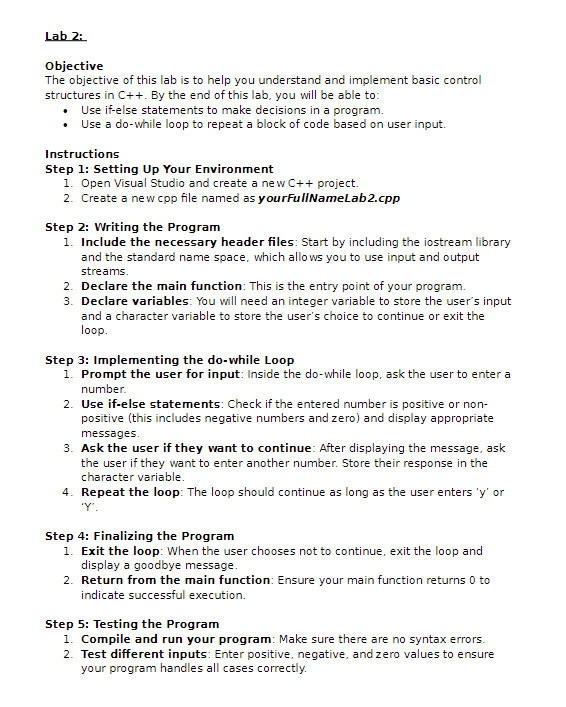
Question: Lab 2 : Objective The objective of this lab is to help you understand and implement basic control structures in C + + . By
Lab :
Objective
The objective of this lab is to help you understand and implement basic control
structures in C By the end of this lab, you will be able to:
Use ifelse statements to make decisions in a program.
Use a dowhile loop to repeat a block of code based on user input.
Instructions
Step : Setting Up Your Environment
Open Visual Studio and create a new C project.
Create a new cpp file named as yourFullNameLabcpp
Step : Writing the Program
Include the necessary header files: Start by including the iostream library
and the standard name space, which allows you to use input and output
streams.
Declare the main function: This is the entry point of your program.
Declare variables: You will need an integer variable to store the users input
and a character variable to store the users choice to continue or exit the
loop.
Step : Implementing the dowhile Loop
Prompt the user for input: Inside the dowhile loop, ask the user to enter a
number.
Use ifelse statements: Check if the entered number is positive or non
positive this includes negative numbers and zero and display appropriate
messages.
Ask the user if they want to continue: After displaying the message, ask
the user if they want to enter another number. Store their response in the
character variable.
Repeat the loop: The loop should continue as long as the user enters y or
Y
Step : Finalizing the Program
Exit the loop: When the user chooses not to continue, exit the loop and
display a goodbye message.
Return from the main function: Ensure your main function returns to
indicate successful execution.
Step : Testing the Program
Compile and run your program: Make sure there are no syntax errors.
Test different inputs: Enter positive, negative, and zero values to ensure
your program handles all cases correctly.
Test the loop: Check if the program correctly prompts the user to continue
or exit based on their input.
Submission
Save your program file with an appropriate name.
Submit your file through the courses Blackboard.
Tips
Pay attention to the syntax of ifelse statements and loops.
Make sure to use proper indentation and comments to make your code
readable.
If you encounter any issues, refer to your textbook or ask for help from your
instructor or peers
Lab :
Objective
The objective of this lab is to help you understand and implement basic control
structures in C By the end of this lab, you will be able to:
Use ifelse statements to make decisions in a program.
Use a dowhile loop to repeat a block of code based on user input.
Instructions
Step : Setting Up Your Environment
Open Visual Studio and create a new C project.
Create a new cpp file named as yourFullNameLabcpp
Step : Writing the Program
Include the necessary header files: Start by including the iostream library
and the standard name space, which allows you to use input and output
streams.
Declare the main function: This is the entry point of your program.
Declare variables: You will need an integer variable to store the user's input
and a character variable to store the user's choice to continue or exit the
loop.
Step : Implementing the dowhile Loop
Prompt the user for input: Inside the dowhile loop, ask the user to enter a
number.
Use ifelse statements: Check if the entered number is positive or non
positive this includes negative numbers and zero and display appropriate
messages.
Ask the user if they want to continue: After displaying the message, ask
the user if they want to enter another number. Store their response in the
character variable.
Repeat the loop: The loop should continue as long as the user enters or
Step : Finalizing the Program
Exit the loop: When the user chooses not to continue, exit the loop and
display a goodbye message.
Return from the main function: Ensure your main function returns to
indicate successful execution.
Step : Testing the Program
Compile and run your program: Make sure there are no syntax errors.
Test different inputs: Enter positive, negative, and zero values to ensure
your program handles all cases correctly. Test the loop: Check if the program correctly prompts the user to continue
or exit based on their input.
Submission
Save your program file with an appropriate name.
Submit your file through the course's Blackboard.
Tips
Pay attention to the syntax of ifelse statements and loops.
Make sure to use proper indentation and comments to make your code
readable.
If you encounter any issues, refer to your textbook or ask for help from your
instructor or peers.
Program Run Sample
Enter a number:
The number is positive.
Do you want to enter another number? yn; y
Enter a number:
The number is nonpositive.
Do you want to enter another number? yn; y
Enter a number:
The number is nonpositive.
Do you want to enter another number? yn: n
Coodbyel
Step by Step Solution
There are 3 Steps involved in it
1 Expert Approved Answer
Step: 1 Unlock

Question Has Been Solved by an Expert!
Get step-by-step solutions from verified subject matter experts
Step: 2 Unlock
Step: 3 Unlock
 Study Help