







Question: Making a design for your software is perhaps one of the most crucial parts of the software development process. This is where you will fully
Making a design for your software is perhaps one of the most crucial parts of the software development process. This is where you will fully flesh out exactly what your software will have and how it will interact with its surrounding environment, including people and databases.
For this part of the project, you must make a well-thought-out System Design Document for a contact manager program.
Template:
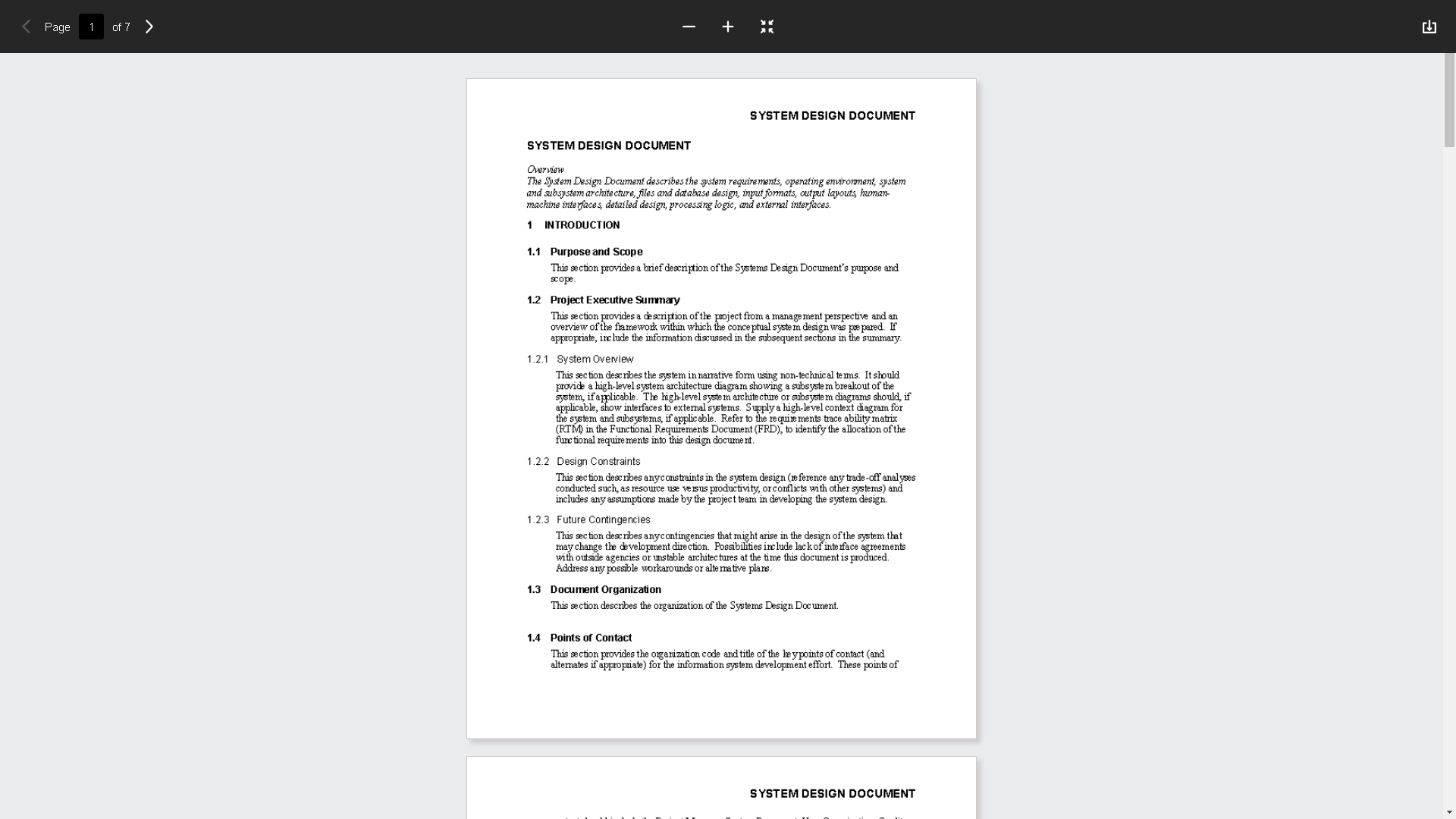
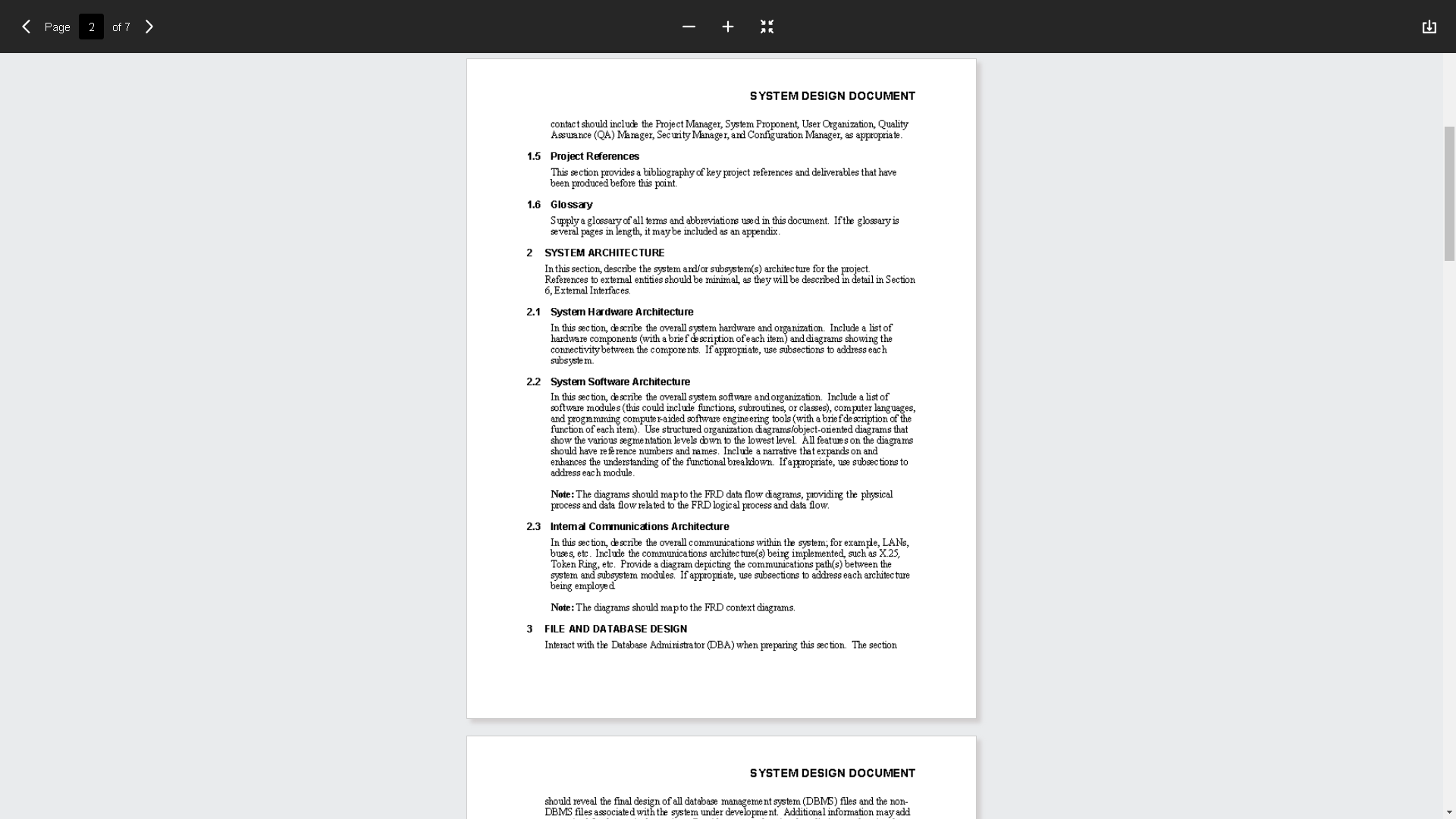
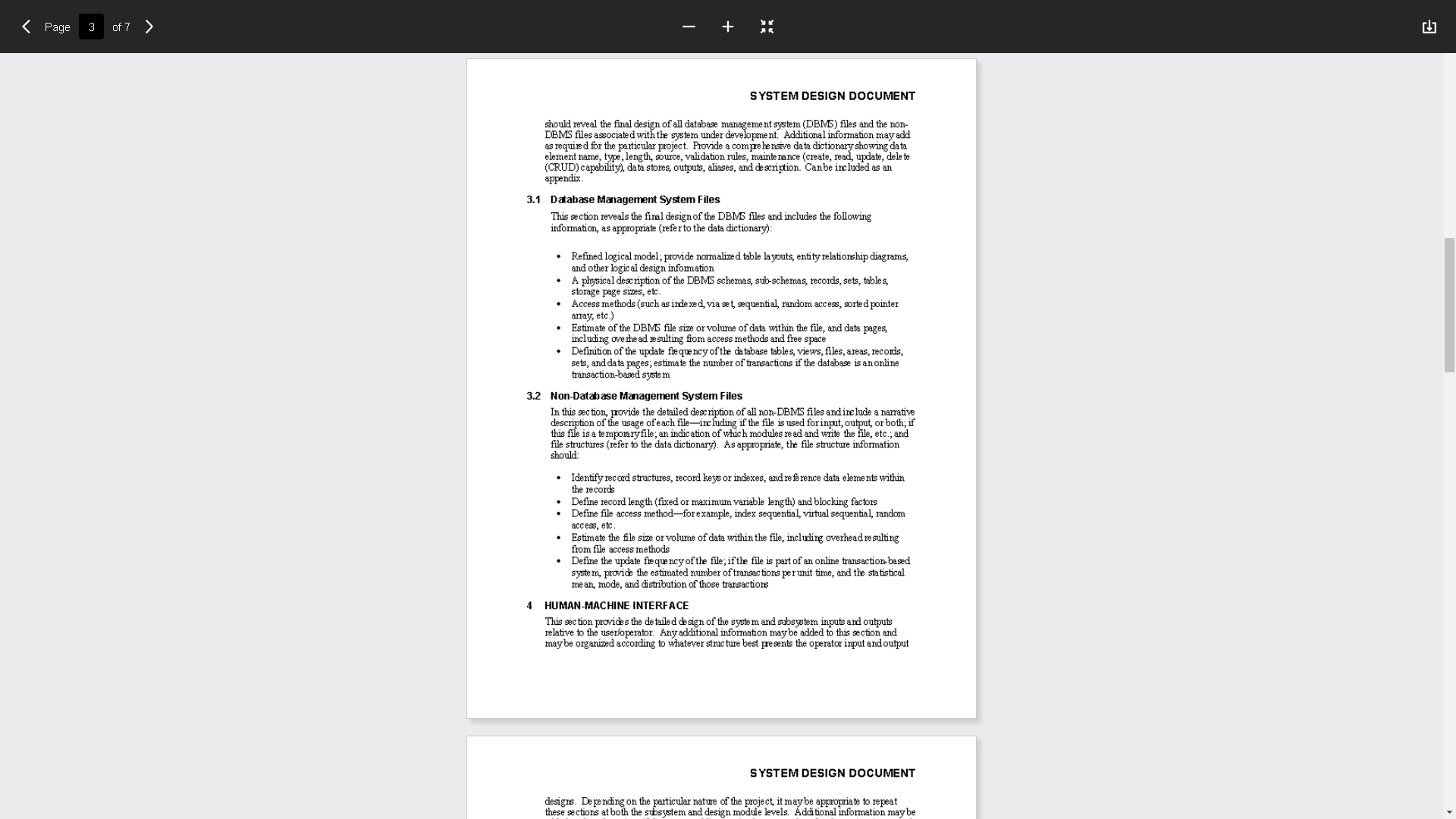
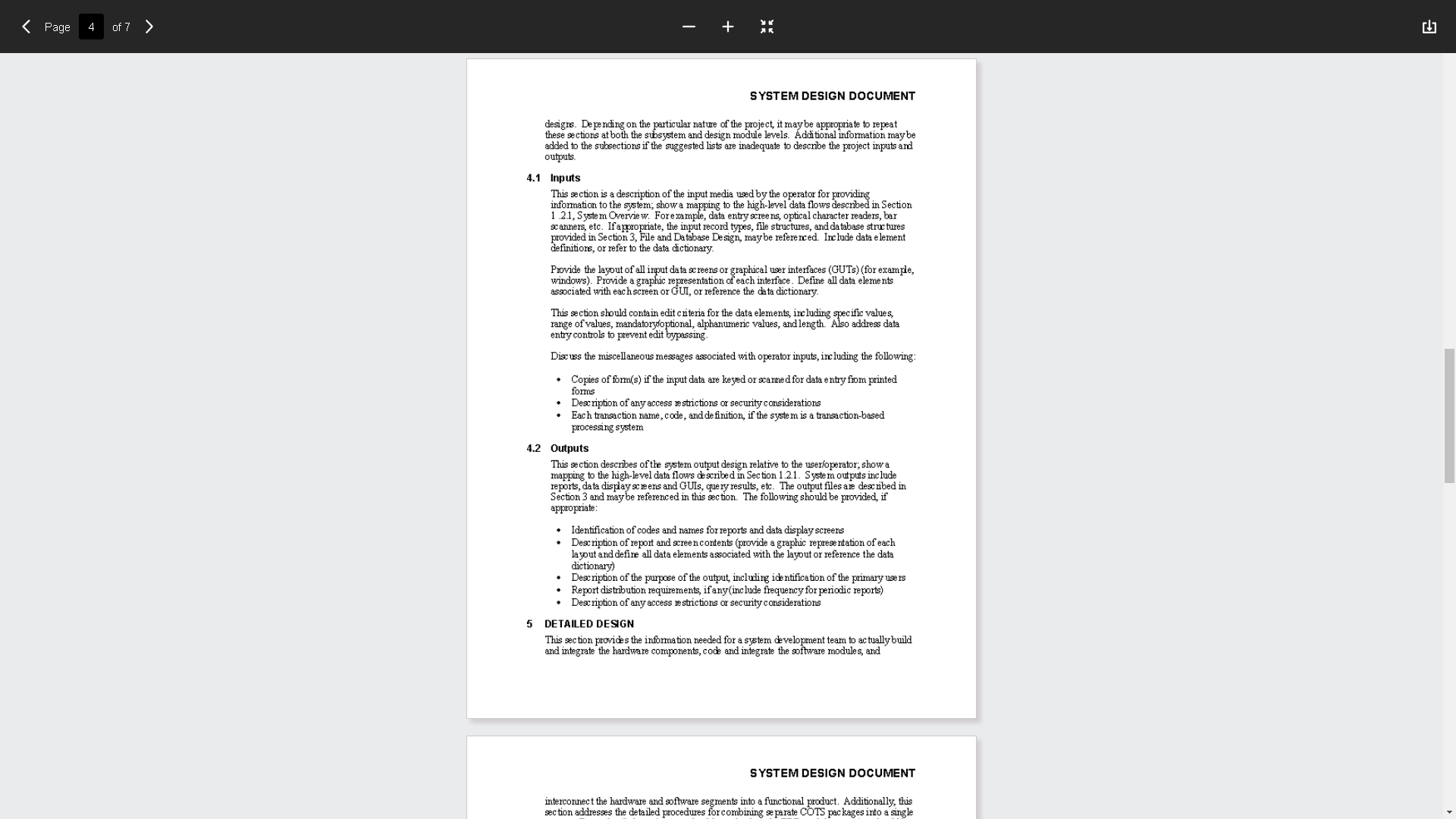
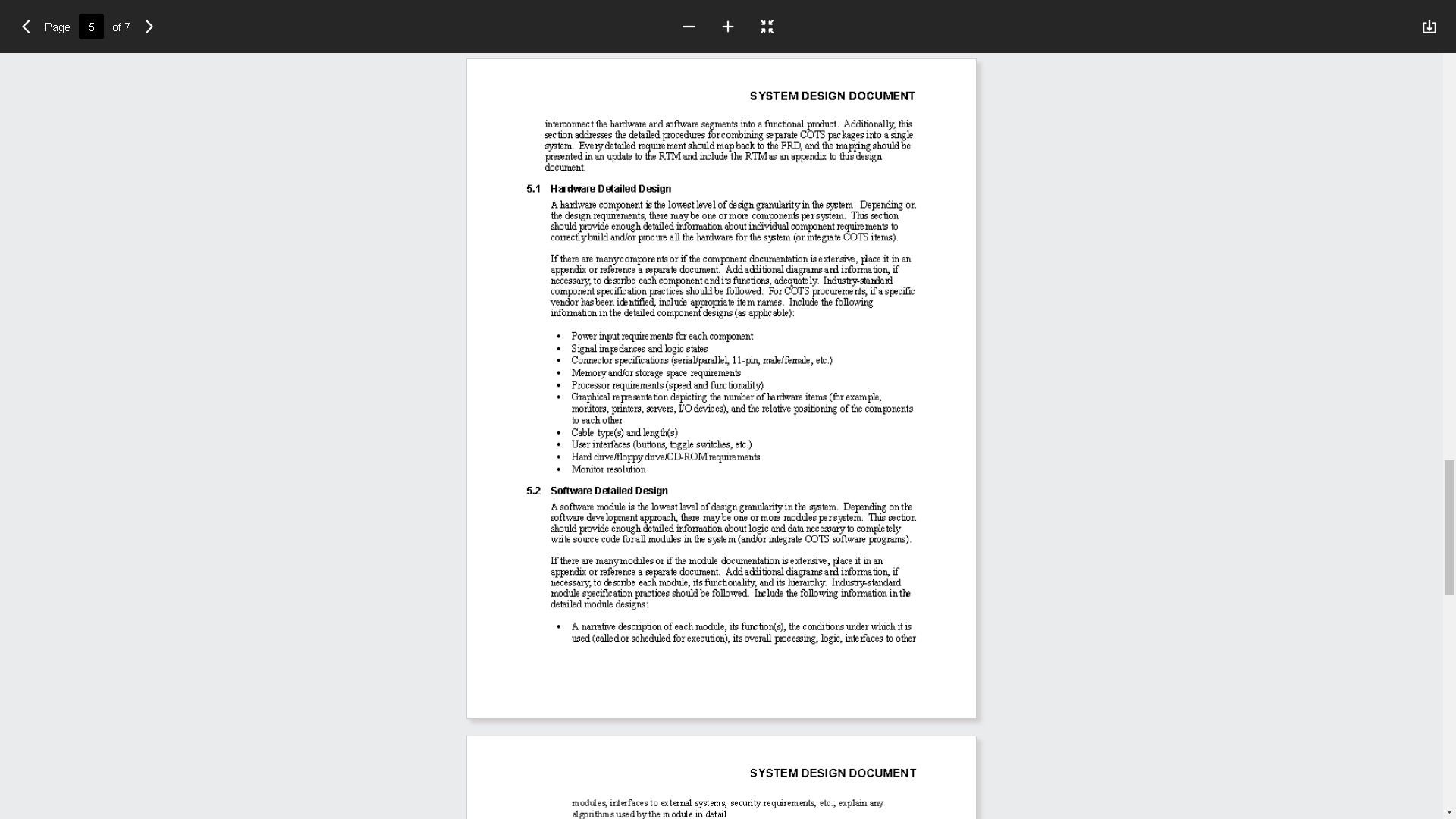
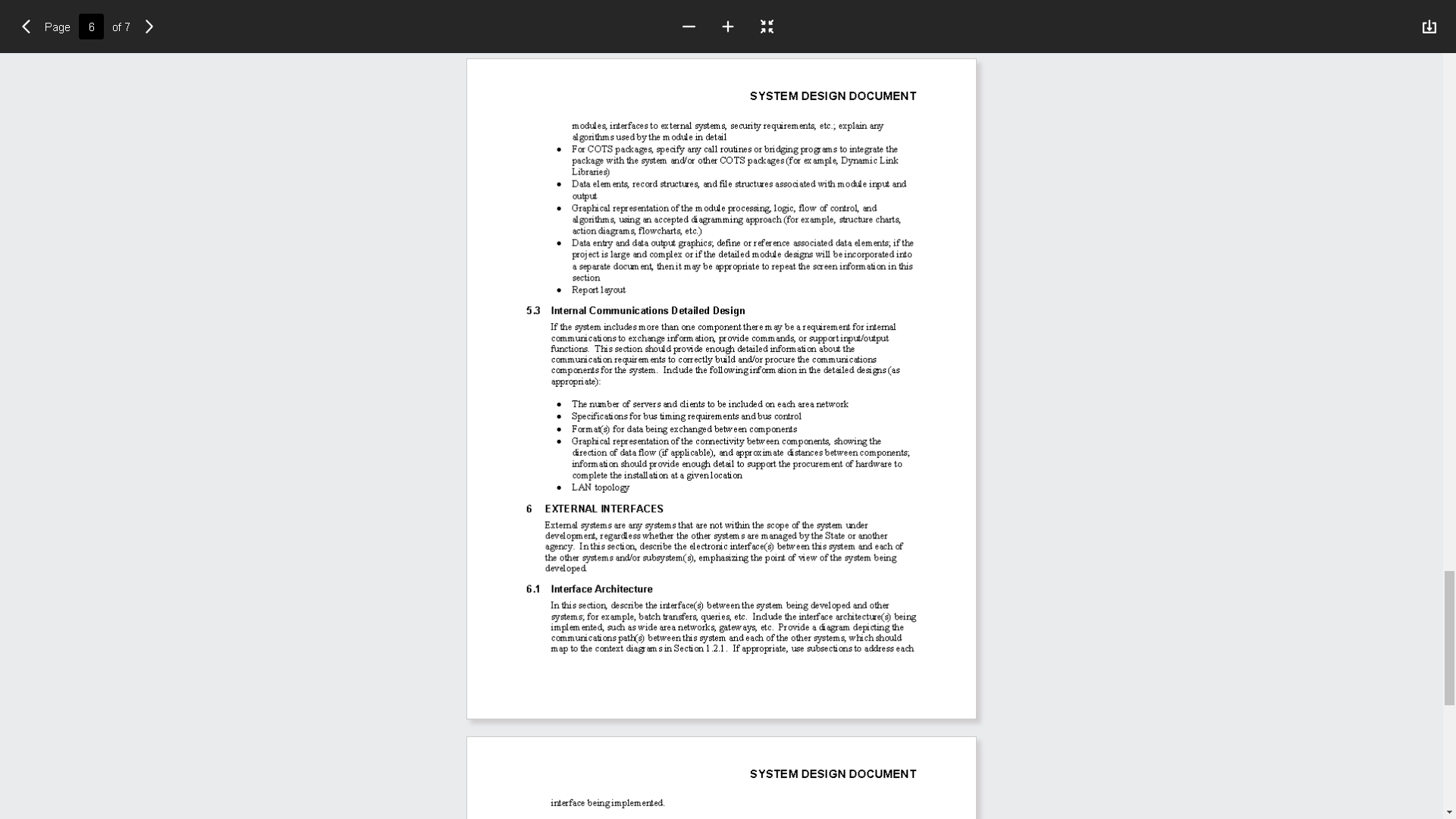
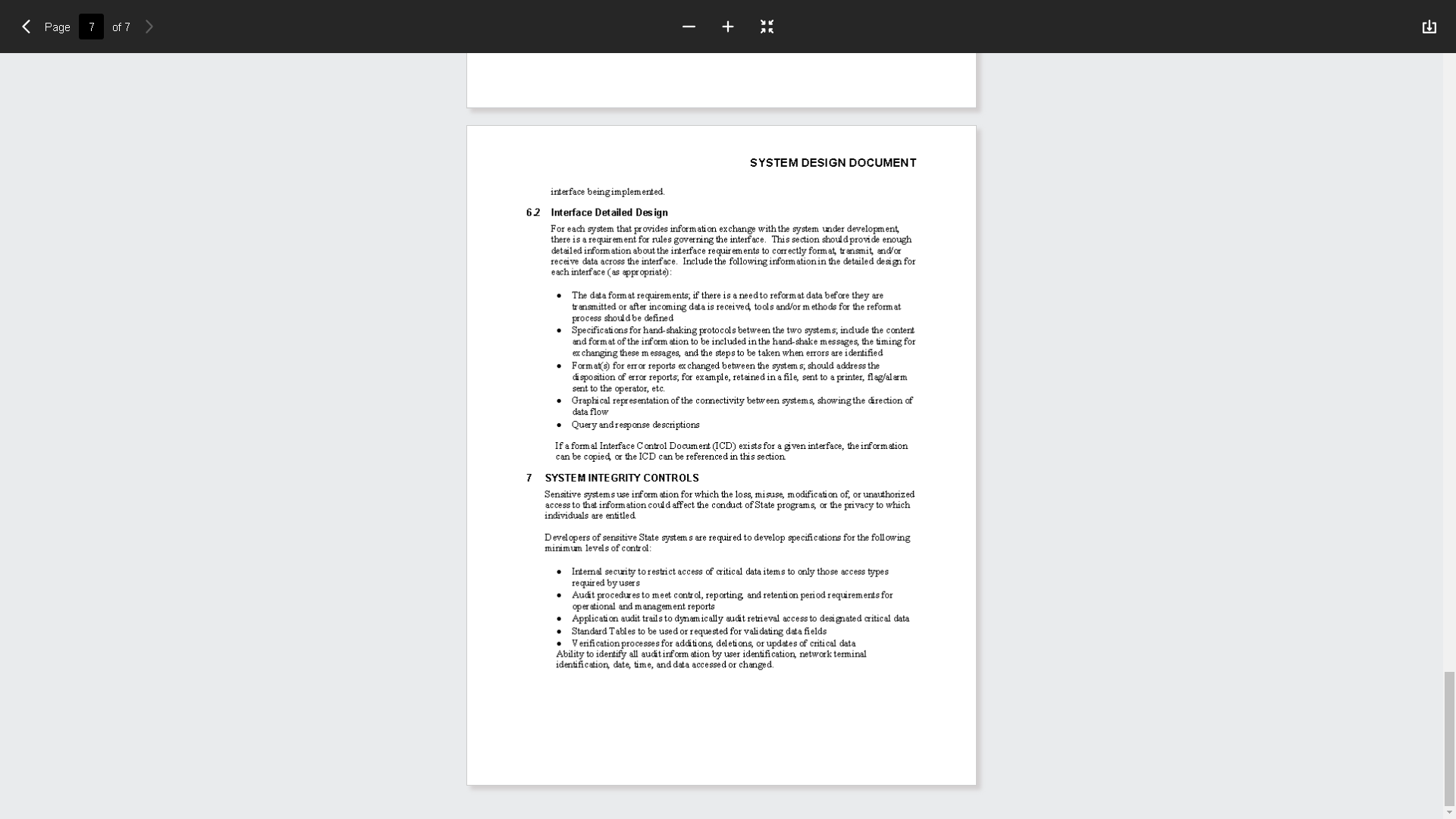
Page 1 of 7 > SYSTEM DESIGN DOCUMENT SYSTEM DESIGN DOCUMENT Overview The System Design Document describes the system requirements, operating environment, system and subsystem architecture, files and database design, input formats, output layouts, human- machine interfaces, detailed design, processing logic, and external interfaces. 1 INTRODUCTION 1.1 Purpose and Scope his section provides a brief description of the Systems Design Document's purpose and scope. 1.2 Project Executive Summary This section provides a description of the project from a manage ment perspective and an overview of the framework within which the conceptual system design was prepared. If appropriate, include the information discussed in the subsequent sections in the summary. 1.2.1 System Overview This section describes the system in narrative form using non-technical terms. It should provide a high-level system architecture diagram showing a subsystem breakout of the system, if applicable. The high- level system architecture or subsystem diagrams should, if applicable, show interfaces to external systems. Supply a high-level context diagram for the system and subsystems, if applicable. Refer to the require ments trace ability matrix (RTM) in the Functional Requirements Document (FRD), to identify the allocation of the functional require ments into this design document 1.2.2 Design Constraints This section describes anyconstraints in the system design (reference any trade-off analyses conducted such, as resource use versus productivity, or conflicts with other systems) and includes any assumptions made by the project team in developing the system design. 1.2.3 Future Contingencies This section describes anycontingencies that might arise in the design of the system that may change the development direction. Possibilities include lack of interface agreements with outside agencies or unstable architectures at the time this document is produced. Address any possible workarounds or alte ma tive plans. 1.3 Document Organization This section describes the organization of the Systems Design Document. 1.4 Points of Contact This section provides the organization code and title of the key points of contact (and alternates if appropriate) for the information system development effort. These points of SYSTEM DESIGN DOCUMENTPage 2 of 7 SYSTEM DESIGN DOCUMENT contact should include the Project Manager, System Proponent, User Organization, Quality Assuance (QA) Manager, Security Manager, and Configuration Manager, as appropriate. 1.5 Project References This section provides a bibliography of key project references and deliverables that have been produced before this point. 1.6 Glossary Supply a glossary of all terms and abbreviations used in this document. If the glossary is everal pages in length, it may be included as an appendix. 2 SYSTEM ARCHITECTURE In this section, describe the system and/or subsystem(s) architecture for the project. References to external entities should be minimal, as they will be described in detail in Section 6, External Interfaces. 2.1 System Hardware Architecture In this section, describe the overall system hardware and organization. Include a list of hardware components (with a brief description of each item) and diagrams showing the connectivity between the components. If appropriate, use subsections to address each subsystem. 2.2 System Software Architecture in this section, describe the overall system software and organization. Include a list of software modules (this could include functions, subroutines, or classes), computer languages, and programming computer-aided software engineering tools ( with a brief description of the function of each item). Use structured organization diagrams/object-oriented diagrams that show the various segmentation levels down to the lowest level. All features on the diagrams should have reference numbers and names. Include a narrative that expands on and enhances the understanding of the functional breakdown. If appropriate, use subsections to address each module Note: The diagrams should map to the FRD data flow diagrams, providing the physical process and data flow related to the FRD logical process and data flow. 2.3 Internal Communications Architecture in this section, describe the overall communications within the system; for example, LANs, ouses, etc. Include the communications architecture(s) being implemented, such as X.25, Token Ring, etc. Provide a diagram depicting the communications path(s) between the system and subsystem modules. If appropriate, use subsections to address each architecture being employed Note: The diagrams should map to the FRD context diagrams. 3 FILE AND DATABASE DESIGN Interact with the Database Administrator (DBA) when preparing this section. The section SYSTEM DESIGN DOCUMENT should reveal the final design of all database management system (DBMS) files and the non- DBMS files associated with the system under development. Additional information may addPage 3 of 7 > SYSTEM DESIGN DOCUMENT should reveal the final design of all database management system (DBMS) files and the non- DBMS files associated with the system under development. Additional information may add as required for the particular project. Provide a comprehensive data dictionary showing data element name, type, length, source, validation rules, maintenance (create, read, update, delete (CRUD) capability), data stores, outputs, aliases, and description. Can be included as an appendix. 3.1 Database Management System Files This section reveals the final design of the DBMS files and includes the following information, as appropriate (refer to the data dictionary): Refined logical model; provide normalized table layouts, entity relationship diagrams, and other logical design information A physical description of the DBMS schemas, sub-schemas, records, sets, tables, storage page sizes, etc. . Access methods (such as indexed, via set, sequential, random access, sorted pointer array, etc.) Estimate of the DBMS file size or volume of data within the file, and data pages, including ove the ad resulting from access methods and free space . Definition of the update frequency of the database tables, views, files, areas, records, sets, and data pages; estimate the number of transactions if the database is an online transaction-based system 3.2 Non-Database Management System Files In this section, provide the detailed description of all non-DBMS files and include a narrative description of the usage of each file-including if the file is used for input, output, or both; if this file is a temporary file; an indication of which modules read and write the file, etc.; and file structures (refer to the data dictionary). As appropriate, the file structure information should: Identify record structures, record keys or indexes, and reference data elements within the records Define record length (fixed or maximum variable length) and blocking factors Define file access method-forexample, index sequential, virtual sequential, random access, etc. Estimate the file size or volume of data within the file, including overhead resulting from file access methods Define the update frequency of the file; if the file is part of an online transaction-based system, provide the estimated number of transactions per unit time, and the statistical mean, mode, and distribution of those transactions 4 HUMAN-MACHINE INTERFACE This section provides the de tailed design of the system and subsystem inputs and outputs relative to the user/operator. Any additional information may be added to this section and may be organized according to whatever structure best presents the operator input and output SYSTEM DESIGN DOCUMENT designs. Depending on the particular nature of the project, it may be appropriate to repeat these sections at both the subsystem and design module levels. Additional information may bePage 4 of 7 > SYSTEM DESIGN DOCUMENT designs. Depending on the particular nature of the project, it may be appropriate to repeat these sections at both the subsystem and design module levels. Additional information may be added to the subsections if the suggested lists are inadequate to describe the project inputs and outputs. 4.1 Inputs This section is a description of the input media used by the operator for providing information to the system; show a mapping to the high-level data flows described in Section 1 .2.1, System Overview. Forexample, data entry screens, optical character readers, bar scanners, etc. If appropriate, the input record types, file structures, and database structures provided in Section 3, File and Database Design, may be referenced. Include data element definitions, or refer to the data dictionary. Provide the layout of all input data screens or graphical user interfaces (GUTs) (for example, windows). Provide a graphic representation of each interface. Define all data elements associated with eachscreen or GUI, or reference the data dictionary. This section should contain edit criteria for the data elements, including specific values, range of values, mandatory/optional, alphanumeric values, and length. Also address data entry controls to prevent edit bypassing. Discuss the miscellaneous messages associated with operator inputs, including the following: Copies of form(s) if the input data are keyed or scammed for data entry from printed forms Description of any access restrictions or security considerations Each transaction name, code, and definition, if the system is a transaction-based processing system 4.2 Outputs This section describes of the system output design relative to the user/operator; show a mapping to the high-level data flows described in Section 1.2.1. System outputs include reports, data display screens and GUIs, query results, etc. The output files are described in Section 3 and may be referenced in this section. The following should be provided, if appropriate Identification of codes and names for reports and data display screens Description of report and screen contents (provide a graphic representation of each layout and define all data elements associated with the layout or reference the data dictionary) Description of the purpose of the output, including identification of the primary users Report distribution requirements, if any(include frequency for periodic reports) Description of any access restrictions or security considerations 5 DETAILED DESIGN This section provides the information needed for a system development team to actually build and integrate the hardware components, code and integrate the software modules, and SYSTEM DESIGN DOCUMENT interconnect the hardware and software segments into a functional product. Additionally, this section addresses the detailed procedures for combining separate COTS packages into a singlePage 5 of 7 SYSTEM DESIGN DOCUMENT interconnect the hardware and software segments into a functional product. Additionally, this section addresses the detailed procedures for combining separate COTS packages into a single system. Every detailed require ment should map back to the FRD, and the mapping should be presented in an update to the RTM and include the RTMas an appendix to this design document. 5.1 Hardware Detailed Design A hardware component is the lowest level of de sign granularity in the system. Depending on the design requirements, there may be one or more components persystem. This section should provide enough detailed information about individual component require ments to correctly build and or procure all the hardware for the system (or integrate COTS items). If there are manycomponents or if the component documentation is extensive, place it in an appendix or reference a separate document. Add additional diagrams and information, if necessary, to describe each component and its functions, adequately. Industry-standard component specification practices should be followed. For COTS procurements, if a specific vendor has been identified, include appropriate item names. Include the following information in the detailed component designs (as applicable): Power input require ments for each component Signal impedances and logic states Connector specifications (serial/parallel, 11-pin, male/female, etc.) Memory and/or storage space requirements Processor requirements (speed and functionality) Graphical re presentation depicting the number of hardware items (for example, monitors, printers, servers, IO devices), and the relative positioning of the components to each other Cable type(s) and length(S) User interfaces (buttons, toggle switches, etc.) Hard drive/floppy drive/CD-ROM require ments Monitor resolution 5.2 Software Detailed Design A software module is the lowest level of design granularity in the system. Depending on the software development approach, there may be one or more modules persystem. This section should provide enough detailed information about logic and data necessary to completely write source code for all modules in the system (and or integrate COTS software programs). If there are manymodules or if the module documentation is extensive, place it in an appendix or reference a separate document. Add additional diagrams and information, if necessary, to de scribe each module, its functionality, and its hierarchy. Industry-standard module specification practices should be followed. Include the following information in the detailed module designs: A narrative description of each module, its function(s), the conditions under which it is used (called or scheduled for execution), its overall processing, logic, interfaces to other SYSTEM DESIGN DOCUMENT modules, interfaces to external systems, security requirements, etc.; explain anyPage 6 of 7 SYSTEM DESIGN DOCUMENT modules, interfaces to external systems, security requirements, etc.; explain any algorithms used by the module in detail . For COTS packages, specify any call routines or bridging programs to integrate the package with the system and/or other COTS packages (for example, Dynamic Link Libraries) Data elements, record structures, and file structures associated with module input and output Graphical representation of the module processing, logic, flow of control, and algorithms, using an accepted diagramming approach (for example, structure charts, action diagrams, flowcharts, etc.) . Data entry and data output graphics; define or reference associated data elements, if the project is large and complex or if the detailed module designs will be incorporated into a separate document, then it may be appropriate to repeat the screen information in this section Report layout 5.3 Internal Communications Detailed Design If the system includes more than one component there may be a requirement for internal communications to exchange information, provide commands, or support input/output functions. This section should provide enough detailed information about the communication requirements to correctly build and/or procure the communications components for the system. Include the following information in the detailed designs (as appropriate): The number of servers and clients to be included on each area network Specifications for bus timing requirements and bus control . Format(s) for data being exchanged between components Graphical representation of the connectivity between components, showing the direction of data flow (if applicable), and approximate distances between components, information should provide enough detail to support the procurement of hardware to complete the install ation at a given location LAN topology EXTERNAL INTERFACES External systems are any systems that are not within the scope of the system under development, regardless whether the other systems are managed by the State or another agency. Inthis section, describe the electronic interface(s) between this system and each of the other systems and/or subsystem(s), emphasizing the point of view of the system being developed 6.1 Interface Architecture In this section, describe the interface(s) between the system being developed and other systems, for example, batch transfers, queries, etc. Include the interface architecture(s) being implemented, such as wide area networks, gateways, etc. Provide a diagram depicting the communications path(s) between this system and each of the other systems, which should map to the context diagrams in Section 1.2.1. If appropriate, use subsections to address each SYSTEM DESIGN DOCUMENT interface being implemented.Page 7 of 7 SYSTEM DESIGN DOCUMENT interface being implemented. 6.2 Interface Detailed Design For each system that provides information exchange with the system under development, there is a requirement for rules governing the interface. This section should provide enough detailed information about the interface requirements to correctly format, transmit, and/ or receive data across the interface. Include the following information in the detailed design for each interface ( as appropriate): The data format requirements, if there is a need to reform at data before they are transmitted or after incoming data is received, tools and/or methods for the reform at process should be defined . Specifications for hand shaking protocols between the two systems, include the content and format of the inform ation to be included in the hand shake messages, the timing for ex changing these messages, and the steps to be taken when errors are identified Format(s) for error reports exchanged between the systems, should address the disposition of error reports, for example, retained in a file, sent to a printer, flag/alarm sent to the operator, etc. . Graphical representation of the connectivity between systems, showing the direction of data flow . Query and response descriptions If a formal Interface Control Document (ICD) exists for a given interface, the information can be copied, or the ICD can be referenced in this section 7 SYSTEM INTEGRITY CONTROLS Sensitive systems use inform ation for which the loss, misuse, modification of, or unauthorized access to that information could affect the conduct of State programs, or the privacy to which individuals are entitled Developers of sensitive State systems are required to develop specifications for the following minimum levels of control: . Internal security to restrict access of critical data items to only those access types required by users Audit procedures to meet control, reporting and retention period requirements for operational and management reports Application audit trails to dynamically audit retrieval access to designated critical data Standard Tables to be used or requested for validating data fields Verification processes for additions, deletions, or updates of critical data Ability to identify all audit inform ation by user identification, network terminal identification, date, time, and data accessed or changed
Step by Step Solution
There are 3 Steps involved in it

Get step-by-step solutions from verified subject matter experts
 Study Help