







Question: Modify this and convert the names to all uppercase before sorting and showing them. Then show a numbered list of names in the text area.
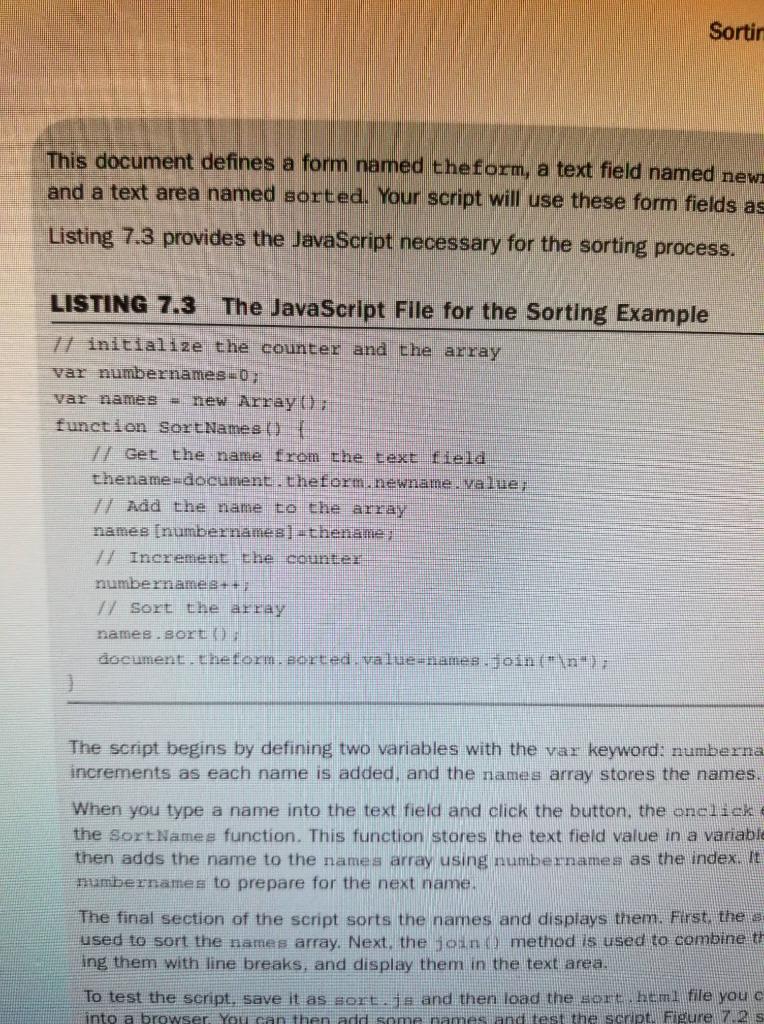
Modify this and convert the names to all uppercase before sorting and showing them. Then show a numbered list of names in the text area. Also change it so that if the user presses enter instead of clicking, the code will still work and not erase the list. Use HTML, and CSS.
Sortir This document defines a form named theform, a text field named news and a text area named sorted. Your script will use these form fields as Listing 7.3 provides the JavaScript necessary for the sorting process. LISTING 7.3 The JavaScript File for the Sorting Example 7/ initialize the counter and the array var numbernames_0; var names new Array ( function SortNames 7 Get the name from the text lleld thename-document.theform.newname value 1) Add the name to the array namee numbernames)-thename? // Increment the counter numbernames++ 7/ Sort the array names. sert (1 document. Chetorm. Borted. value=names.join(" The script begins by defining two variables with the var keyword: numberna increments as each name is added, and the names array stores the names. When you type a name into the text field and click the button, the onclick the SortNames function. This function stores the text field value in a variable then adds the name to the names array using numbernames as the index. It numbernames to prepare for the next name, The final section of the script sorts the names and displays them. First, the s used to sort the names array. Next, the join() method is used to combine t ing them with line breaks, and display them in the text area. To test the script, save it as sort ja and then load the northem file you c into a browser. You can then add some hames and test the script Figure 72
Step by Step Solution
There are 3 Steps involved in it

Get step-by-step solutions from verified subject matter experts
 Study Help