







Question: Most of the code is already done, All that needs to be added are the other Input sections and their corresponding event handles when receiving
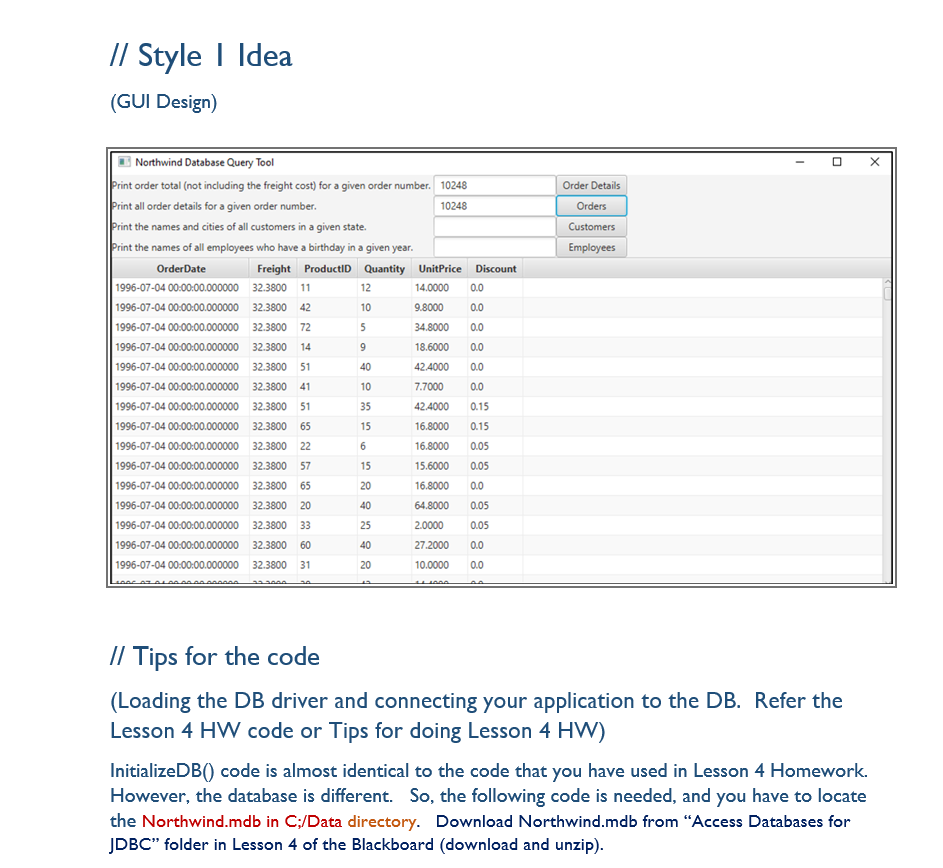

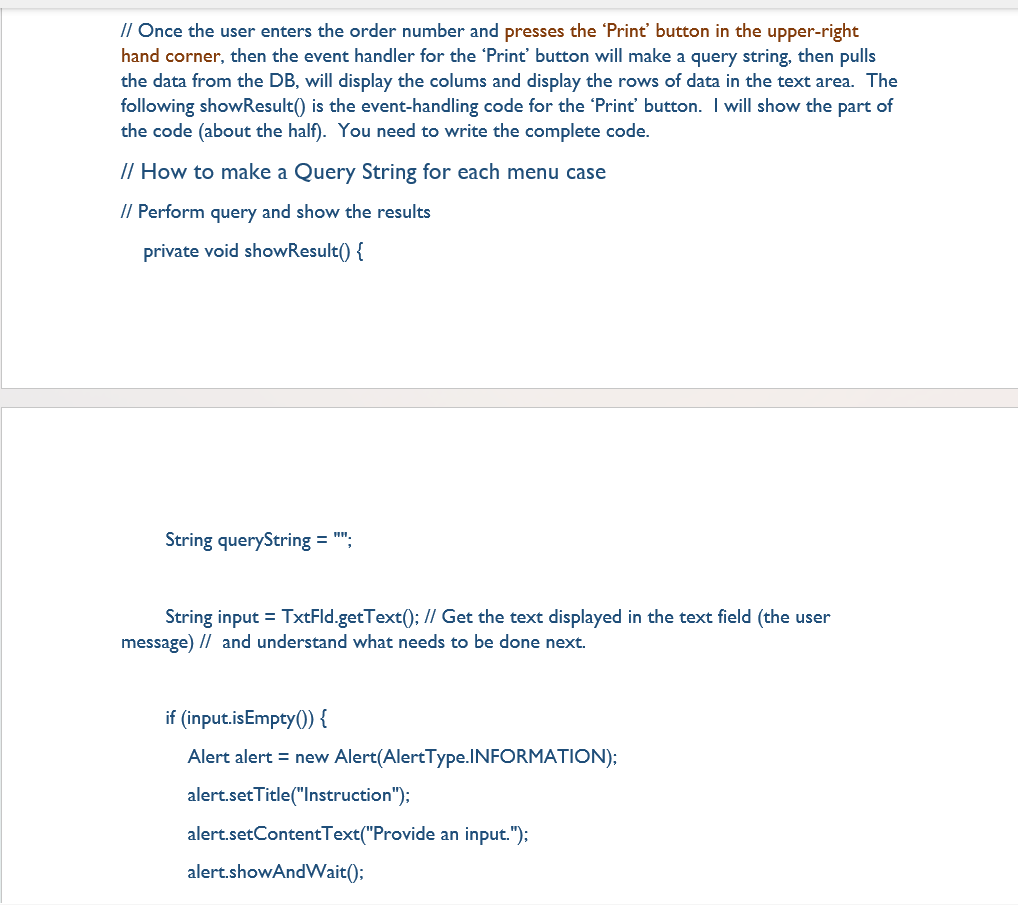
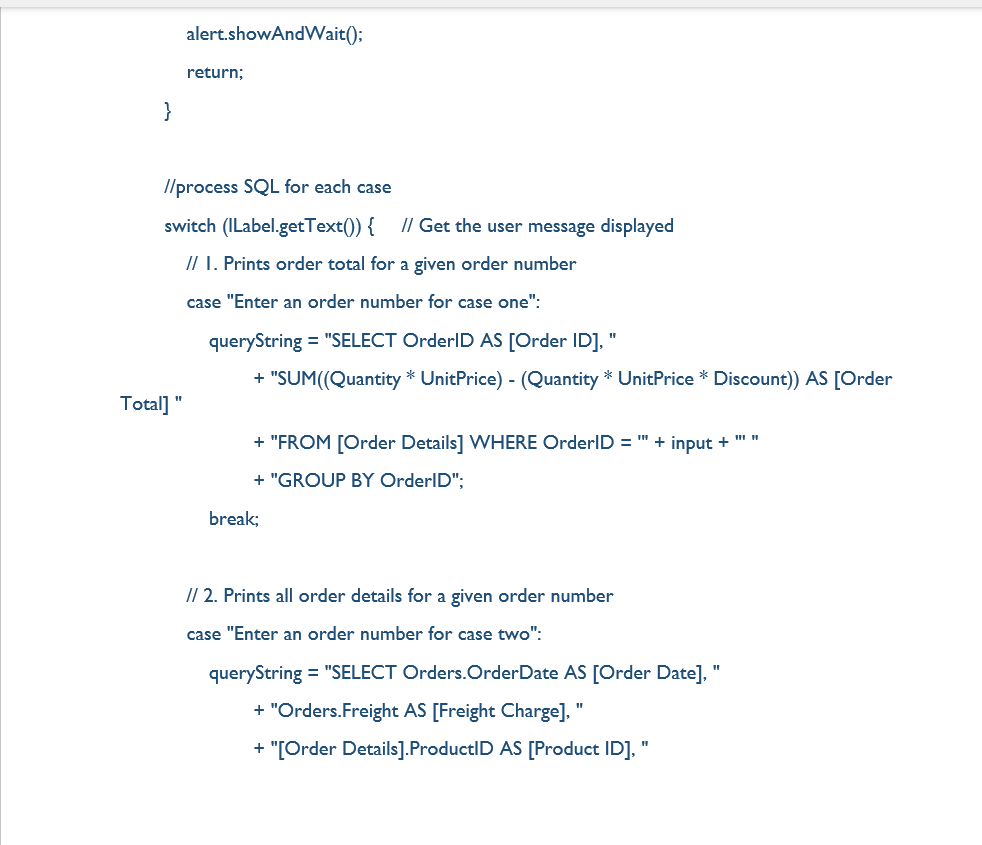
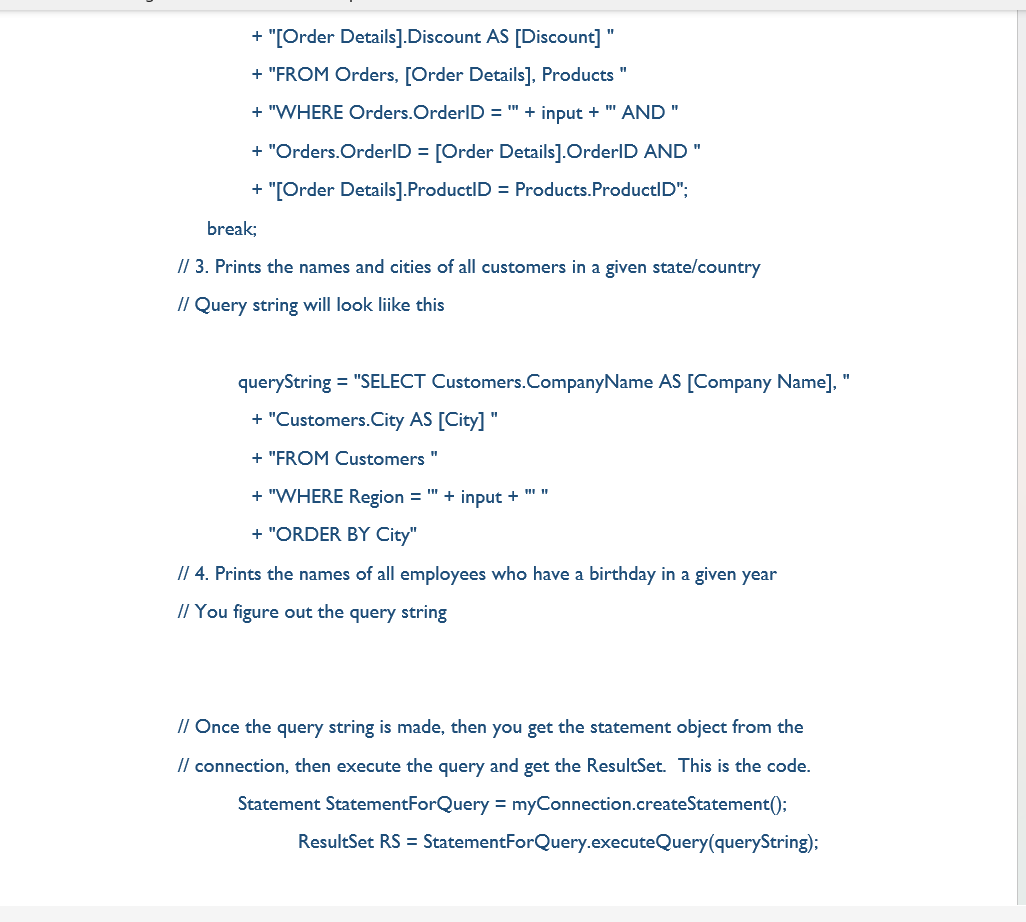

Most of the code is already done, All that needs to be added are the other Input sections and their corresponding event handles when receiving a specific input. (e.g numbers for the first 2, a name for the third 1, and a number for the fourth one)
here is the code.
/* * To change this license header, choose License Headers in Project Properties. * To change this template file, choose Tools | Templates * and open the template in the editor. */ package com.example.exercise32_06; import javafx.application.Application; import javafx.collections.FXCollections; import javafx.collections.ObservableList; import javafx.scene.Scene; import javafx.scene.control.Button; import javafx.scene.control.Label; import javafx.scene.control.TableColumn; import javafx.scene.control.TableView; import javafx.scene.control.TextField; import javafx.scene.layout.HBox; import javafx.scene.layout.VBox; import javafx.stage.Stage; import java.sql.*; import javafx.beans.property.SimpleStringProperty; import javafx.beans.value.ObservableValue; import javafx.scene.control.TableColumn.CellDataFeatures; import javafx.util.Callback; public class Exercise32_06 extends Application { public static void main(String[] args) { launch(args); } // Statement for executing queries private Statement stmt; private TextField tfTableName = new TextField(); private ObservableList data; private TableView tableview; @Override // Override the start method in the Application class public void start(Stage primaryStage) { // Initialize database connection and create a Statement object tableview = new TableView(); initializeDB(); Button btTotal = new Button("Order Details"); Button btOrder = new Button("Orders"); Button btCust = new Button("Customers"); Button btEmploy = new Button("Employees"); HBox hBox = new HBox(5); hBox.getChildren().addAll(new Label("Print order total (not including the freight cost) for a given order number"), tfTableName, (btTotal)); VBox vBox = new VBox(10); vBox.getChildren().addAll(hBox, tableview); tfTableName.setPrefColumnCount(6); btTotal.setOnAction(e -> showContent()); // Create a scene and place it in the stage Scene scene = new Scene(vBox, 500, 180); primaryStage.setTitle("Prgramming Exercise 03"); primaryStage.setScene(scene); // Place the scene in the stage primaryStage.show(); // Display the stage } private void initializeDB() { try { // Load the JDBC driver Class.forName("net.ucanaccess.jdbc.UcanaccessDriver"); System.out.println("Driver loaded"); // Establish a connection Connection connection = DriverManager.getConnection("jdbc:ucanaccess://C:/Data/Northwind.mdb"); // Create a statement stmt = connection.createStatement(); } catch (Exception ex) { ex.printStackTrace(); } } private void showContent() { data = FXCollections.observableArrayList(); try { String queryString = "SELECT * from " + tfTableName.getText() + ";"; ResultSet rs = stmt.executeQuery(queryString); for (int i = 0; i , ObservableValue>() { public ObservableValue call(CellDataFeatures param) { return new SimpleStringProperty (param.getValue().get(j).toString()); } }); tableview.getColumns().addAll(col); } while (rs.next()) { // Iterate Row ObservableList row = FXCollections. observableArrayList(); for (int i = 1; i
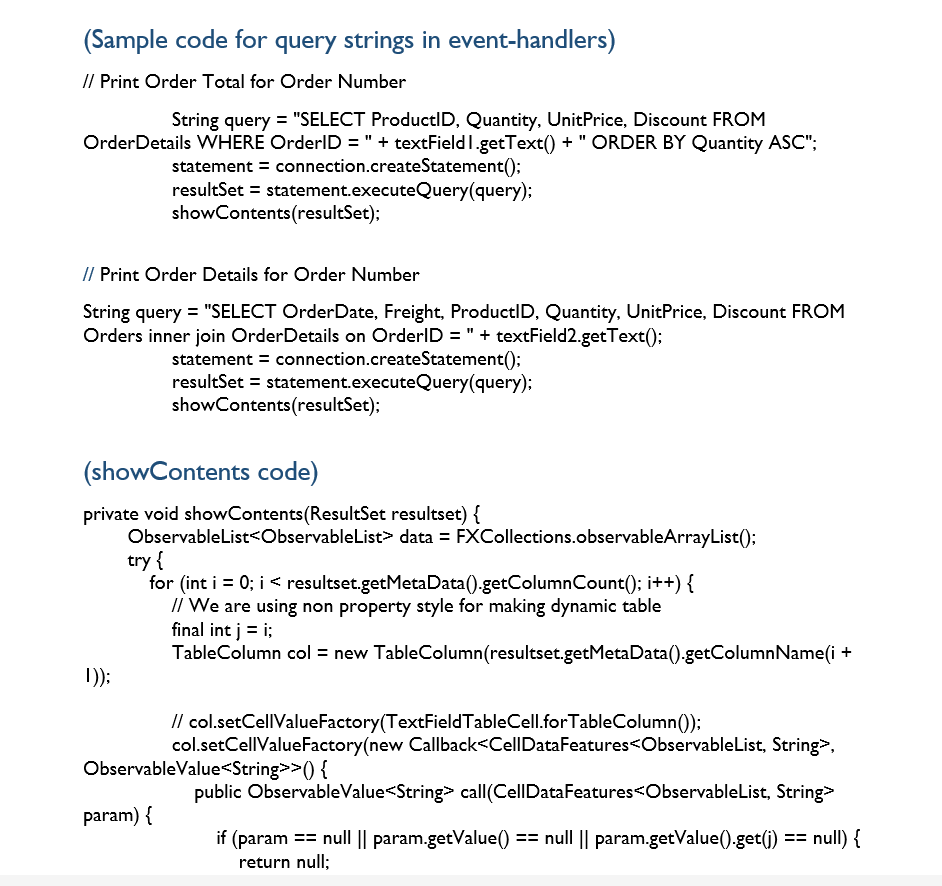
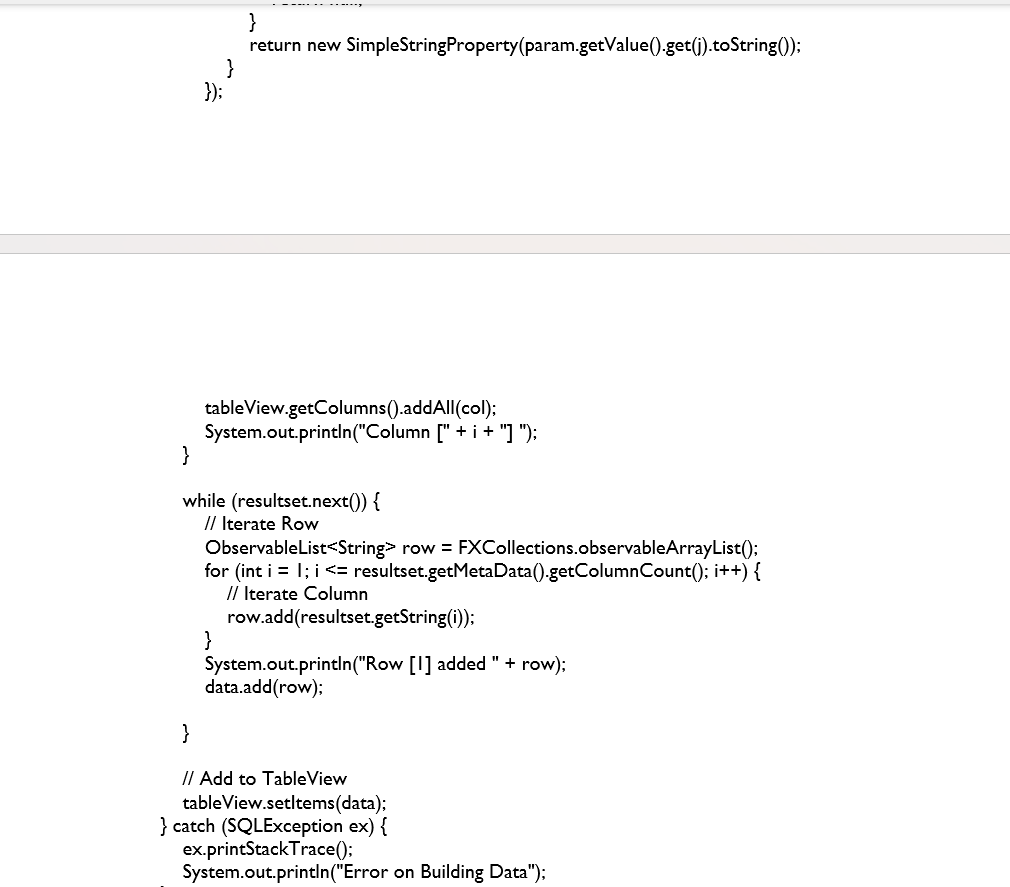
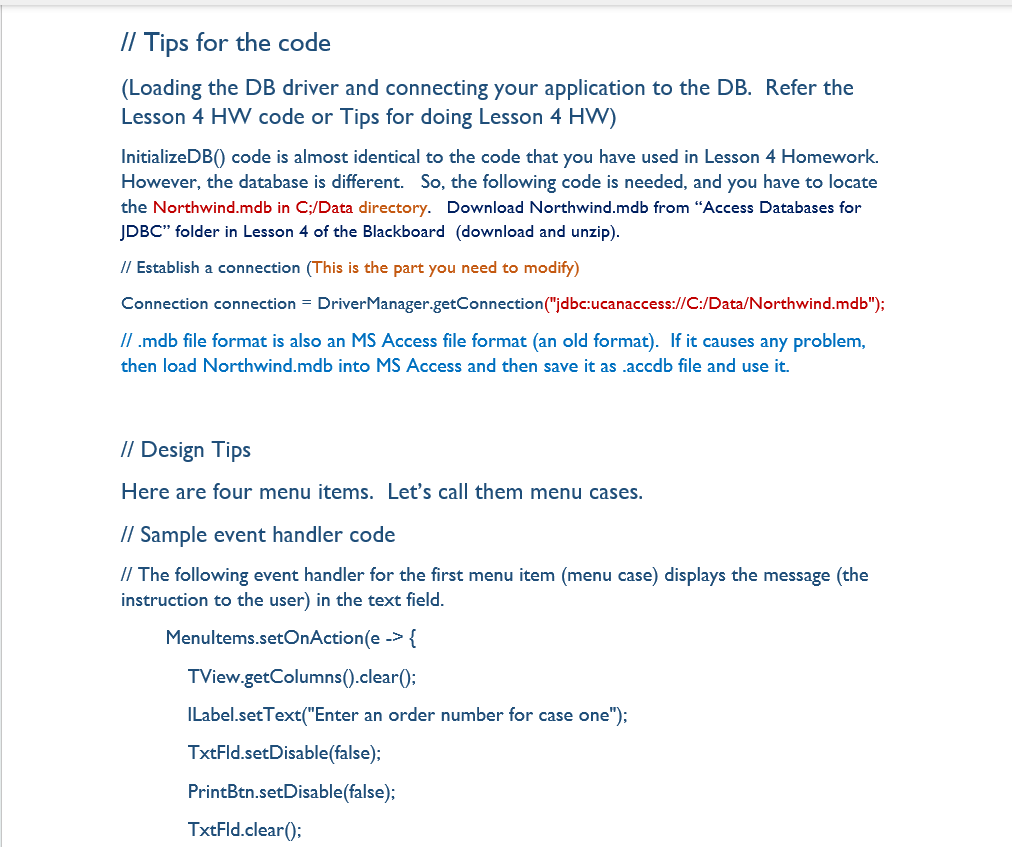
// Style I Idea (GUI Design) II Northwind Database Querv Tool // Tips for the code (Loading the DB driver and connecting your application to the DB. Refer the Lesson 4HW code or Tips for doing Lesson 4HW ) InitializeDB() code is almost identical to the code that you have used in Lesson 4 Homework. However, the database is different. So, the following code is needed, and you have to locate the Northwind.mdb in C;/Data directory. Download Northwind.mdb from "Access Databases for JDBC" folder in Lesson 4 of the Blackboard (download and unzip). Connection connection = DriverManager.getConnection("jdbc:ucanaccess://C:/Data/Northwind.mdb"); // .mdb file format is also an MS Access file format (an old format). If it causes any problem, then load Northwind.mdb into MS Access and then save it as accdb file and use it. (Sample code for query strings in event-handlers) // Print Order Total for Order Number String query = "SELECT ProductID, Quantity, UnitPrice, Discount FROM OrderDetails WHERE OrderID = " + textField I.getText() + " ORDER BY Quantity ASC"; statement = connection.createStatement () ; resultSet = statement.executeQuery(query); showContents(resultSet); // Print Order Details for Order Number String query = "SELECT OrderDate, Freight, ProductID, Quantity, UnitPrice, Discount FROM Orders inner join OrderDetails on OrderID = " + textField2.getText(); statement = connection.createStatement () ; resultSet = statement.executeQuery(query); showContents(resultSet); (showContents code) private void showContents(ResultSet resultset) \{ ObservableList data = FXCollections.observableArrayList(); try{ for (int i =0; i , ObservableValue > () \{ public ObservableValue param) \{ if ( param == null param.getValue ()== null param.getValue () get (j)== null \{ return null; 33 return new SimpleStringProperty(param.getValue().get(j).toString()); tableView.getColumns().addAll(col); System.out.println("Column [" + i + "] "); \} while (resultset.next ()){ // Iterate Row ObservableList> row = FXCollections.observableArrayList () ; for (int i=l;i
Step by Step Solution
There are 3 Steps involved in it
1 Expert Approved Answer
Step: 1 Unlock

Question Has Been Solved by an Expert!
Get step-by-step solutions from verified subject matter experts
Step: 2 Unlock
Step: 3 Unlock
 Study Help