







Question: **My answers (listed below) need modification per the below instruction** INSTRUCTIONS: 1) For #1 add another statement to display all the columns for all the
**My answers (listed below) need modification per the below instruction**
INSTRUCTIONS:
1) For #1 add another statement to display all the columns for all the rows in the view (SELECT * ....).
2) Add a statement to delete the CONTACT view after your statement for #2.
3) For #5 add another statement to display all the columns for all the rows in the view (SELECT * ....).
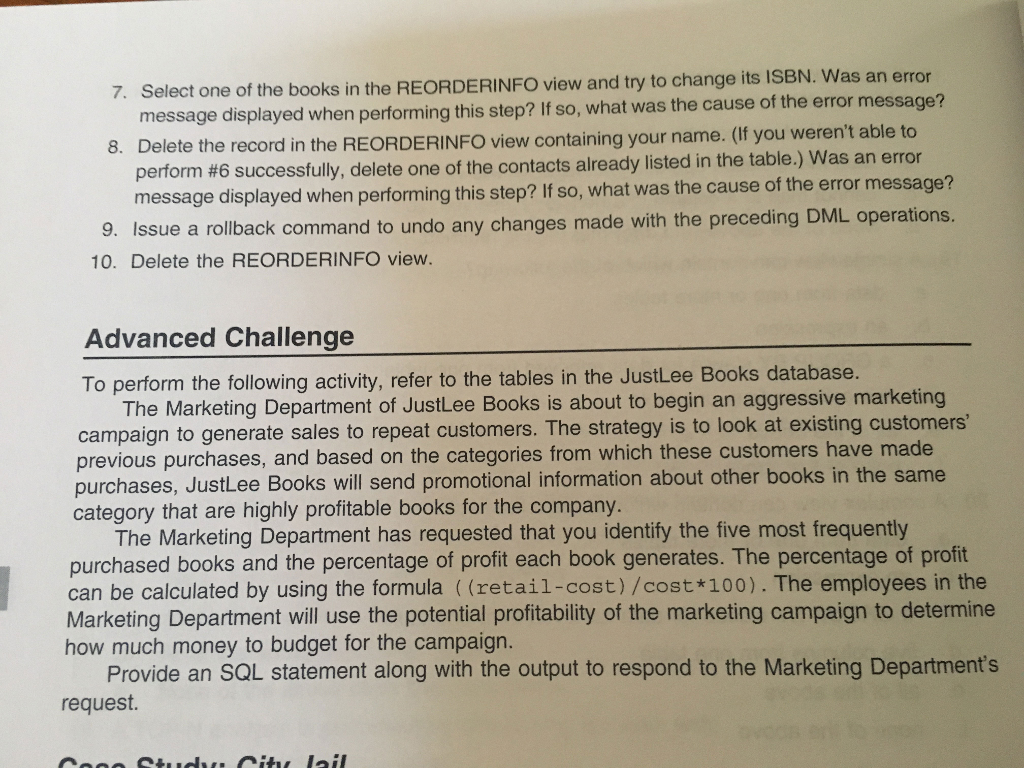
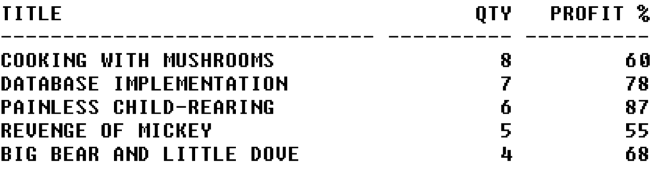
4) The Advanced Challenge requests you create a memo. Do not do this. Instead submit your SQL scripts as directed below. List the book title, the number of times ordered, and the profit percent. The number of times ordered depends on the quantity ordered. In other words, if an order has one orderitems row and that row has a quantity of 1000 of a certain book then count that as 1000 purchases of that book not one purchase.
MY ANSWERS (without above modifications):
REM HandsOn #1 CREATE VIEW contact AS SELECT contact, phone FROM publisher;
REM HandsOn #2 CREATE OR REPLACE VIEW CONTACT AS SELECT name, phone FROM publisher WITH READ ONLY;
REM HandsOn #5 CREATE VIEW reorderinfo AS SELECT isbn, title, contact, phone FROM books JOIN publisher USING (pubid);
REM HandsOn #10 SQL> DROP VIEW reorderinfo;
REM Advanced Challenge *no attempted answer
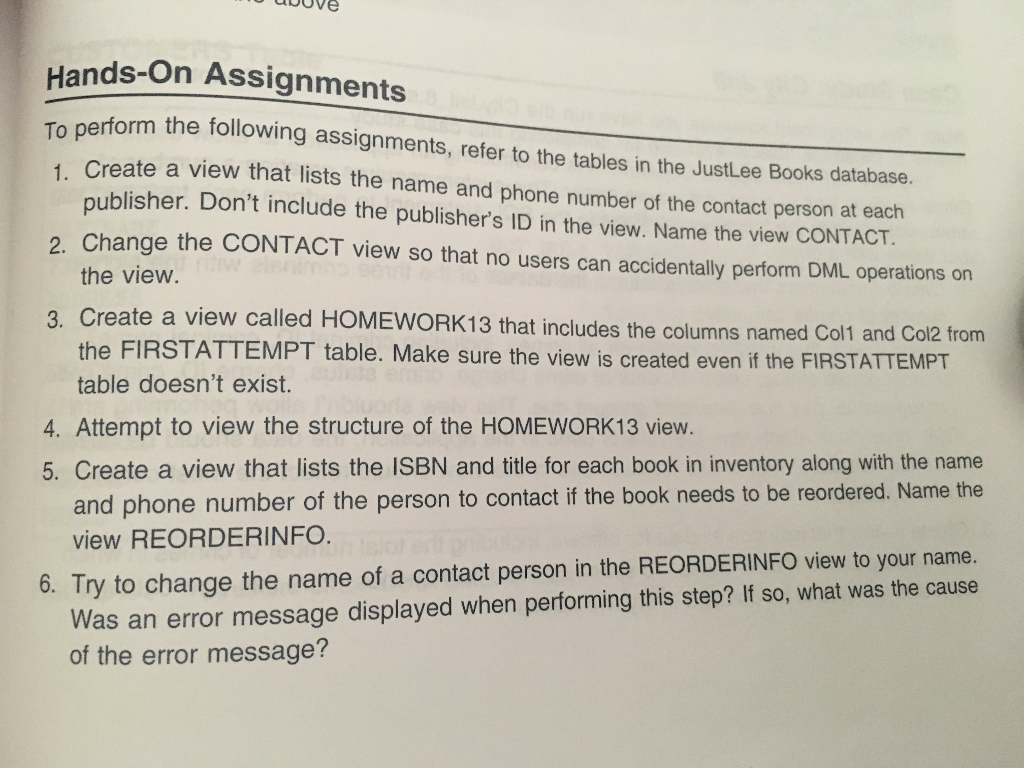
Hands On AND Advanced Challange from Book (Oracle 12c: SQL by Joan Casteel)
REQUIRED RESULTS FOR VIEW ASSIGNMENTS:
Listed below are the results you should see when you process the correct SQL statement against the JustLee Books database. Make sure you match the headings, data, and column formats.
#1
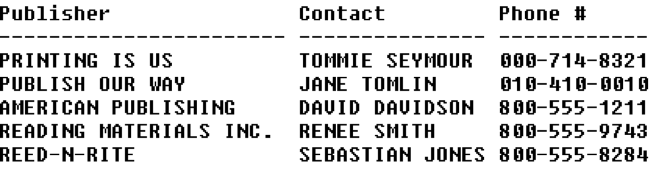
The above is the result if you executed the following statement after creating your view: SELECT * FROM contact;
#2
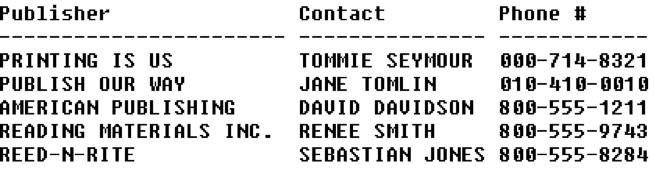
The above is the result if you executed the following statement after creating your view: SELECT * FROM contact; The output should be the same as that in #1.
#5
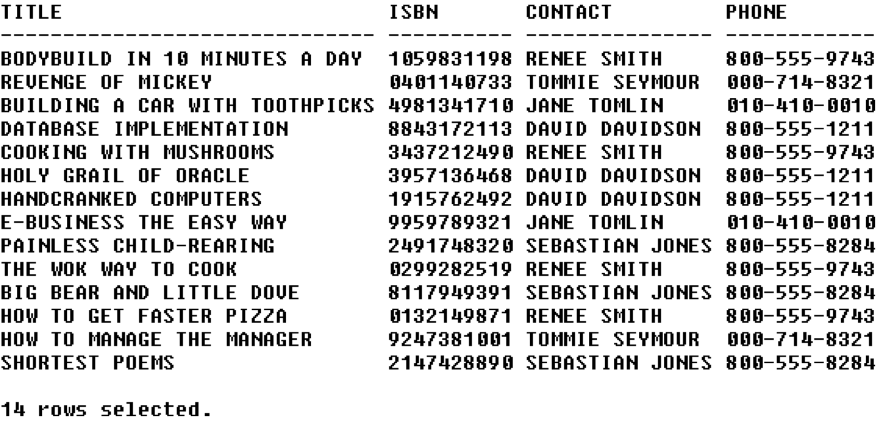
The above is the result if you executed the following statement after creating your view: SELECT * FROM reorderinfo;
#10 There is no table output for this item except an acknowledgement the view was dropped.
Advanced Challenge
ubove Hands-On Assignments perform the following assignments, refer to the tables in the Justlee Books database. Create a view that lists the name and phone number of the contact person at publisher. Don't include the publisher's ID in the view. Name the view CONTACT. To each 2. Change the CONTACT view so that no users can accidentally perform DML operations on the view 3. Create a view called the FIRSTATTEMPT table doesn't exist. HOMEWORK13 that includes the columns named Col1 and Col2 from table. Make sure the view is created even if the FIRSTATTEMPT 4. Attempt to view the structure of the HOMEWORK13 view. 5. Create a view that lists the ISBN and title for each book in inventory along with the name and phone number of the person to contact if the book needs to be reordered. Name the view REORDERINFO. Was an error message displayed when performing this step? If so, what was the cause of the error message? 6. Try to change the name of a contact person in the REORDERINFO view to your name
Step by Step Solution
There are 3 Steps involved in it

Get step-by-step solutions from verified subject matter experts
 Study Help