







Question: Please Use MATLAB to solve the problem PLEASE FOLLOW THE PROBLEM EXACTLY AS IT IS STATED. There are multiple ways to solve the problem TC.mat
Please Use MATLAB to solve the problem
PLEASE FOLLOW THE PROBLEM EXACTLY AS IT IS STATED. There are multiple ways to solve the problem
TC.mat is posted below
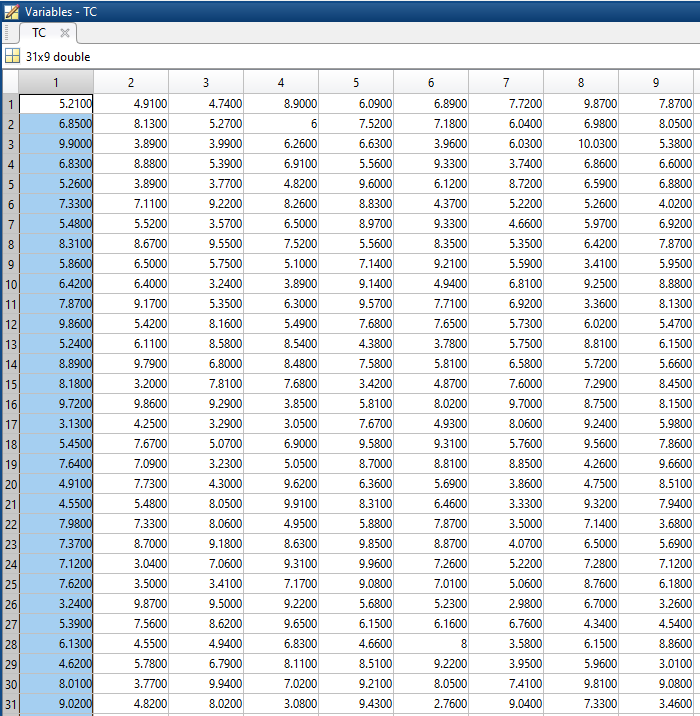
5.21000000000000 4.91000000000000 4.74000000000000 8.90000000000000 6.09000000000000 6.89000000000000 7.72000000000000 9.87000000000000 7.87000000000000
6.85000000000000 8.13000000000000 5.27000000000000 6 7.52000000000000 7.18000000000000 6.04000000000000 6.98000000000000 8.05000000000000
9.90000000000000 3.89000000000000 3.99000000000000 6.26000000000000 6.63000000000000 3.96000000000000 6.03000000000000 10.0300000000000 5.38000000000000
6.83000000000000 8.88000000000000 5.39000000000000 6.91000000000000 5.56000000000000 9.33000000000000 3.74000000000000 6.86000000000000 6.60000000000000
5.26000000000000 3.89000000000000 3.77000000000000 4.82000000000000 9.60000000000000 6.12000000000000 8.72000000000000 6.59000000000000 6.88000000000000
7.33000000000000 7.11000000000000 9.22000000000000 8.26000000000000 8.83000000000000 4.37000000000000 5.22000000000000 5.26000000000000 4.02000000000000
5.48000000000000 5.52000000000000 3.57000000000000 6.50000000000000 8.97000000000000 9.33000000000000 4.66000000000000 5.97000000000000 6.92000000000000
8.31000000000000 8.67000000000000 9.55000000000000 7.52000000000000 5.56000000000000 8.35000000000000 5.35000000000000 6.42000000000000 7.87000000000000
5.86000000000000 6.50000000000000 5.75000000000000 5.10000000000000 7.14000000000000 9.21000000000000 5.59000000000000 3.41000000000000 5.95000000000000
6.42000000000000 6.40000000000000 3.24000000000000 3.89000000000000 9.14000000000000 4.94000000000000 6.81000000000000 9.25000000000000 8.88000000000000
7.87000000000000 9.17000000000000 5.35000000000000 6.30000000000000 9.57000000000000 7.71000000000000 6.92000000000000 3.36000000000000 8.13000000000000
9.86000000000000 5.42000000000000 8.16000000000000 5.49000000000000 7.68000000000000 7.65000000000000 5.73000000000000 6.02000000000000 5.47000000000000
5.24000000000000 6.11000000000000 8.58000000000000 8.54000000000000 4.38000000000000 3.78000000000000 5.75000000000000 8.81000000000000 6.15000000000000
8.89000000000000 9.79000000000000 6.80000000000000 8.48000000000000 7.58000000000000 5.81000000000000 6.58000000000000 5.72000000000000 5.66000000000000
8.18000000000000 3.20000000000000 7.81000000000000 7.68000000000000 3.42000000000000 4.87000000000000 7.60000000000000 7.29000000000000 8.45000000000000
9.72000000000000 9.86000000000000 9.29000000000000 3.85000000000000 5.81000000000000 8.02000000000000 9.70000000000000 8.75000000000000 8.15000000000000
3.13000000000000 4.25000000000000 3.29000000000000 3.05000000000000 7.67000000000000 4.93000000000000 8.06000000000000 9.24000000000000 5.98000000000000
5.45000000000000 7.67000000000000 5.07000000000000 6.90000000000000 9.58000000000000 9.31000000000000 5.76000000000000 9.56000000000000 7.86000000000000
7.64000000000000 7.09000000000000 3.23000000000000 5.05000000000000 8.70000000000000 8.81000000000000 8.85000000000000 4.26000000000000 9.66000000000000
4.91000000000000 7.73000000000000 4.30000000000000 9.62000000000000 6.36000000000000 5.69000000000000 3.86000000000000 4.75000000000000 8.51000000000000
4.55000000000000 5.48000000000000 8.05000000000000 9.91000000000000 8.31000000000000 6.46000000000000 3.33000000000000 9.32000000000000 7.94000000000000
7.98000000000000 7.33000000000000 8.06000000000000 4.95000000000000 5.88000000000000 7.87000000000000 3.50000000000000 7.14000000000000 3.68000000000000
7.37000000000000 8.70000000000000 9.18000000000000 8.63000000000000 9.85000000000000 8.87000000000000 4.07000000000000 6.50000000000000 5.69000000000000
7.12000000000000 3.04000000000000 7.06000000000000 9.31000000000000 9.96000000000000 7.26000000000000 5.22000000000000 7.28000000000000 7.12000000000000
7.62000000000000 3.50000000000000 3.41000000000000 7.17000000000000 9.08000000000000 7.01000000000000 5.06000000000000 8.76000000000000 6.18000000000000
3.24000000000000 9.87000000000000 9.50000000000000 9.22000000000000 5.68000000000000 5.23000000000000 2.98000000000000 6.70000000000000 3.26000000000000
5.39000000000000 7.56000000000000 8.62000000000000 9.65000000000000 6.15000000000000 6.16000000000000 6.76000000000000 4.34000000000000 4.54000000000000
6.13000000000000 4.55000000000000 4.94000000000000 6.83000000000000 4.66000000000000 8 3.58000000000000 6.15000000000000 8.86000000000000
4.62000000000000 5.78000000000000 6.79000000000000 8.11000000000000 8.51000000000000 9.22000000000000 3.95000000000000 5.96000000000000 3.01000000000000
8.01000000000000 3.77000000000000 9.94000000000000 7.02000000000000 9.21000000000000 8.05000000000000 7.41000000000000 9.81000000000000 9.08000000000000
9.02000000000000 4.82000000000000 8.02000000000000 3.08000000000000 9.43000000000000 2.76000000000000 9.04000000000000 7.33000000000000 3.46000000000000
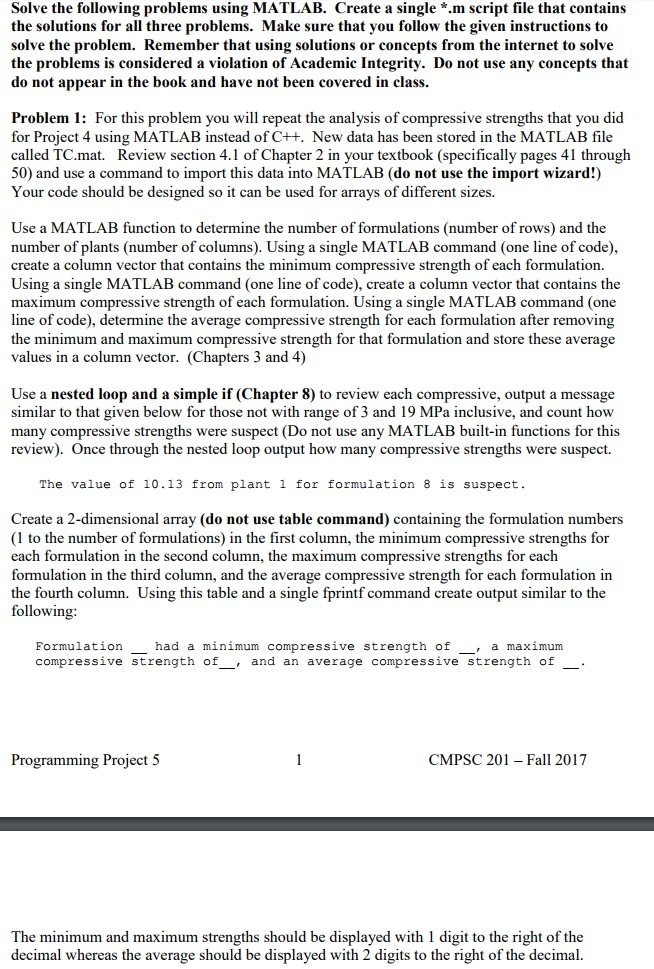
Solve the following problems using MATLAB. Create a single *.m script file that contains the solutions for all three problems. Make sure that you follow the given instructions to solve the problem. Remember that using solutions or concepts from the internet to solve the problems is considered a violation of Academic Integrity. Do not use any concepts that do not appear in the book and have not been covered in class. Problem 1: For this problem you will repeat the analysis of compressive strengths that you did for Project 4 using MATLAB instead of C++. New data has been stored in the MATLAB file called TC.mat. Review section 4.1 of Chapter 2 in your textbook (specifically pages 41 through 50) and use a command to import this data into MATLAB (do not use the import wizard!) Your code should be designed so it can be used for arrays of different sizes. Use a MATLAB function to determine the number of formulations (number of rows) and the number of plants (number of columns). Using a single MATLAB command (one line of code), create a column vector that contains the minimum compressive strength of each formulation. Using a single MATLAB command (one line of code), create a column vector that contains the maximum compressive strength of each formulation. Using a single MATLAB command (one line of code), determine the average compressive strength for each formulation after removing the minimum and maximum compressive strength for that formulation and store these average values in a column vector. (Chapters 3 and 4) Use a nested loop and a simple if (Chapter 8) to review each compressive, output a message similar to that given below for those not with range of 3 and 19 MPa inclusive, and count how many compressive strengths were suspect (Do not use any MATLAB built-in functions for this review). Once through the nested loop output how many compressive strengths were suspect. The value of 10.13 from plant 1 for formulation 8 is suspect Create a 2-dimensional array (do not use table command) containing the formulation numbers (1 to the number of formulations) in the first column, the minimum compressive strengths for each formulation in the second column, the maximum compressive strengths for each formulation in the third column, and the average compressive strength for each formulation in h column. Using this table and a single fprintf command create output similar to the following Formulation compressive strength of had a minimum compressive strength of , a maximum , and an average compressive strength of . Programming Project 5 CMPSC 201 -Fall 2017 The minimum and maximum strengths should be displayed with 1 digit to the right of the decimal whereas the average should be displayed with 2 digits to the right of the decimal. Solve the following problems using MATLAB. Create a single *.m script file that contains the solutions for all three problems. Make sure that you follow the given instructions to solve the problem. Remember that using solutions or concepts from the internet to solve the problems is considered a violation of Academic Integrity. Do not use any concepts that do not appear in the book and have not been covered in class. Problem 1: For this problem you will repeat the analysis of compressive strengths that you did for Project 4 using MATLAB instead of C++. New data has been stored in the MATLAB file called TC.mat. Review section 4.1 of Chapter 2 in your textbook (specifically pages 41 through 50) and use a command to import this data into MATLAB (do not use the import wizard!) Your code should be designed so it can be used for arrays of different sizes. Use a MATLAB function to determine the number of formulations (number of rows) and the number of plants (number of columns). Using a single MATLAB command (one line of code), create a column vector that contains the minimum compressive strength of each formulation. Using a single MATLAB command (one line of code), create a column vector that contains the maximum compressive strength of each formulation. Using a single MATLAB command (one line of code), determine the average compressive strength for each formulation after removing the minimum and maximum compressive strength for that formulation and store these average values in a column vector. (Chapters 3 and 4) Use a nested loop and a simple if (Chapter 8) to review each compressive, output a message similar to that given below for those not with range of 3 and 19 MPa inclusive, and count how many compressive strengths were suspect (Do not use any MATLAB built-in functions for this review). Once through the nested loop output how many compressive strengths were suspect. The value of 10.13 from plant 1 for formulation 8 is suspect Create a 2-dimensional array (do not use table command) containing the formulation numbers (1 to the number of formulations) in the first column, the minimum compressive strengths for each formulation in the second column, the maximum compressive strengths for each formulation in the third column, and the average compressive strength for each formulation in h column. Using this table and a single fprintf command create output similar to the following Formulation compressive strength of had a minimum compressive strength of , a maximum , and an average compressive strength of . Programming Project 5 CMPSC 201 -Fall 2017 The minimum and maximum strengths should be displayed with 1 digit to the right of the decimal whereas the average should be displayed with 2 digits to the right of the decimal
Step by Step Solution
There are 3 Steps involved in it

Get step-by-step solutions from verified subject matter experts
 Study Help