







Question: Purpose You are to create a Junit 5 test in advance of lab 3. This Junit class will test the functionality of java.util.Queue (initialized by
Purpose
You are to create a Junit 5 test in advance of lab 3. This Junit class will test the functionality of java.util.Queue (initialized by java.util.LinkedList). In next lab you will create a Queue which implements java.util.Queue. In this lab you will test the edge, normal and error cases of each public method in LinkedListQueue (only methods mentioned in UML). There is no need to create anything else but your JUnit 5 class. Important Notes
Do not use any JUnit import which does not have Jupiter in package path. You don't have to implement anything from the UML diagram attached. If you want to get a head start for lab 3 feel free to play around with it. When making JUnit tests, ideally there should not be any if conditions. If your method is too complicated you should break it down to smaller test methods. Tests should be clear and to the point, like edge test, error test, normal test. Different normal, edge, and error cases should be in their own methods. However for the sake of this course I don't require you to make that many methods, just break down your methods to edge, error, and normal tests. Be prepared to have many methods that will have very similar codes. That is fine, in fact it is normal. If a method does not throw exceptions or no clear mention of errors you don't have to create error tests. Never put system.out.print/ln inside of tests. This rule is specifically for final solution. Naming of methods should be verbos, clear. Ideally you should be able to tell the purpose of the method by the name of the test alone. To figure out how and what to test for each method, read the documentation for Queue interface before starting. For this lab we will use the implementation java.util.LinkedList. In lab 3 you will create your own implementation of Queue. Since we are using the LinkedList implementation it means your test should comply with the Linkedlist. Ex, when looking for error (exceptions) look at LinkedList. Remember LinkedList can accept null values. Feel free to use any annotations of JUnit 5 if you know them. Method, Class, structure, and the way you do this lab is up to you.
Setup
In any IDE you like (recommendation is eclipse), create a new java project, name it LinkedListQueue-Lab02. Right click your project and choose new then "Source Folder". Name it "test" and click finished. Right click on your test folder and choose new then "Package". Name it "datastructure.queue" and click finished. Right click datastructure.queue package and make a new java class called "TestQueue". To add JUnit 5 to your project, right click it and choose build path/add libraries. Select JUnit then JUnit 5 and click finish.
TestQueue Class
Refer to the UML diagram attached to see the structure of the LinkedListQueue class. This is the class that will be created for lab 3. This class implements java.util.Queue. You need to tests all the public methods. Most method are very similar. Node classe is private class for next lab. Tests all the public methods in LinkedListQueue class. Create test method for error, normal, and edge cases. If a method does not throw exceptions or no clear mention of errors you don't have to create error tests. You do not need to create any of the classes in the UML diagram. For this lab you will test the methods of LinkListQueue which are directly inherited from java.util.Queue. Since java.util.Queue is an interface simply initialize it using java.util.LinkedList. In the next lab the initialization will be replaced with LinkedListQueue. Make a variable in your class which is of type java.util.Queue. In setup method initialize it with java.util.LinkedList. Write your tests using this variable.
Requirements
Tests all public the methods in LinkedListQueue class. Create test method for error, normal, and edge cases.
Minimum Test cases
Here is small list of minimum cases to test for each method in UML:
Edge case 1 when the list is empty. This is the time when head and tail are null and size is zero. Edge case 2 when the list only has one element. This is the time when both head and tail are the same and size is one. Normal case when the list has at least a few elements or more. This is the time when head and tail are different, there are other elements in between and size is more than 2. Error case if the method throws and exception based on LinkedList documentation.
Optional Test Cases
Here are some optional cases if you like to practice a bit more:
Edge case 3 when the list has 2 element. This is the time when head and tail will have different values for the first time. Edge case 3 if it applies, for method such as remove and contains. Don't just check if a value exists or it can be removed also check if it does not exists or it cannot be removed. Normal case 2 when you have many element, you can use a for loop for a large scale test.
Bonus
Bonus is up to you to research and finish. If you need help during the labs I can give you hints and suggestions. +2 marks, making the lab out of 12 instead of 10.
Create tests for java.util.Queue::iterator. +2 Documentation of Iterator, https://docs.oracle.com/en/java/javase/11/docs/api/java.base/java/util/Iterator.html You need to test next, hasNext, and remove.
Example
package datastructure.queue;
import static org.junit.jupiter.api.Assertions.assertEquals; import static org.junit.jupiter.api.Assertions.assertTrue;
import java.util.LinkedList; import java.util.Queue;
import org.junit.jupiter.api.BeforeEach; import org.junit.jupiter.api.Test;
//Make sure to have Jupiter in all your imports public class TestLinkedList {
private Queue list;
@BeforeEach public void setup() { list = new LinkedList(); }
@Test public void testOfferNormalForOneSizeCheck() { assertTrue( list.isEmpty());//check if list is empty first assertTrue( list.offer( 1));//return must return true assertEquals( 1, list.size()); }
@Test public void testOfferNormalForOneElementCheck() { assertTrue( list.isEmpty());//check if list is empty first assertTrue( list.offer( 1));//return must return true assertEquals( 1, list.peek()); } }
UML Queue
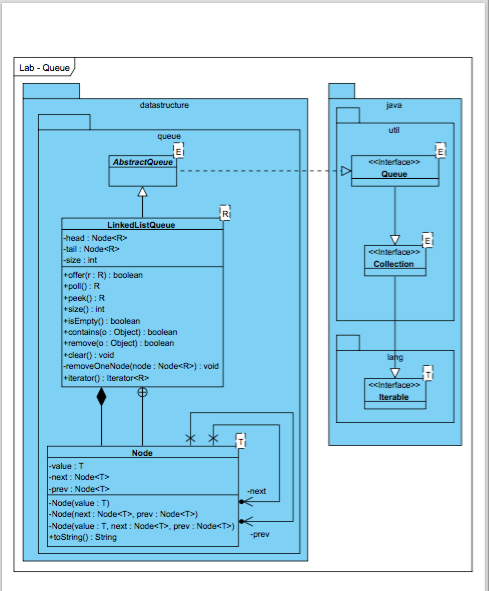
Lab - Queue datastructure java queue m AbstractQueue ccinterfaces Queue RI cinterface Collection LinkedListQueue -head: Node
Step by Step Solution
There are 3 Steps involved in it

Get step-by-step solutions from verified subject matter experts
 Study Help