







Question: Same scenario - but digging into the Packet Bytes Pane of Wireshark. If we didn't have Wireshark installed on a host that we had
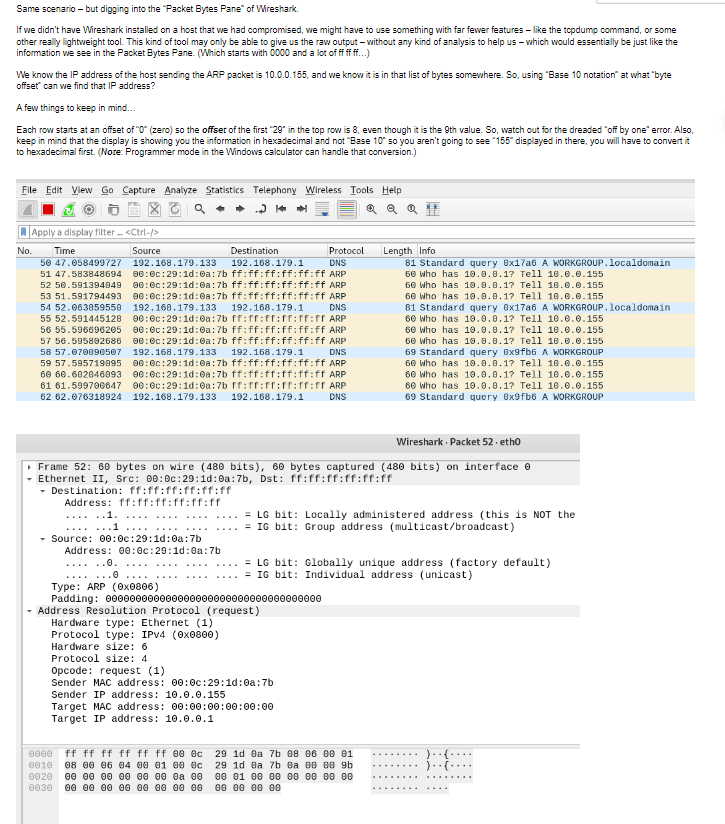
Same scenario - but digging into the "Packet Bytes Pane" of Wireshark. If we didn't have Wireshark installed on a host that we had compromised, we might have to use something with far fewer features like the tcpdump command, or some other really lightweight tool. This kind of tool may only be able to give us the raw output-without any kind of analysis to help us - which would essentially be just like the information we see in the Packet Bytes Pane. (Which starts with 0000 and a lot of ff ff ff...) We know the IP address of the host sending the ARP packet is 10.0.0.155, and we know it is in that list of bytes somewhere. So, using "Base 10 notation" at what "byte offset" can we find that IP address? A few things to keep in mind... Each row starts at an offset of "0" (zero) so the offset of the first "29" in the top row is 8, even though it is the 9th value. So, watch out for the dreaded "off by one" error. Also, keep in mind that the display is showing you the information in hexadecimal and not "Base 10" so you aren't going to see "155" displayed in there, you will have to convert it to hexadecimal first. (Note: Programmer mode in the Windows calculator can handle that conversion.) File Edit View Go Capture Analyze Statistics Telephony Wireless Tools Help Q Q Q Apply a display filter_. Time Source No. Destination Protocol DNS 192.168.179.133 192.168.179.1 50 47.058499727 51 47.583848694 00:00:29:10:0a:7b ff:ff:ff:ff:ff:ff ARP 52 50.591394849 00:00:29:1d:0a:7b ff:ff:ff:ff:ff:ff ARP 53 51.591794493 00:00:29:10:0a:7b ff:ff:ff:ff:ff:ff ARP 54 52.063859550 192.168.179.133 192.168.179.1 DNS 55 52.591445128 00:00:29:1d:0a:7b ff:ff:ff:ff:ff:ff ARP 56 55.596696205 00:00:29:1d:0a:7b ff:ff:ff:ff:ff:ff ARP 57 56.595802686 00:00:29:1d:0a:7b ff:ff:ff:ff:ff:ff ARP 58 57.070890507 192.168.179.133 192.168.179.1 DNS 59 57.595719095 00:0c:29:11:0a:7b ff:ff:ff:ff:ff:ff ARP 60 60.682046093 00:00:29:10:0a:7b ff:ff:ff:ff:ff:ff ARP 61 61.599700647 00:0c:29:1d:0a:7b fr:ff:ff:fr:ff:ff ARP 62 62.076318924 192.168.179.133 192.168.179.1 DNS Destination: ff:ff:ff:ff:ff:ff Address: ff:ff:ff:ff:ff:ff ......1. ...1.... Wireshark. Packet 52. eth0 Frame 52: 60 bytes on wire (480 bits), 60 bytes captured (480 bits) on interface e - Ethernet II, Src: 00:0c:29:1d:0a:7b, Dst: ff:ff:ff:ff:ff:ff Source: 00:0c:29:1d:0a:7b Address: 00:0c:29:1d:0a:7b ......0. Type: ARP (0x0806) Padding: 00000000000000000000000000000 = LG bit: Locally administered address (this is NOT the = IG bit: Group address (multicast/broadcast) Address Resolution Protocol (request) Hardware type: Ethernet (1) Protocol type: IPv4 (0x0800) Hardware size: 6 0000 ff ff ff ff ff ff 00 0c 0010 08 00 06 04 00 01 00 0c 0020 00 00 00 00 00 00 0a 00 0030 00 00 00 00 00 00 00 00 = LG bit: Globally unique address (factory default) = IG bit: Individual address (unicast) Protocol size: 4 Opcode: request (1) Sender MAC address: 00:0c:29:1d:0a:7b Sender IP address: 10.0.0.155 Length Info 81 Standard query 8x17a6 A WORKGROUP.localdomain 60 who has 10.0.8.1? Tell 10.0.0.155 60 Who has 10.0.0.1? Tell 10.0.0.155 60 Who has 10.0.0.1? Tell 10.0.0.155 81 Standard query 8x17a6 A WORKGROUP.localdomain 60 Who has 10.0.0.1? Tell 10.0.0.155 Target MAC address: 00:00:00:00:00:00 Target IP address: 10.0.0.1 60 Who has 10.0.0.1? Tell 10.0.0.155 60 who has 10.0.8.1? Tell 10.0.0.155 69 Standard query 8x9fb6 A WORKGROUP 60 Who has 10.0.0.17 Tell 10.0.0.155 60 Who has 10.0.0.1? Tell 10.0.0.155 60 Who has 10.0.0.1? Tell 10.0.0.155 69 Standard query 8x9fb6 A WORKGROUP 29 1d ea 7b 08 06 00 01 29 1d Ba 7b Ba 88 88 9b 00 01 00 00 00 00 00 00 00 00 00 00 )..(. j...
Step by Step Solution
There are 3 Steps involved in it

Get step-by-step solutions from verified subject matter experts
 Study Help