







Question: Step Instructions Points Possible 1 Start Excel. Download and open the workbook named: Zutter_Problem 6-13 Start. In cell H29, by using cell references to the
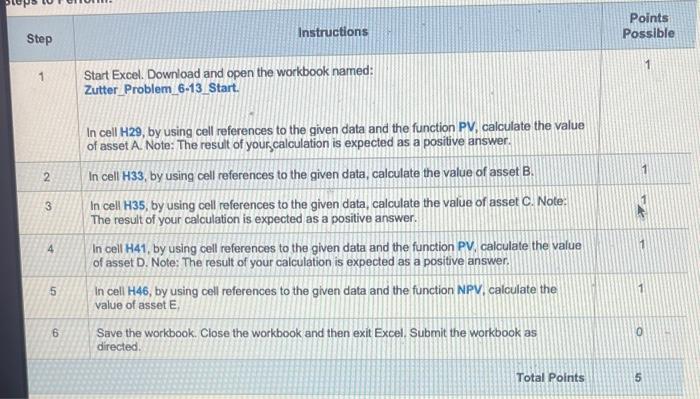
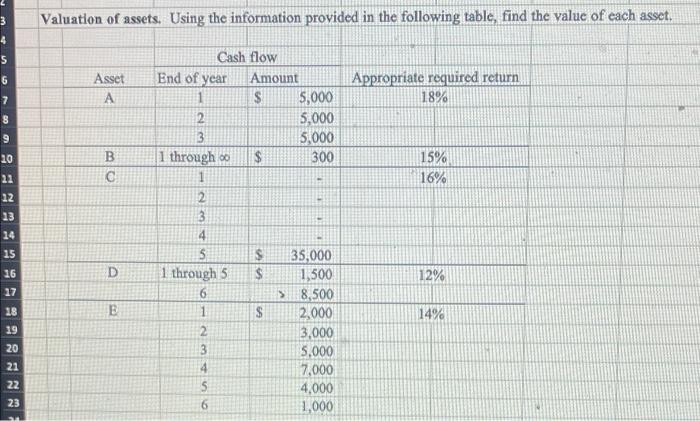
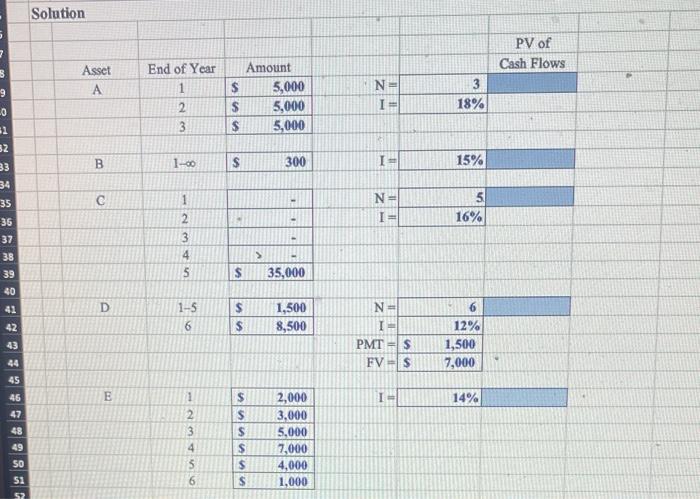
Step Instructions Points Possible 1 Start Excel. Download and open the workbook named: Zutter_Problem 6-13 Start. In cell H29, by using cell references to the given data and the function PV, calculate the value of asset A. Note: The result of your calculation is expected as a positive answer. 2. In cell H33, by using cell references to the given data, calculate the value of asset B. 3 In cell H35, by using cell references to the given data, calculate the value of asset C. Note: The result of your calculation is expected as a positive answer. 4 In cell H41, by using cell references to the given data and the function PV, calculate the value of asset D. Note: The result of your calculation is expected as a positive answer. 5 In cell H46, by using cell references to the given data and the function NPV, calculate the value of asset E, 6 Save the workbook. Close the workbook and then exit Excel. Submit the workbook as directed. Total Points Valuation of assets. Using the information provided in the following table, find the value of each asset. S Step Instructions Points Possible 1 Start Excel. Download and open the workbook named: Zutter_Problem 6-13 Start. In cell H29, by using cell references to the given data and the function PV, calculate the value of asset A. Note: The result of your calculation is expected as a positive answer. 2. In cell H33, by using cell references to the given data, calculate the value of asset B. 3 In cell H35, by using cell references to the given data, calculate the value of asset C. Note: The result of your calculation is expected as a positive answer. 4 In cell H41, by using cell references to the given data and the function PV, calculate the value of asset D. Note: The result of your calculation is expected as a positive answer. 5 In cell H46, by using cell references to the given data and the function NPV, calculate the value of asset E, 6 Save the workbook. Close the workbook and then exit Excel. Submit the workbook as directed. Total Points Valuation of assets. Using the information provided in the following table, find the value of each asset. S
Step by Step Solution
There are 3 Steps involved in it

Get step-by-step solutions from verified subject matter experts
 Study Help