







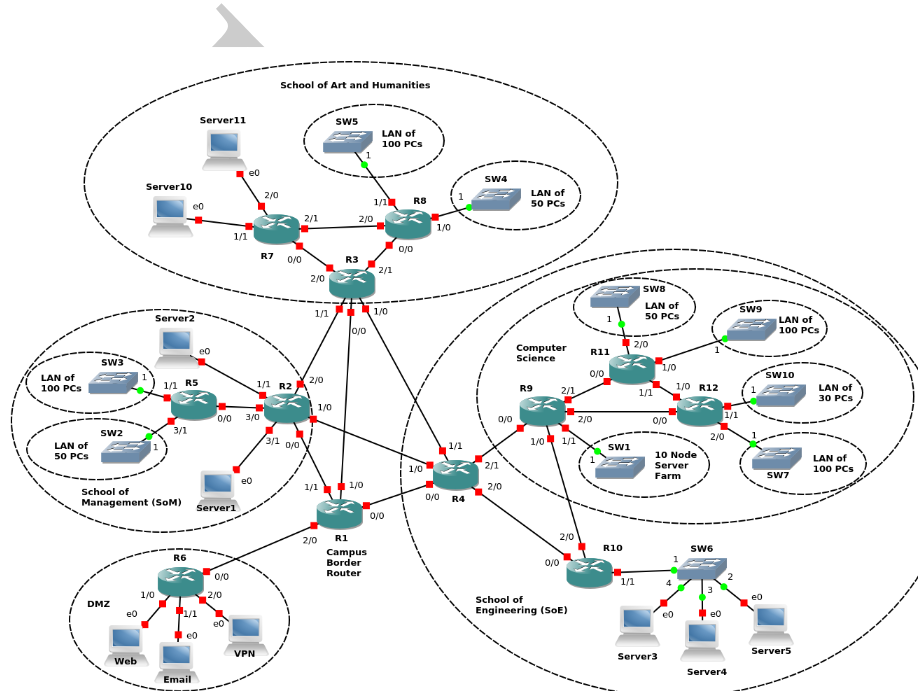
Question: The figure includes a backbone network among routers R1 to R4. R1 is the border router connecting the campus network to the Internet. R2 to
The figure includes a backbone network among routers R1 to R4. R1 is the border router connecting the campus network to the Internet. R2 to R4 are gateway routers for the three school networks on the campus. Finally, R6 is the gateway router for the DMZ where main public facing servers are located. There are several LANs in each school network. These represent computer labs where desktop PCs are connected through a layer-two switch (i.e, SW1 to SW11) to the rest of the campus network. Each of these LANs is an IP subnet where the PCs can directly communicate with each other via the switch shown in the figure for each LAN. These switches also connect their respected LANs to the campus network via the shown connections to the routers. The PCs in these LANs are mainly used as client systems for students/staff to browse the web or perform other academic or office related work. These PCs are not expected to run any publicly accessible services. On the other hand, the servers in various school networks including the server farm in Computer Science network are meant to be publicly accessible systems running various services. The figure also includes the interface labels for each device (e.g., f0/0). The router interface names follow the interface abbreviations for Cisco routers and may not be the same for other platforms. Nevertheless, in this lab they will serve as unique identifiers for each interface together with their router labels (R1 to R12).
Consider the campus network topology in Figure 3.1. How many point-to-point subnets are there in this network? what are they and circle them in the diagram.
Consider the campus network topology in Figure 3.1. How many multi-access subnets (i.e., subnets having more than two devices connected to them) are there in this network? what are they and circle them in the diagram.
Step by Step Solution
There are 3 Steps involved in it

Get step-by-step solutions from verified subject matter experts
 Study Help