







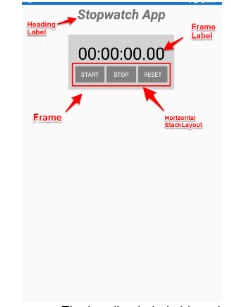
Question: *The image for the project is displayed at the bottom of this document. Create a new Xamarin.Forms project named SWProject. Add a new XAML ContentPage
*The image for the project is displayed at the bottom of this document.
Create a new Xamarin.Forms project named SWProject. Add a new XAML ContentPage also named SWProject.
Modify the SWProject XAML page so that the UI looks like this. The heading Label object should have the following characteristics.
Centered horizontally.
The font size should be 40.
The text should be bold and italic.
The Frame should have the following characteristics.
The background color should be set to #D2D2D2.
It should be centered horizontally.
The vertical options should be StartAndExpand.
The top and bottom margin should be set to 30.
The Frame Label should have the following characteristics.
The font size should be 50.
The text color should be Black.
It should be centered horizontally.
The vertical options should be Start.
The text should be set as shown above.
The Label will also need a name so it can be changed programmatically.
The buttons should be set within a horizontal StackLayout that is centered horizontally and the vertical options set to StartAndExpand.
Inside the horizontal StackLayout create a ResourceDictionary that styles the three buttons as follows.
The text color should be White.
The background value should be Gray.
The font size should be Medium.
Set the text property for each buttons as shown above.
The app should have the following functionality.
Pressing the Start button will either start or restart the stopwatch.
Pressing the Stop button will stop the stopwatch.
Pressing the Reset button will reset the stopwatch to zero.
The app should track hours:minutes:seconds to the nearest hundredth of a second.
Topics you will need to research.
Google C# Stopwatch class. This provides the functionality for starting, stopping, and resetting your stopwatch.
Google C# TimeSpan class.
Google Xamarin Forms Device.StartTimer().
Step by Step Solution
There are 3 Steps involved in it

Get step-by-step solutions from verified subject matter experts
 Study Help