







Question: transaction apps There are 2 functions in the webapps. CRUD of items entity, and list of transaction and its details entities. You are required to
transaction apps
There are 2 functions in the webapps. CRUD of items entity, and list of transaction and its details entities.
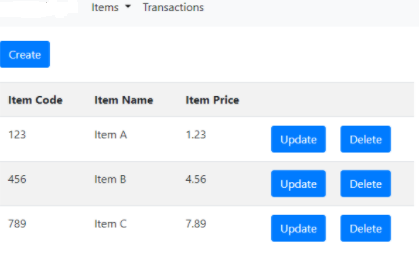
You are required to implements the setup, repository, view, controller and entity for items Create, Update, Retrieve, Delete operations.
using jpa orm
transactions entity, there are 2 extra columns not included in the database table. They are ttlQty (int) and ttlAmt (double) input by another programme, not by this web only showing.
Setup the dispatcher-servlet.xml, add the glassfish descriptor xml, add the standard deployment descriptor
You are required to implements a search functions for items, the request URL is http://localhost:8080/demo02/items/index/{the keywords}. When user manually type the keywords, the list will filter out the matched items, with item code or item name start with that keywords.
use custom JPQL query repository
eg:@Query("SELECT u FROM User u WHERE u.status = 1") Collection
B.
ItemValidator using Bean Validation
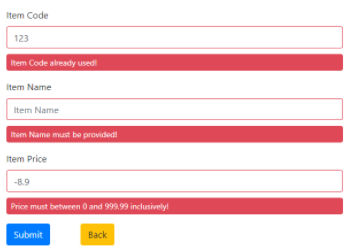
must have Item code a.item code unique b. item name must be provided (validate by entity annotation) c. item price between 0.0 to 999.99
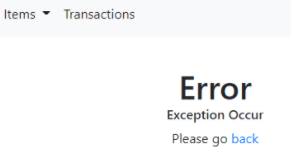
error page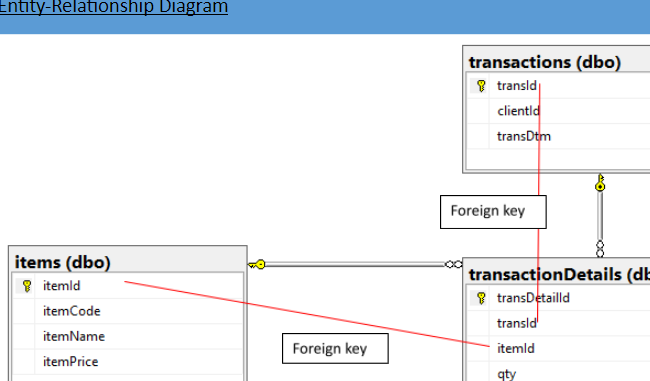
create table items(
itemId int not null primary key auto_increment,
itemCode varchar(100) not null unique,
itemName varchar(255) not null,
itemPrice decimal(5,2) not null
);
create table transactions(
transId bigint not null primary key auto_increment,
clientId int not null,
transDtm datetime not null default now()
);
create table transactionDetails(
transDetailId bigint not null primary key auto_increment,
transId bigint not null,
itemId int not null,
qty int not null,
constraint fk_transactionDetails_transId_transactions foreign key (transId)
references transactions (transId),
constraint fk_transactionDetails_transId_items foreign key (itemId)
references items (itemId)
);
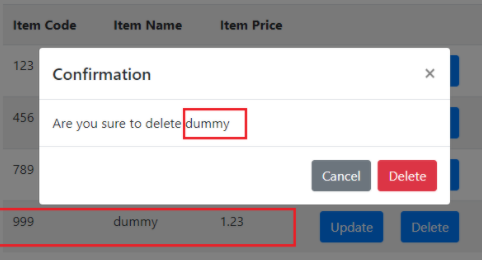
if input item 999 not exist ,display error page
index.jsp
"> "> "> ">
$("#delItemBoxConfirm").click(function() { window.location.href="
$("#delItemBox").modal({ show: true }); }
Entity-Relationship Diagram transactions (dbo) transld clientid transDtm Foreign key items (dbo) 8 itemld itemCode itemName itemPrice transaction Details (dk transDetailld transld itemld Foreign key qty Items. Transactions Create Item Code Item Name Item Price 123 Item A 1.23 Update Delete 456 Item B 4.56 Update Delete 789 Item C 7.89 Update Delete Item Code 123 Item Code already used! Item Name Item Name Item Name must be provided! item Price -8.9 Price must between 0 and 999.99 inclusively! Submit Back Item Code Item Name Item Price 123 Confirmation 456 Are you sure to delete dummy 789 Cancel Delete 999 dummy 1.23 Update Delete Items Transactions Error Exception Occur Please go back Entity-Relationship Diagram transactions (dbo) transld clientid transDtm Foreign key items (dbo) 8 itemld itemCode itemName itemPrice transaction Details (dk transDetailld transld itemld Foreign key qty Items. Transactions Create Item Code Item Name Item Price 123 Item A 1.23 Update Delete 456 Item B 4.56 Update Delete 789 Item C 7.89 Update Delete Item Code 123 Item Code already used! Item Name Item Name Item Name must be provided! item Price -8.9 Price must between 0 and 999.99 inclusively! Submit Back Item Code Item Name Item Price 123 Confirmation 456 Are you sure to delete dummy 789 Cancel Delete 999 dummy 1.23 Update Delete Items Transactions Error Exception Occur Please go back
Step by Step Solution
There are 3 Steps involved in it

Get step-by-step solutions from verified subject matter experts
 Study Help