







Question: use windows terminal NOTE: For all your answers below. Please attach a print screen of the results to your answer. Q1. Open the command line,
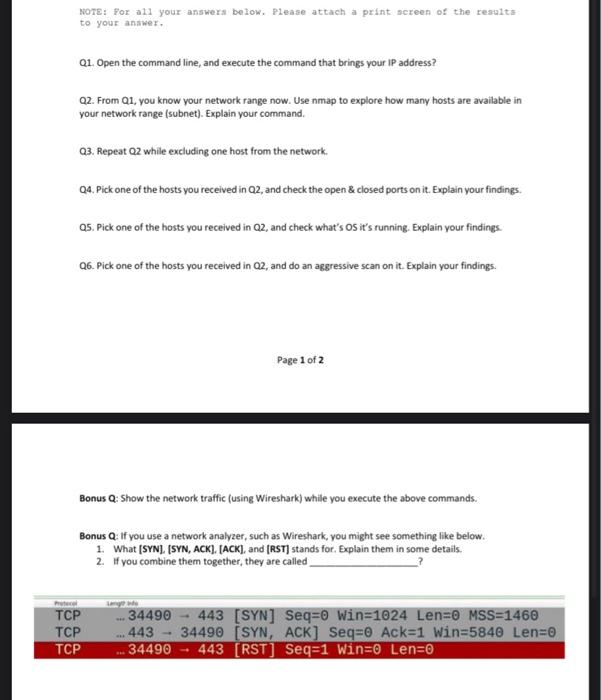
NOTE: For all your answers below. Please attach a print screen of the results to your answer. Q1. Open the command line, and execute the command that brings your IP address? Q2. From 01. you know your network range now. Use nmap to explore how many hosts are available in your network range (subnet). Explain your command. 03. Repeat Q2 while excluding one host from the network. 04. Pick one of the hosts you received in Q2, and check the open & closed ports on it. Explain your findings. 05. Pick one of the hosts you received in Q2, and check what's os it's running. Explain your findings Q6. Pick one of the hosts you received in Q2, and do an aggressive scan on it. Explain your findings Page 1 of 2 Bonus Q: Show the network traffic (using Wireshark) while you execute the above commands. Bonus Q: If you use a network analyzer, such as Wireshark, you might see something like below. 1. What (SYN], [SYN, ACK), [ACK), and (RST] stands for. Explain them in some details. 2. If you combine them together, they are called we TCP TCP TCP ... 443 34490 - 443 [SYN] Seq=0 Win=1024 Len=0 MSS=1460 34490 (SYN, ACK] Seq=0 Ack=1 Win=5840 Len=0 34490 443 [RST] Seq=1 Win=0 Len=0
Step by Step Solution
There are 3 Steps involved in it

Get step-by-step solutions from verified subject matter experts
 Study Help