







Question: A simple and basic, small office configuration is required for this assignment. You will be configuring routers, switches, and network devices. These devices will need
A simple and basic, small office configuration is required for this assignment. You will be configuring routers, switches, and network devices. These devices will need to be secured hardened from hack attacks. All Passwords used on the routers and switches need to be encrypted.
Background you are an engineer at a new company and need to put a network together to support the employees at the company. The organization uses an office space with departments HR Engineering, and Sales in separate rooms. There are about or so employees per group right now. The rooms are only about ft from a central telecommunications closet. Based on information gathered from learning in the course, create a small office network that will connect to the ISP and allow all the users to connect each other, but be segregated by the department. You have been given the address space internally, and the Internet Service Provider has given you for the WAN connection. The following are the requirements:
Use a Cisco layer devices to connect to the ISP via a WAN connection connect the WAN port to the ISYS Office Switch
A default route will be needed pointing to the ISP
Use enough Cisco layer devices to service the total users.
Place the Human Resources, Engineering, and Sales into their logical areas.
Subnetting must be used.
subnets for hosts per network
Packet Tracer must have host from each department, and they must communicate with one another and the ISP Web server.
PING tofrom each host must be successful as well as PING to the ISP Web Server from each host. Also, each PC will be able to view the picture at Regentjpg
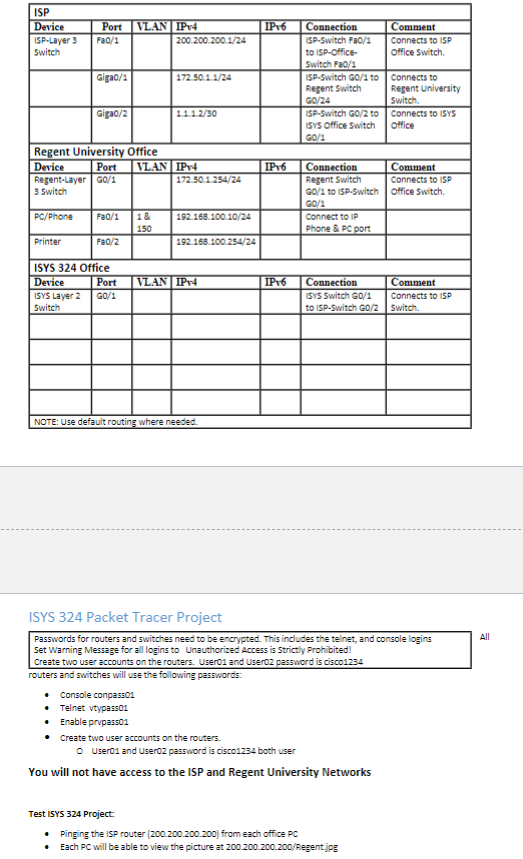
The attached ISYS Packet Tracer Project.pkt file is the file used to get you started in packet tracer. This file has the network setup done but is missing some of the required devices in the ISYS office. All the needed hardware is included in the ISP and Regent University networks. The ISYS office computers will need to be addressed into represented subnets.
In the packet tracer file, there are multiple areas connecting to the ISP network. The ISP network is the gateway to the Internet but you will not have to worry about the cloud connection. You will be dealing with the connectivity between the ISYS Office and the ISP. NOTE: You will not need to configure the ISP and Regent University networks.
The ISYS Office network will need a layer switch for a WAN connection to the ISP Network. You will need to design and install the ISYS Office network. A layer switch within the ISYS Office network is connected to the ISP. DO not delete this switch.
Building Network Requirements
Security
All routers and switches will use the following passwords:
Console conpass
Telnet vtypass
Enable prvpass
Create two user accounts on the routers.
User and User password is cisco both users
You will not have access to the ISP and Regent University NetworksBuilding Network Requirements
SecurityBuilding Network Requirements
SecurityISYS Packet Tracer Project
Passwords for routers and switches need to be encrypted. This includes the telnet, and console logins
Set Warning Message for all logins to Unauthorized Access is Strictly Prohibited!
Create two user accounts on the routers. User and User password is cisco
routers and switches will use the following passwords:
Console conpass
Telnet vtypass
Enable prvpasso
Create two user accounts on the routers.
O User and User password is cisco both user
You will not have access to the ISP and Regent University Networks
Test IYS Project:
Pinging the ISP router from each office PC
Each PC will be able to view the picture at Regent.jpg
Step by Step Solution
There are 3 Steps involved in it
1 Expert Approved Answer
Step: 1 Unlock

Question Has Been Solved by an Expert!
Get step-by-step solutions from verified subject matter experts
Step: 2 Unlock
Step: 3 Unlock
 Study Help