







Question: AB Assignment 1 DO THIS LAB IN PACKET TRACER PERFORM ALL STEPS SUCCESSFULLY. ONCE THIS LAB IS DONE YOU HAVE TO INCLUDE THE BELOW
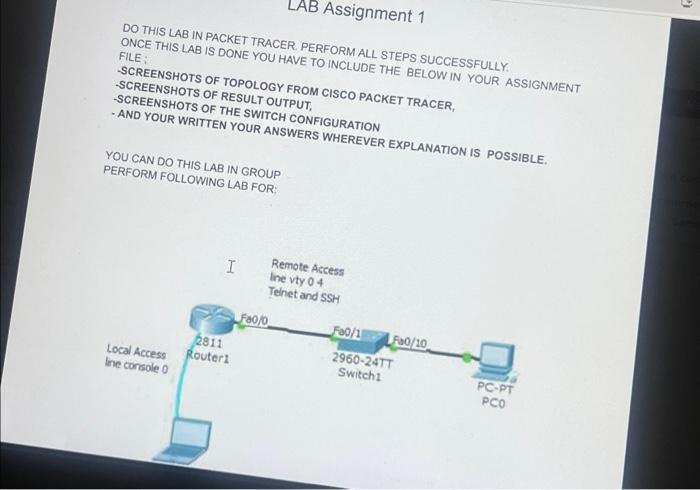
AB Assignment 1 DO THIS LAB IN PACKET TRACER PERFORM ALL STEPS SUCCESSFULLY. ONCE THIS LAB IS DONE YOU HAVE TO INCLUDE THE BELOW IN YOUR ASSIGNMENT FILE: -SCREENSHOTS OF TOPOLOGY FROM CISCO PACKET TRACER, SCREENSHOTS OF RESULT OUTPUT, SCREENSHOTS OF THE SWITCH CONFIGURATION - AND YOUR WRITTEN YOUR ANSWERS WHEREVER EXPLANATION IS POSSIBLE. YOU CAN DO THIS LAB IN GROUP PERFORM FOLLOWING LAB FOR: Local Access line console 0 I 2811 Router1 Fa0/0 Remote Access line vty 04 Telnet and SSH Fa0/1 Fa0/10 2960-24TT Switch1 PC-PT PCO 2)
Step by Step Solution
3.43 Rating (162 Votes )
There are 3 Steps involved in it
Remote Access Configure Telnet and SSH access on Router1 Telnet Go to Configuration mode Enter the following command line vty 0 4 This creates a virtual terminal line Enter the following command passw... View full answer

Get step-by-step solutions from verified subject matter experts
 Study Help