







Question: I posted this question before here but unfortunately, I got the wrong answers. my teacher has told me that my answers have to be related
I posted this question before here but unfortunately, I got the wrong answers. my teacher has told me that my answers have to be related to the steps that I did in the word file and u can find it down there with screenshots. please check the work and make sure the answers are related to the practical lab.
1. Discuss and compare the efficiency of controlling permissions in each of the following ways.
a. granting permissions to resources one-by-one to users
b. adding user accounts to domain local groups, then granting permissions to resources to the domain local groups
c. adding user accounts to global groups, adding global groups to domain local groups, then granting permissions to resources to the domain local groups
and here is the pervious answers i got from chegg
a- It may be waiting condition and it is not efficient if two users require resources at the same time.
b- It is the best, his data or information will be safe.
c- It will be more best, but globally data can be accessed by other or hackers so it may be harmful.
and here is the file:
KWANTLEN POLYTECHNIC UNIVERSITY
INFO 2416 Spring 2018
ASSIGNMENT 3
Working with OUs and Groups
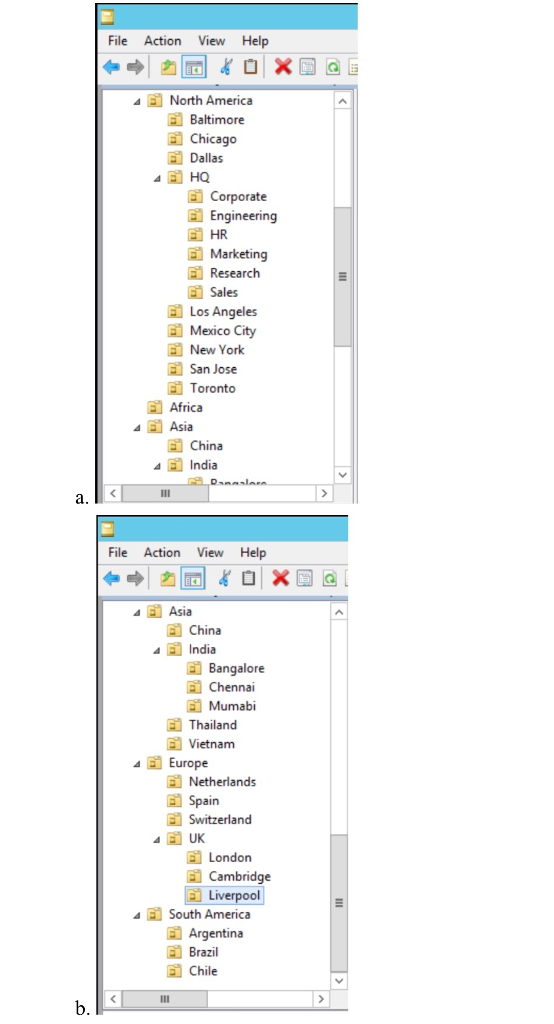
1. Obtain a screenshot of the AD Users & Computers window that shows all the OUs you have created in the left-hand folder tree.
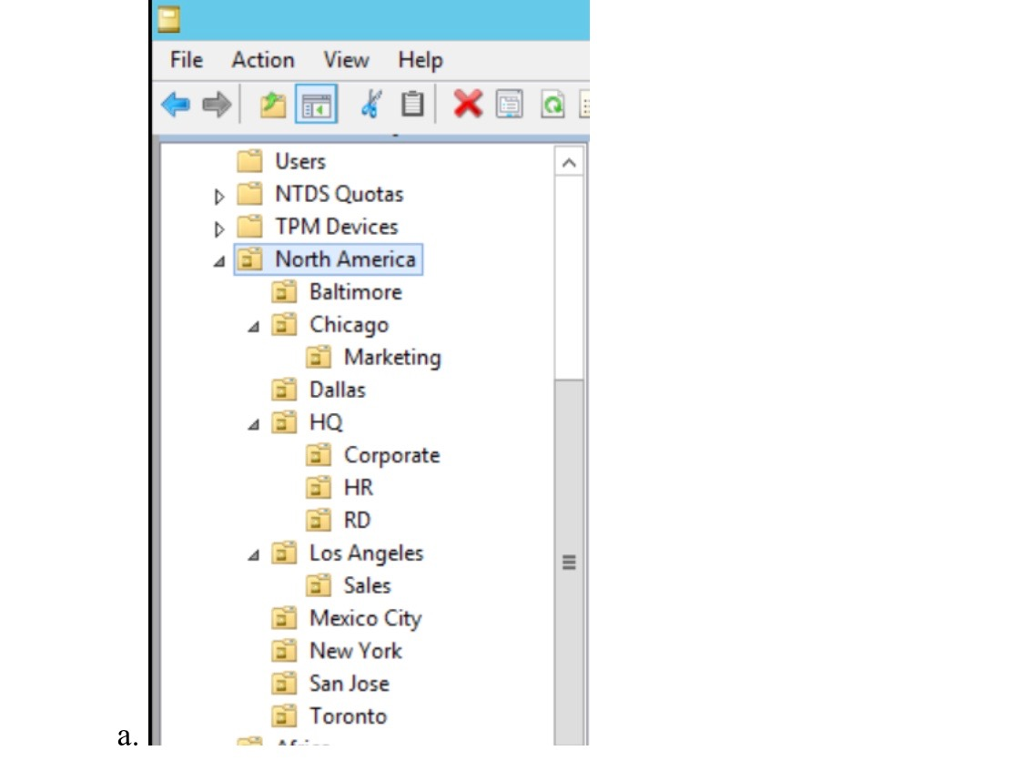
2. Obtain a screenshot of the AD Users & Computers window that shows all the expanded North America OU branch with the changes you have made.
Delegate Control Over an Organizational Unit
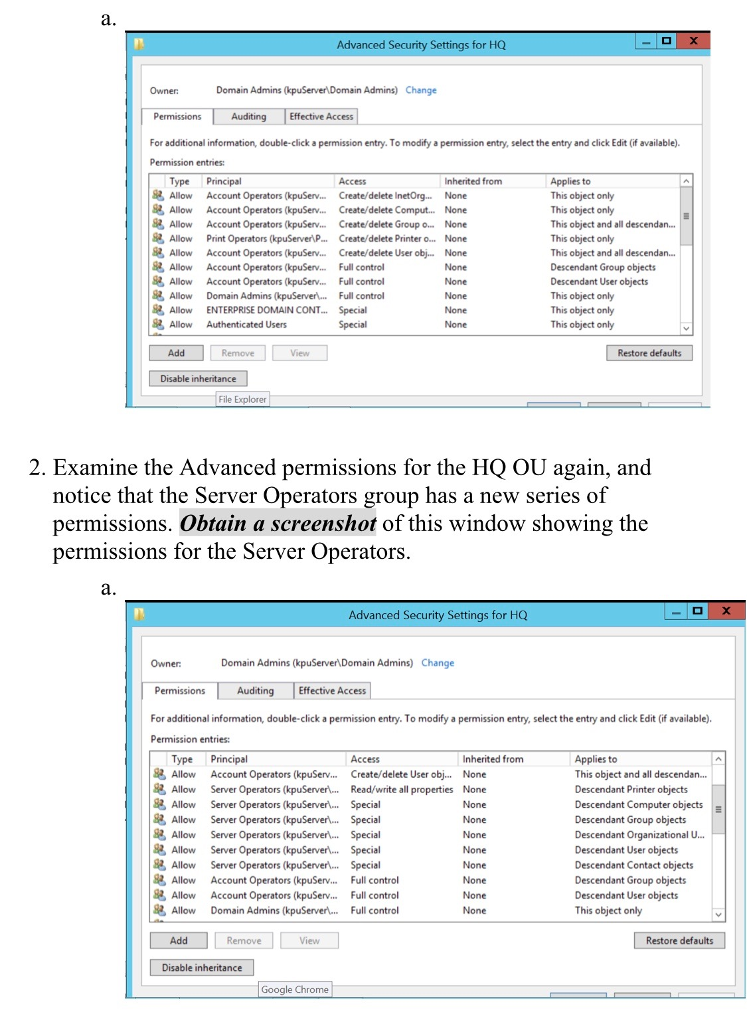
1. You should be able to check the effect of your changes by right-clicking the HQ OU and looking at its Properties. (Note that you will have to have View > Advanced Features checked to see the Security tab in the Properties window.) If you click Account Operators in the list of security principals, you will see that that group has special permissions. Click Advanced to see what those permissions are. You should see that the Account Operators group now has full control over Descendant Group objects and Descendant User objects. Obtain a screenshot of this window and close that window and the HQ properties window.
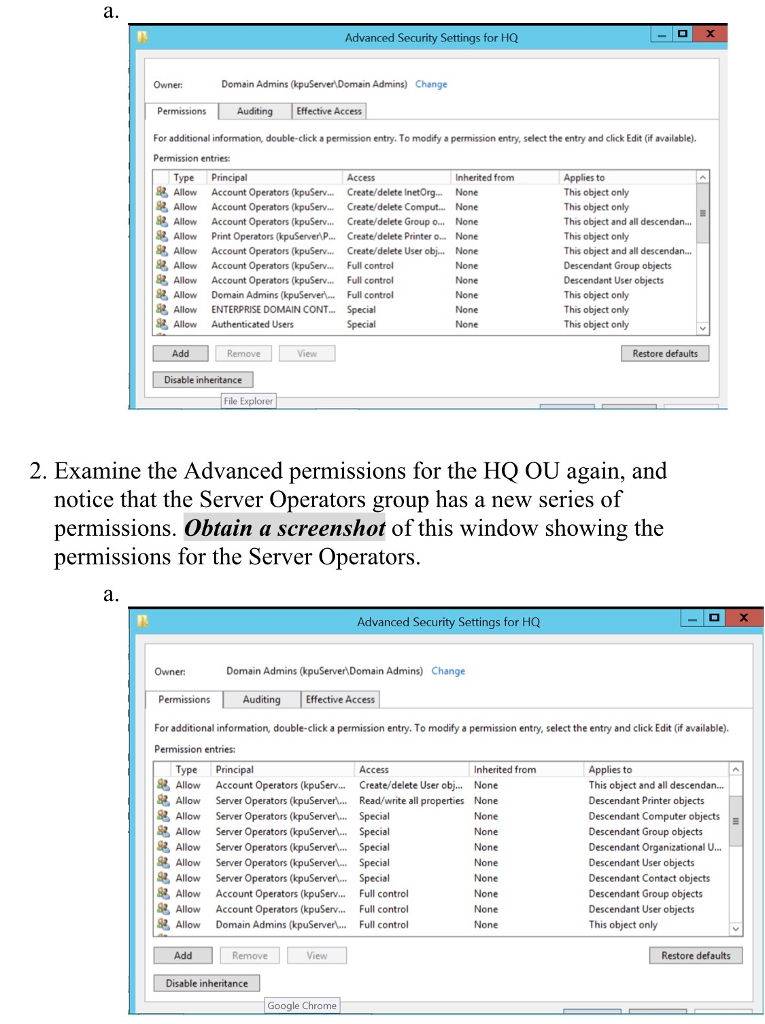
2. Examine the Advanced permissions for the HQ OU again, and notice that the Server Operators group has a new series of permissions. Obtain a screenshot of this window showing the permissions for the Server Operators.
Create Security Groups
1. At this point, notice that to grant permissions user-by-user to the folders as described would create a lot of work! Granting permissions one user at a time, how many times would you have to set permissions for a user/folder combination (e.g. student1 for the Common folder, student2 for the same folder, etc.)? How did you calculate this? (Write your answers in the work you hand in.)
Student1 common + student lounge 2 times of setting permissions
Student2 --> common + student lounge --> 2 times of setting permissions
Student3 --> common + student lounge --> 2 times of setting permissions
Jumanji --> common + VIPs --> 2 times of setting permissions
Dwayne Johnson --> common + VIPs --> 2 times of setting permissions
Lionel Messi --> common + VIPs--> 2 times of setting permissions
Cristiano Ronaldo --> common + VIPs--> 2 times of setting permissions
Total permission assignment is 14 times
Total permission assignment is 14 times
2. Verify the membership of the various groups. You can do this by right-clicking the group icon, selecting Properties, and looking at the Members tab. Obtain screenshots of one of the global groups showing its members, and one of the domain local groups showing its members.
a.Global group (Celebrities) members:
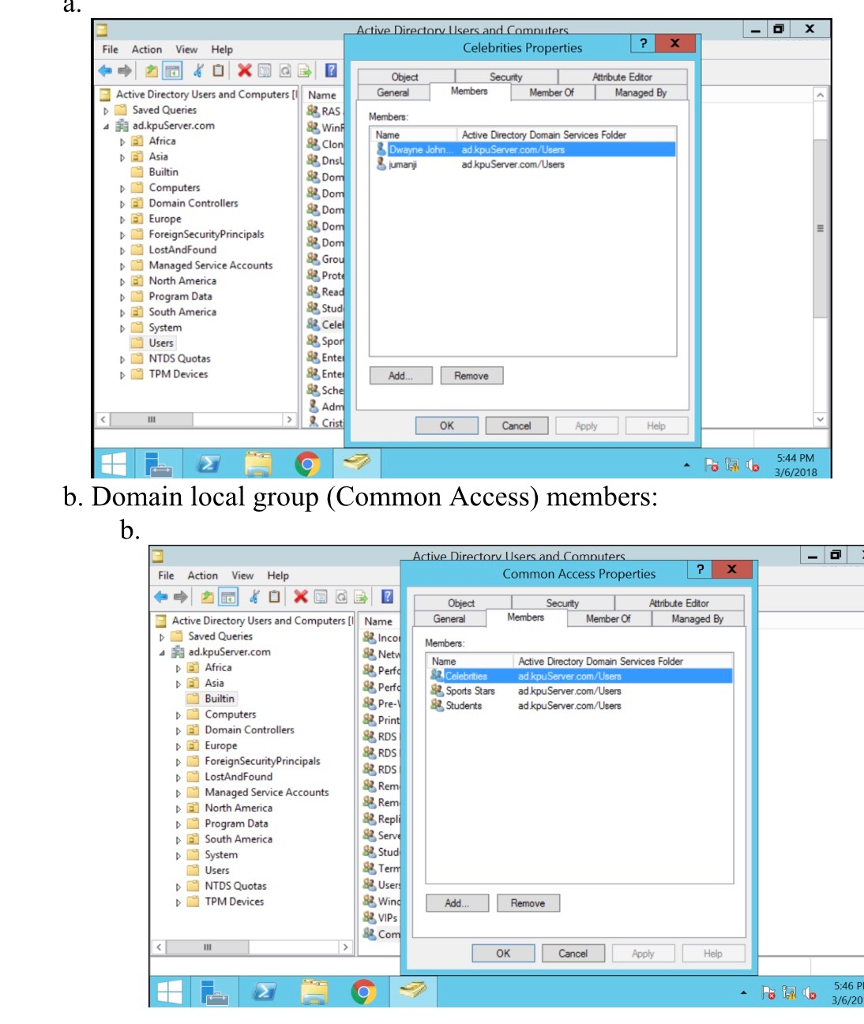
Domain local group (Common Access) members:
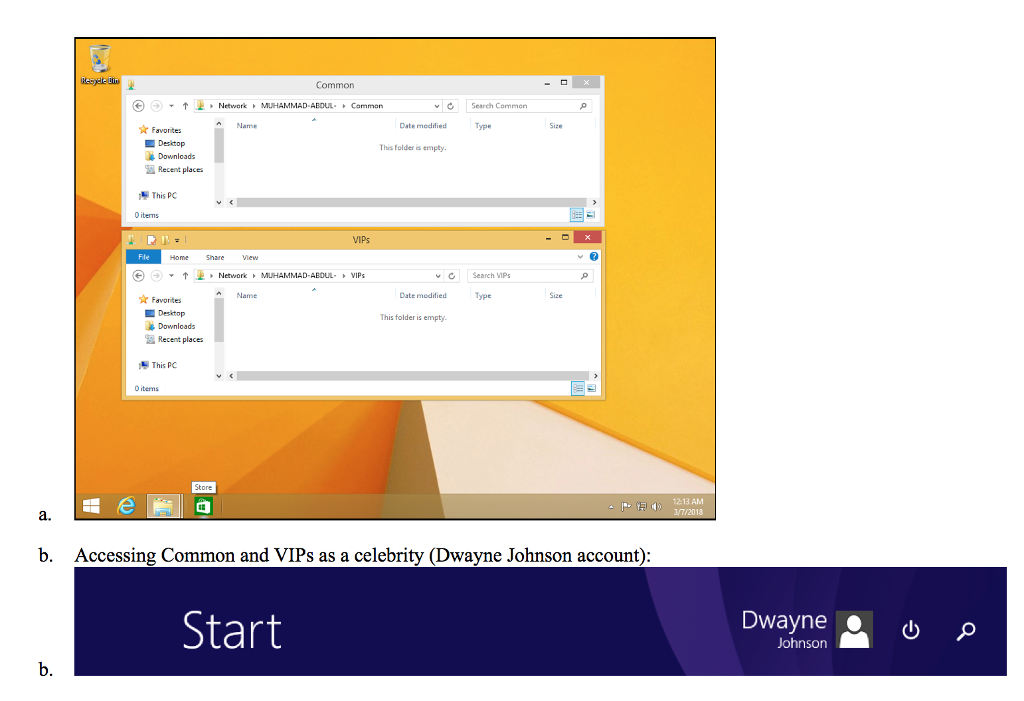
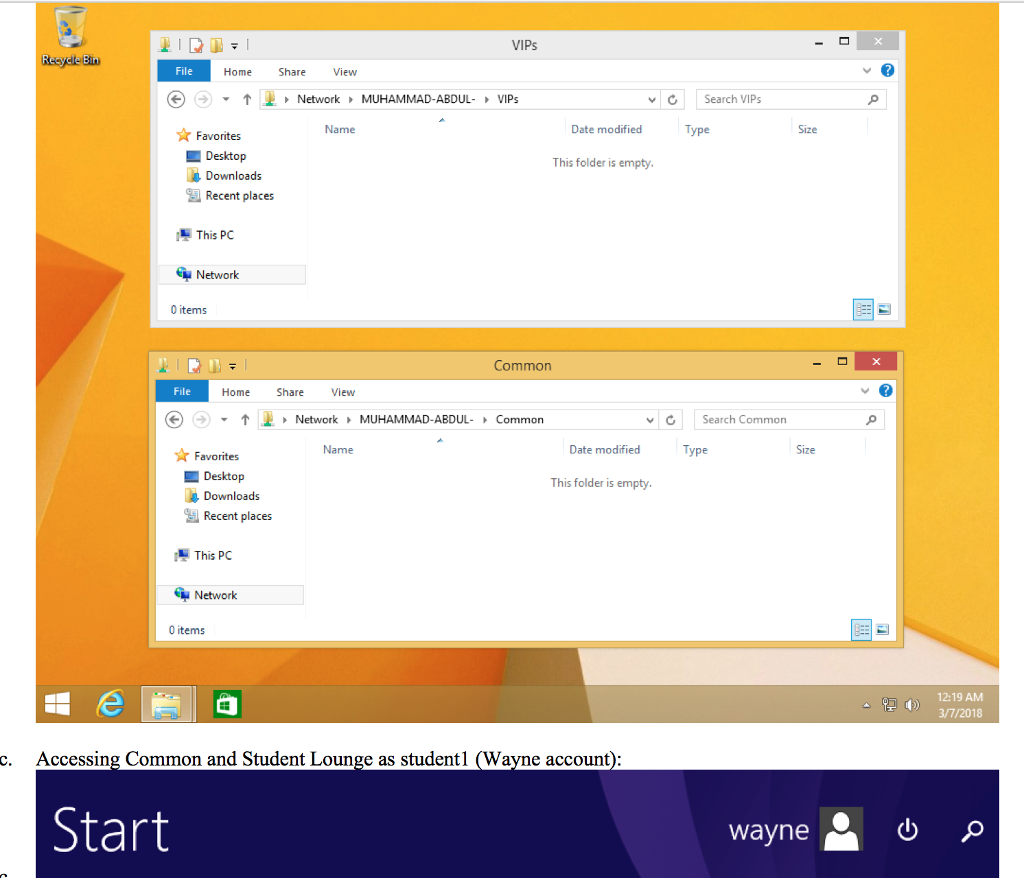
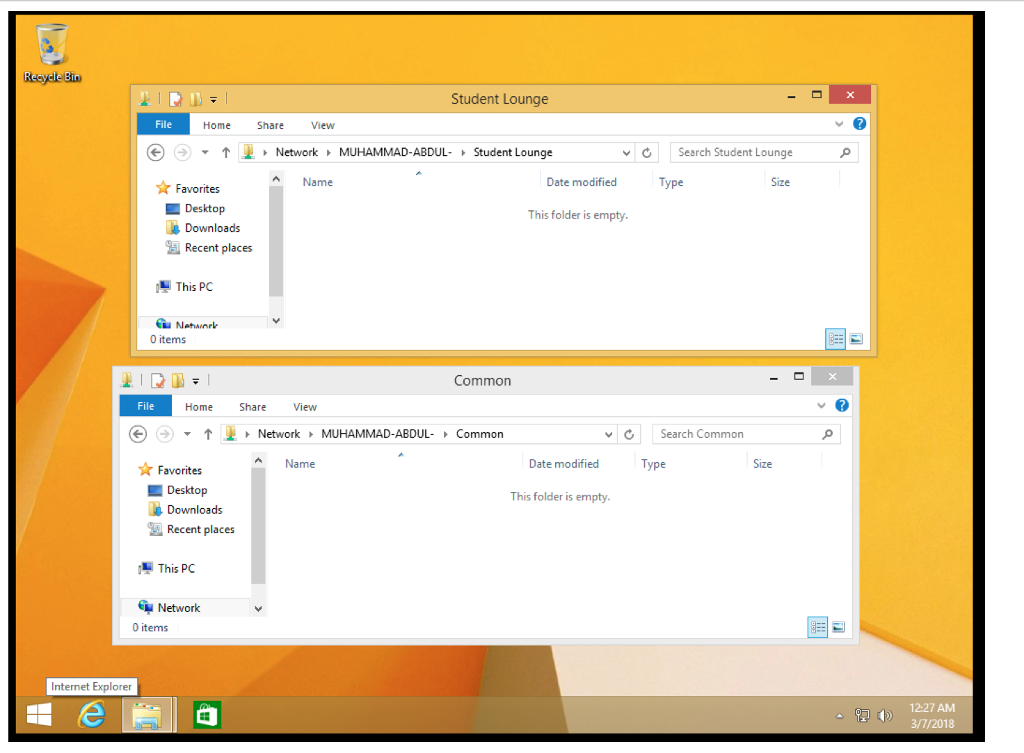
3. Turn on your Windows 8.1 client VM and log on as each of the types of users (i.e. as a student, as a celebrity, as a sports star), and obtain screenshots that show that each type of user has access to the appropriate folders. If you have problems, remember to check both the share permissions and the NTFS permissions on the folders.
a.Accessing Common and VIPs as a sport star(Lionel Messi account):

4. Discuss and compare the efficiency of controlling permissions in each of the following ways.
a. granting permissions to resources one-by-one to users
b. adding user accounts to domain local groups, then granting permissions to resources to the domain local groups
c. adding user accounts to global groups, adding global groups to domain local groups, then granting permissions to resources to the domain local groups
Consider the work of initially preparing the framework, the work of adding a number of new users, the work of removing users, and the work of modifying user access. Write your answers in the work you hand in.
File Action View Help North America corporate ngineeri Marketing Research Bangalore Netherlands Switzerland London South America 9 0 ce Vi-ia Chi Ind Vie ope Net Spa Swi UK uth BCD File Action View Help North America corporate ngineeri Marketing Research Bangalore Netherlands Switzerland London South America 9 0 ce Vi-ia Chi Ind Vie ope Net Spa Swi UK uth BCD
Step by Step Solution
There are 3 Steps involved in it

Get step-by-step solutions from verified subject matter experts
 Study Help