







Question: PLEASE HELP!! If I can just see how the server part of this is completed I believe I can complete the client part on my
PLEASE HELP!!
If I can just see how the server part of this is completed I believe I can complete the client part on my own. I would like to write this using c++ and not c, please.
The instructions are below along with the TCP client-server code (WRITTEN IN C but I need to write in C++) that needs to be modified. ANY HELP WOULD BE GREATLY APPRECIATED!!!
When the tcp-client-server.tar file was opened this is what the code that needs to be modified looked like:
#include
#define SERVER_TCP_PORT 3000 #define BUFLEN 256 /* buffer length */
int main(int argc, char **argv) { int n, bytes_to_read; int sd, port; struct hostent *hp; struct sockaddr_in server; char *host, *bp, rbuf[BUFLEN], sbuf[BUFLEN];
switch(argc) { case 2: host = argv[1]; port = SERVER_TCP_PORT; break; case 3: host = argv[1]; port = atoi(argv[2]); break; default: fprintf(stderr, "Usage: %s host [port] ", argv[0]); exit(1); }
/* Create a stream socket */ if ((sd = socket(AF_INET, SOCK_STREAM, 0)) == -1) { fprintf(stderr, "Can't create a socket "); exit(1); }
bzero((char *)&server, sizeof(struct sockaddr_in)); server.sin_family = AF_INET; server.sin_port = htons(port); if ((hp = gethostbyname(host)) == NULL) { fprintf(stderr, "Can't get server's address "); exit(1); }
printf("h_length = %d ", hp->h_length);
bcopy(hp->h_addr, (char *)&server.sin_addr, hp->h_length);
/* Connecting to the server */ if (connect(sd, (struct sockaddr *)&server, sizeof(server)) == -1) { fprintf(stderr, "Can't connect "); exit(1); } printf("Connected: server's address is %s ", hp->h_name); printf("TX:"); gets(sbuf); /* get user's text */ write(sd, sbuf, BUFLEN); /* send it out */
printf("RX:"); bp = rbuf; bytes_to_read = BUFLEN; while ((n = read(sd, bp, bytes_to_read)) > 0) { bp += n; bytes_to_read -= n; } printf("%s ", rbuf);
close(sd); return(0); }
LDFLAGS = -lm -lnsl CFLAGS = -g TARGET = server client
default: $(TARGET)
server: server.o gcc $(CFLAGS) -o $@ $? $(LDFLAGS)
client: client.o gcc $(CFLAGS) -o $@ $? $(LDFLAGS)
clean: -rm -f *.o *~
cleanall: clean -rm -f $(TARGET)
#include
#define SERVER_TCP_PORT 3000 /* well-known port */ #define BUFLEN 256 /* buffer length */
int main(int argc, char **argv) { int n, bytes_to_read; int sd, new_sd, client_len, port; struct sockaddr_in server, client; char *bp, buf[BUFLEN];
switch(argc) { case 1: port = SERVER_TCP_PORT; break; case 2: port = atoi(argv[1]); break; default: fprintf(stderr, "Usage: %s [port] ", argv[0]); exit(1); } /* Create a stream socket */ if ((sd = socket(AF_INET, SOCK_STREAM, 0)) == -1) { fprintf(stderr, "Can't create a socket "); exit(1); }
/* Bind an address to the socket */ bzero((char *)&server, sizeof(struct sockaddr_in)); server.sin_family = AF_INET; server.sin_port = htons(port); server.sin_addr.s_addr = htonl(INADDR_ANY); if (bind(sd, (struct sockaddr *)&server, sizeof(server)) == -1) { fprintf(stderr, "Can't bind name to socket "); exit(1); }
/* queue up to 5 connect requests */ listen(sd, 5);
while (1) { client_len = sizeof(client); if ((new_sd = accept(sd, (struct sockaddr *)&client, &client_len)) == -1) { fprintf(stderr, "Can't accept client "); exit(1); }
bp = buf; bytes_to_read = BUFLEN; while ((n = read(new_sd, bp, bytes_to_read)) > 0) { bp += n; bytes_to_read -= n; } printf("RCVD: %s ", buf);
write(new_sd, buf, BUFLEN); printf("SEND: %s ", buf); close(new_sd); } close(sd); return(0); }
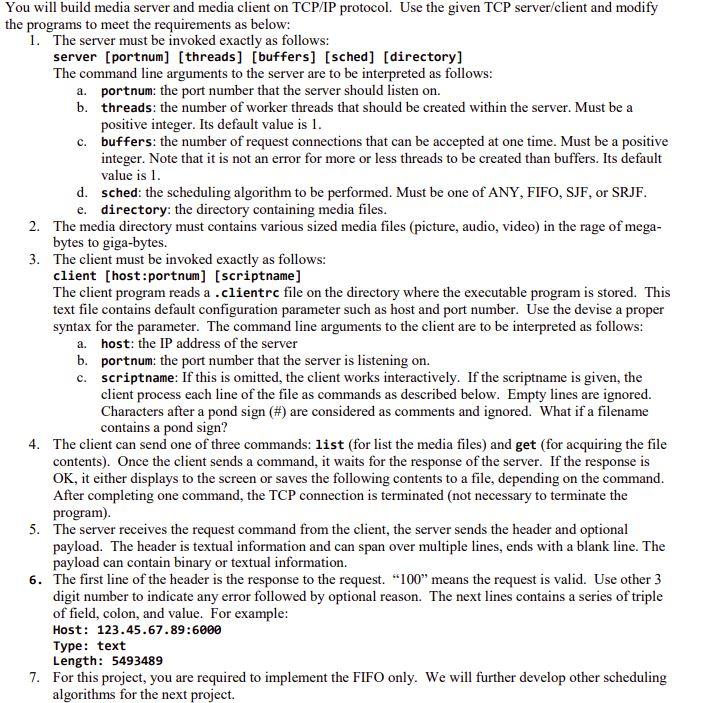
You will build media server and media client on TCP/IP protocol. Use the given TCP server/client and modify the programs to meet the requirements as below: 1. The server must be invoked exactly as follows: server [portnum] (threads] [buffers] (sched] [directory] The command line arguments to the server are to be interpreted as follows: a. portnum: the port number that the server should listen on. b. threads: the number of worker threads that should be created within the server. Must be a positive integer. Its default value is 1. c. buffers: the number of request connections that can be accepted at one time. Must be a positive integer. Note that it is not an error for more or less threads to be created than buffers. Its default value is I. d. sched: the scheduling algorithm to be performed. Must be one of ANY, FIFO, SJF, or SRJF. e. directory: the directory containing media files. 2. The media directory must contains various sized media files (picture, audio, video) in the rage of mega- bytes to giga-bytes. 3. The client must be invoked exactly as follows: client [host:portnum] (scriptname] The client program reads a .clientrc file on the directory where the executable program is stored. This text file contains default configuration parameter such as host and port number. Use the devise a proper syntax for the parameter. The command line arguments to the client are to be interpreted as follows: a. host: the IP address of the server b. portnum: the port number that the server is listening on. c. scriptname: If this is omitted, the client works interactively. If the scriptname is given, the client process each line of the file as commands as described below. Empty lines are ignored. Characters after a pond sign (#) are considered as comments and ignored. What if a filename contains a pond sign? 4. The client can send one of three commands: list (for list the media files) and get (for acquiring the file contents). Once the client sends a command, it waits for the response of the server. If the response is OK, it either displays to the screen or saves the following contents to a file, depending on the command. After completing one command, the TCP connection is terminated (not necessary to terminate the program). 5. The server receives the request command from the client, the server sends the header and optional payload. The header is textual information and can span over multiple lines, ends with a blank line. The payload can contain binary or textual information. 6. The first line of the header is the response to the request. "100" means the request is valid. Use other 3 digit number to indicate any error followed by optional reason. The next lines contains a series of triple of field, colon, and value. For example: Host: 123.45.67.89:6000 Type: text Length: 5493489 7. For this project, you are required to implement the FIFO only. We will further develop other scheduling algorithms for the next project. You will build media server and media client on TCP/IP protocol. Use the given TCP server/client and modify the programs to meet the requirements as below: 1. The server must be invoked exactly as follows: server [portnum] (threads] [buffers] (sched] [directory] The command line arguments to the server are to be interpreted as follows: a. portnum: the port number that the server should listen on. b. threads: the number of worker threads that should be created within the server. Must be a positive integer. Its default value is 1. c. buffers: the number of request connections that can be accepted at one time. Must be a positive integer. Note that it is not an error for more or less threads to be created than buffers. Its default value is I. d. sched: the scheduling algorithm to be performed. Must be one of ANY, FIFO, SJF, or SRJF. e. directory: the directory containing media files. 2. The media directory must contains various sized media files (picture, audio, video) in the rage of mega- bytes to giga-bytes. 3. The client must be invoked exactly as follows: client [host:portnum] (scriptname] The client program reads a .clientrc file on the directory where the executable program is stored. This text file contains default configuration parameter such as host and port number. Use the devise a proper syntax for the parameter. The command line arguments to the client are to be interpreted as follows: a. host: the IP address of the server b. portnum: the port number that the server is listening on. c. scriptname: If this is omitted, the client works interactively. If the scriptname is given, the client process each line of the file as commands as described below. Empty lines are ignored. Characters after a pond sign (#) are considered as comments and ignored. What if a filename contains a pond sign? 4. The client can send one of three commands: list (for list the media files) and get (for acquiring the file contents). Once the client sends a command, it waits for the response of the server. If the response is OK, it either displays to the screen or saves the following contents to a file, depending on the command. After completing one command, the TCP connection is terminated (not necessary to terminate the program). 5. The server receives the request command from the client, the server sends the header and optional payload. The header is textual information and can span over multiple lines, ends with a blank line. The payload can contain binary or textual information. 6. The first line of the header is the response to the request. "100" means the request is valid. Use other 3 digit number to indicate any error followed by optional reason. The next lines contains a series of triple of field, colon, and value. For example: Host: 123.45.67.89:6000 Type: text Length: 5493489 7. For this project, you are required to implement the FIFO only. We will further develop other scheduling algorithms for the next project
Step by Step Solution
There are 3 Steps involved in it

Get step-by-step solutions from verified subject matter experts
 Study Help