







Question: Please help with this lab!! It's fairly easy but I'm just having trouble with it. Will leave a great rating and review. Thank you! Part
Please help with this lab!! It's fairly easy but I'm just having trouble with it.
Will leave a great rating and review.
Thank you!
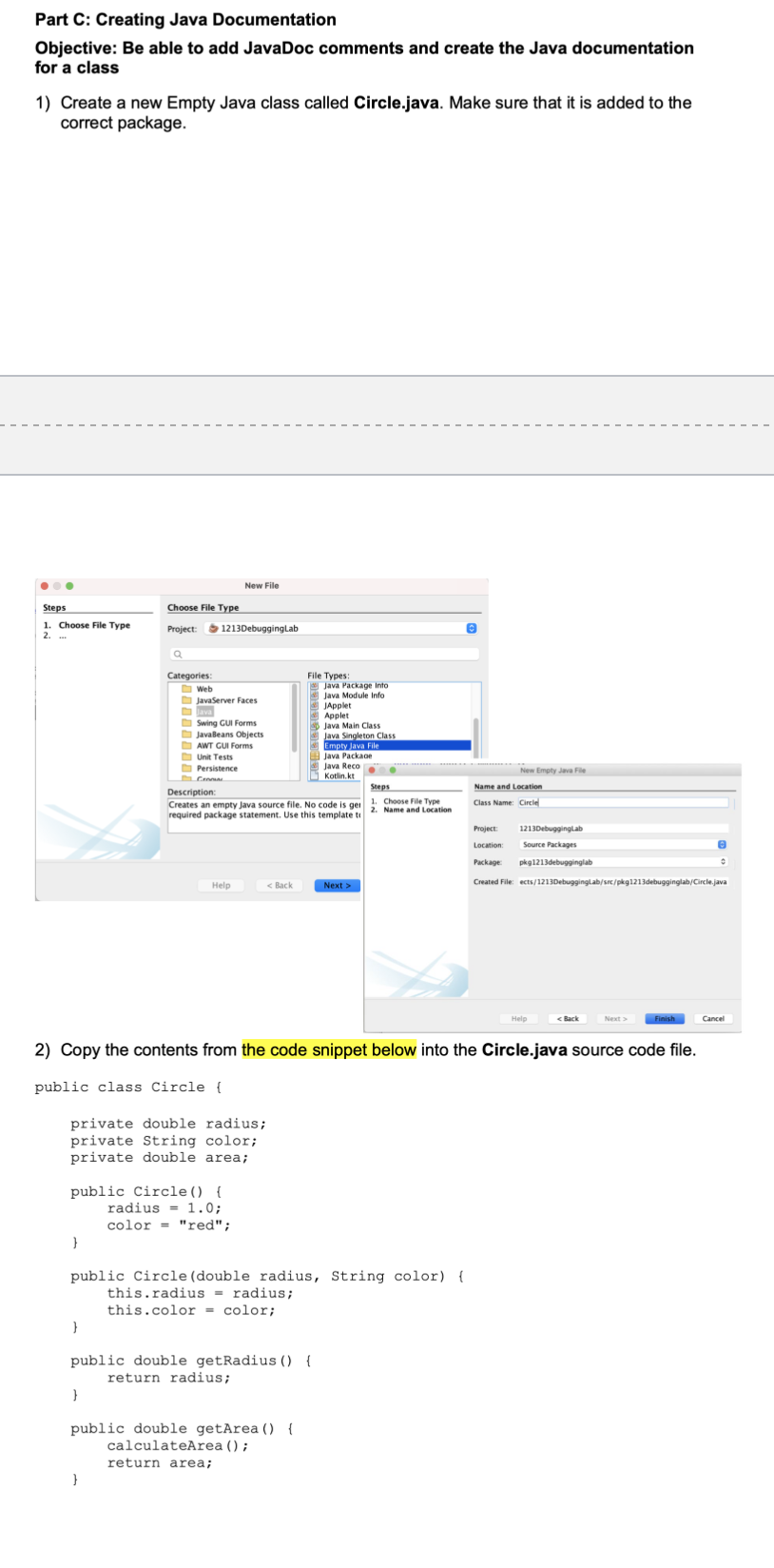
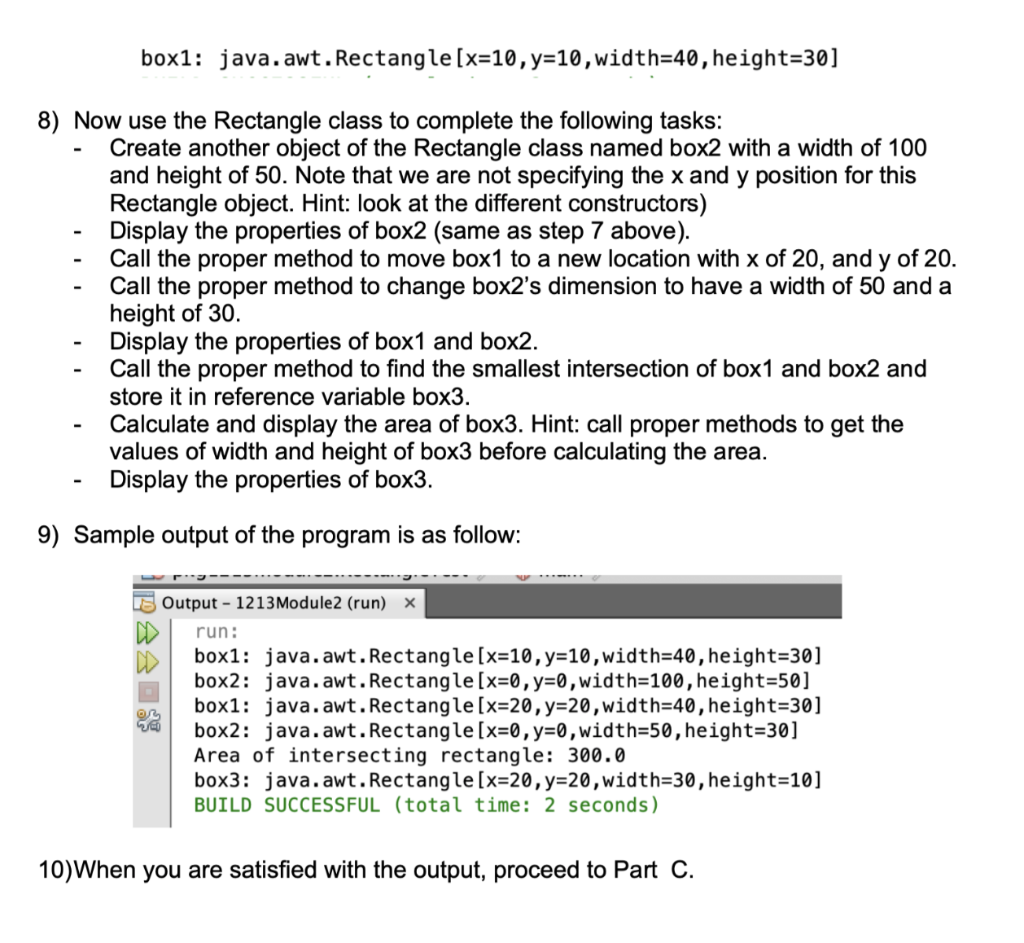
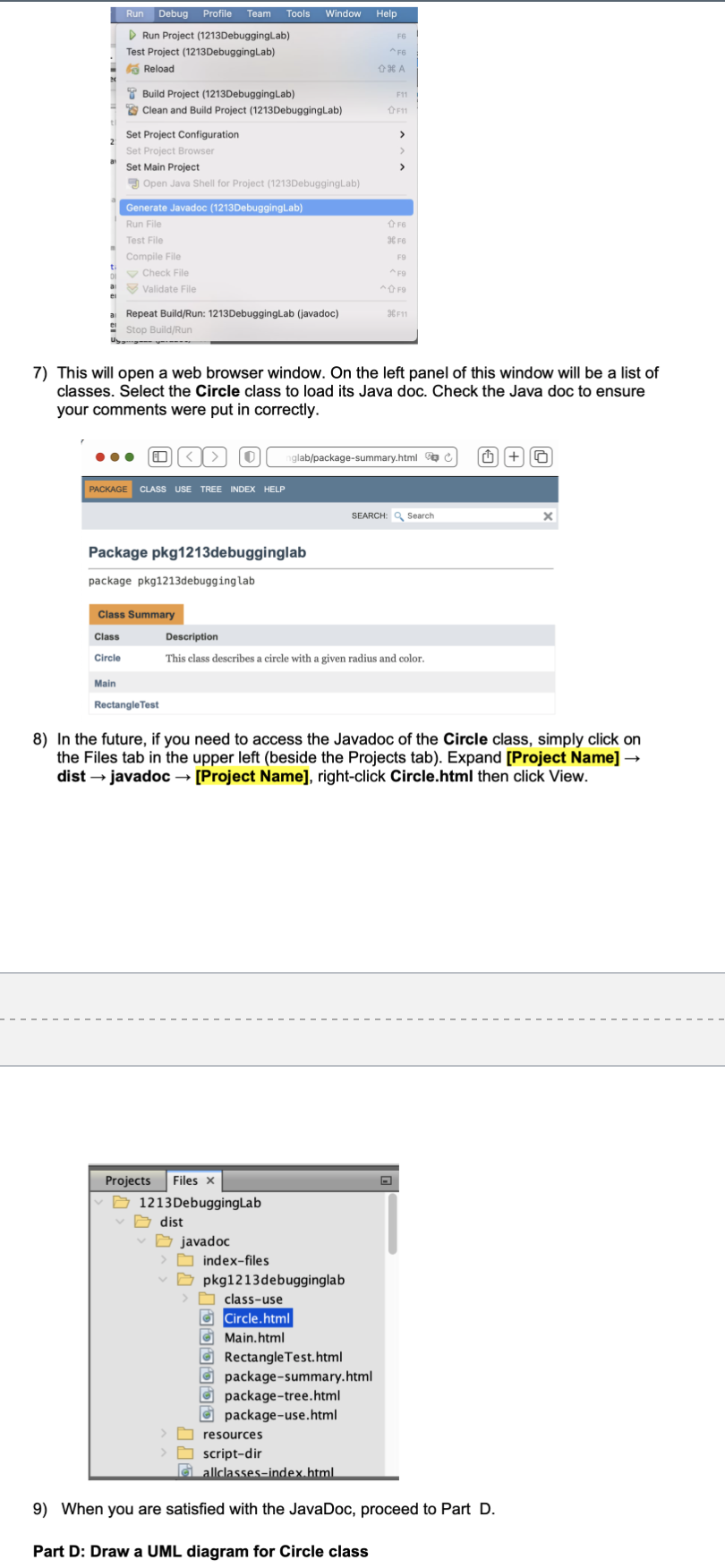
Part C: Creating Java Documentation Objective: Be able to add JavaDoc comments and create the Java documentation for a class 1) Create a new Empty Java class called Circle.java. Make sure that it is added to the correct package. New File Choose File Type Steps 1. Choose File Type 2.. Project 1213Debugginglab Categories: File Types Web Java Package into Java Module Info JavaServer Faces Java JApplet Applet Swing GUI Forms Java Main Class JavaBeans Objects Java Singleton Class AWT GUI Forms Empty Java File Unit Tests Java Package Persistence Java Reco C Kotlinkt Steps Description: Creates an empty Java source file. No code is gel 1. Choose File Type 2. Name and Location required package statement. Use this template to New Empty Java Name and Location Class Name: Circle Project 1213Debugginglab Location: Source Packages Package: pkg1213debugginglab Created File: ects/1213DebuggingLab/src/pkg1213debugginglab/Circle.java Help Help Finish Cancel 2) Copy the contents from the code snippet below into the Circle.java source code file. public class Circle { private double radius; private String color; private double area; public Circle() { radius = 1.0; color = "red"; } public Circle (double radius, String color) { this.radius = radius; this.color = color; } public double getRadius () { return radius; } public double getArea() { calculateArea(); return area; } box1: java.awt. Rectangle[x=10, y=10, width=40, height=30] - 8) Now use the Rectangle class to complete the following tasks: Create another object of the Rectangle class named box2 with a width of 100 and height of 50. Note that we are not specifying the x and y position for this Rectangle object. Hint: look at the different constructors) Display the properties of box2 (same as step 7 above). Call the proper method to move box1 to a new location with x of 20, and y of 20. Call the proper method to change box2s dimension to have a width of 50 and a height of 30. Display the properties of box1 and box2. Call the proper method to find the smallest intersection of box1 and box2 and store it in reference variable box3. Calculate and display the area of box3. Hint: call proper methods to get the values of width and height of box3 before calculating the area. Display the properties of box3. 9) Sample output of the program is as follow: Output - 1213 Module2 (run) X run: box1: java.awt. Rectangle[x=10, y=10,width=40, height=30] box2: java.awt. Rectangle[x=0, y=0,width=100,height=50] box1: java.awt. Rectangle [x=20, y=20,width=40, height=30] box2: java.awt. Rectangle[x=0, y=0,width=50, height=30] Area of intersecting rectangle: 300.0 box3: java.awt. Rectangle[x=20, y=20,width=30, height=10] BUILD SUCCESSFUL (total time: 2 seconds) 10)When you are satisfied with the output, proceed to Part C. Run Debug Profile Team Tools Window Help Run Project (1213DebuggingLab) Test Project (1213DebuggingLab) Reload 36 A F11 F11 > Build Project (1213DebuggingLab) Clean and Build Project (1213DebuggingLab) Set Project Configuration Set Project Browser Set Main Project 3 Open Java Shell for Project (1213DebuggingLab) F 96 F Generate Javadoc (1213DebuggingLab) Run File Test File Compile File t Check File al Validate File F9 AFO AFO 36F11 Repeat Build/Run: 1213DebuggingLab (javadoc) Stop Build/Run U----- 7) This will open a web browser window. On the left panel of this window will be a list of classes. Select the Circle class to load its Java doc. Check the Java doc to ensure your comments were put in correctly. 0 glab/package-summary.html + PACKAGE CLASS USE TREE INDEX HELP SEARCH: Search Package pkg1213debugginglab package pkg1213debugginglab Class Summary Class Description This class describes a circle with a given radius and color. Circle Main Rectangle Test 8) In the future, if you need to access the Javadoc of the Circle class, simply click on the Files tab in the upper left (beside the Projects tab). Expand [Project Name] dist javadoc - [Project Name], right-click Circle.html then click View. Projects Files x 1213 DebuggingLab D dist javadoc > index-files pkg1213debugginglab > class-use a Circle.html g Main.html g Rectangle Test.html G package-summary.html g package-tree.html a package-use.html resources script-dir a allclasses-index.html 9) When you are satisfied with the JavaDoc, proceed to Part D. Part D: Draw a UML diagram for Circle class
Step by Step Solution
There are 3 Steps involved in it

Get step-by-step solutions from verified subject matter experts
 Study Help