







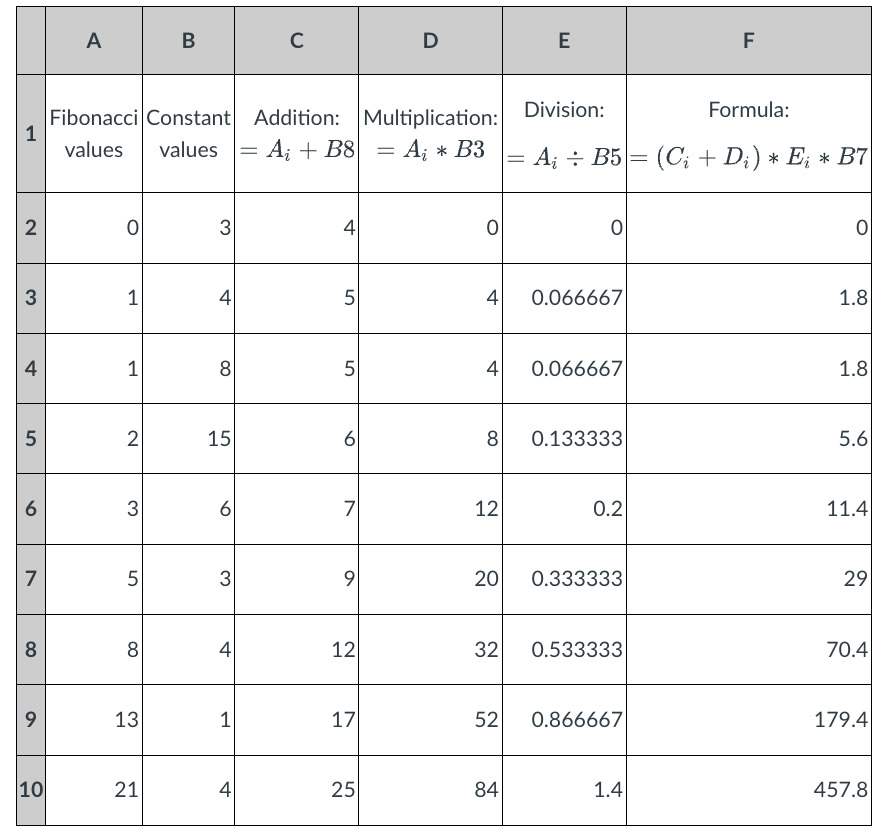
Question: Question 1 : Change the number in cell B 5 , and input the number 7 . Using copy and paste functions, copy the content
Question :
Change the number in cell B and input the number Using copy and paste functions, copy the content of E and paste it into the cell G Then, use the fill handle to extend the formula to Cells G to G and G to G In which cell would you get the value if you have less decimal places in your cell, the number will be rounded like: or or or or
Step by Step Solution
There are 3 Steps involved in it
1 Expert Approved Answer
Step: 1 Unlock

Question Has Been Solved by an Expert!
Get step-by-step solutions from verified subject matter experts
Step: 2 Unlock
Step: 3 Unlock
 Study Help