







Question: these are the added information for Circle, Rectangles, Squares, and Triangle. CSC255 - Programming III Assignment 2: Create a Shape GUI Application Total: 100 pts
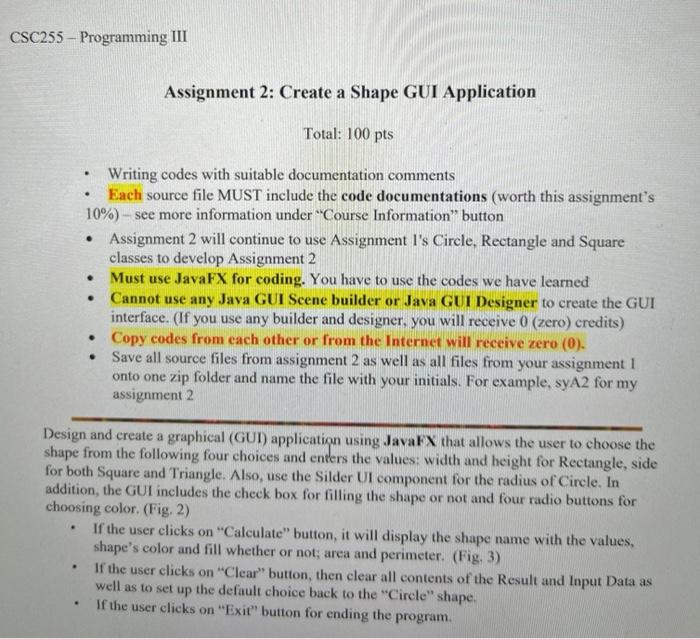
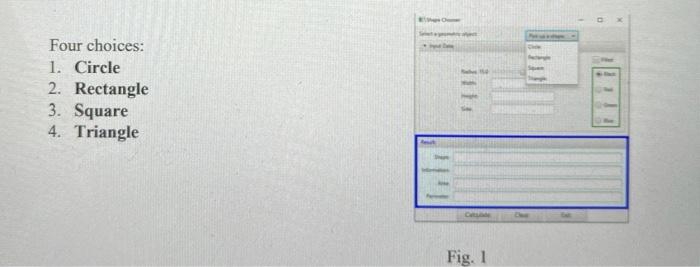
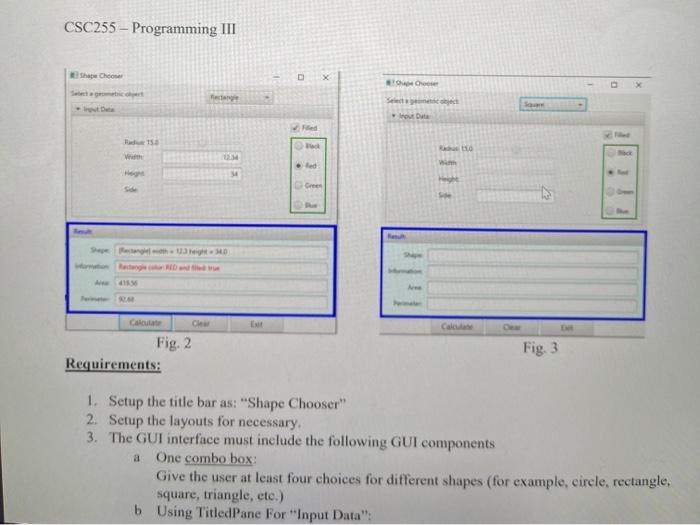
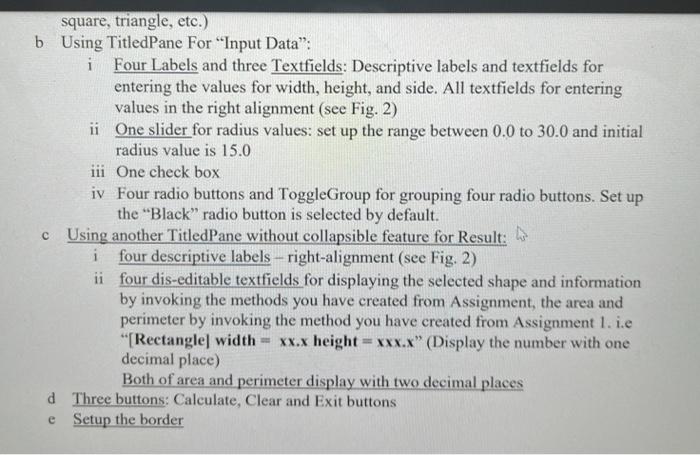
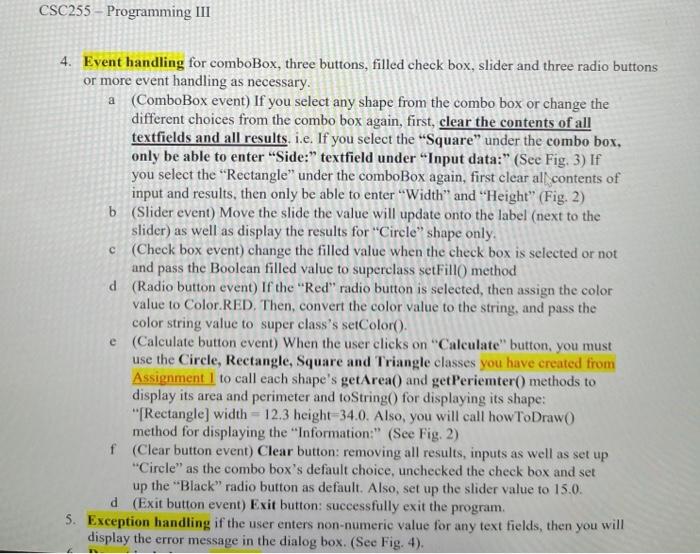
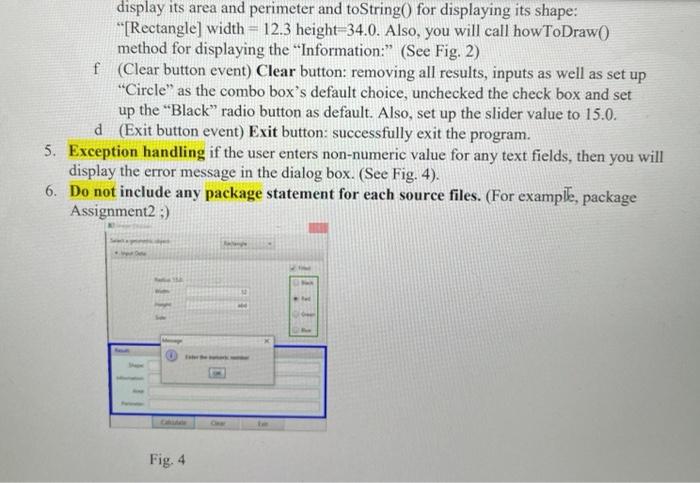
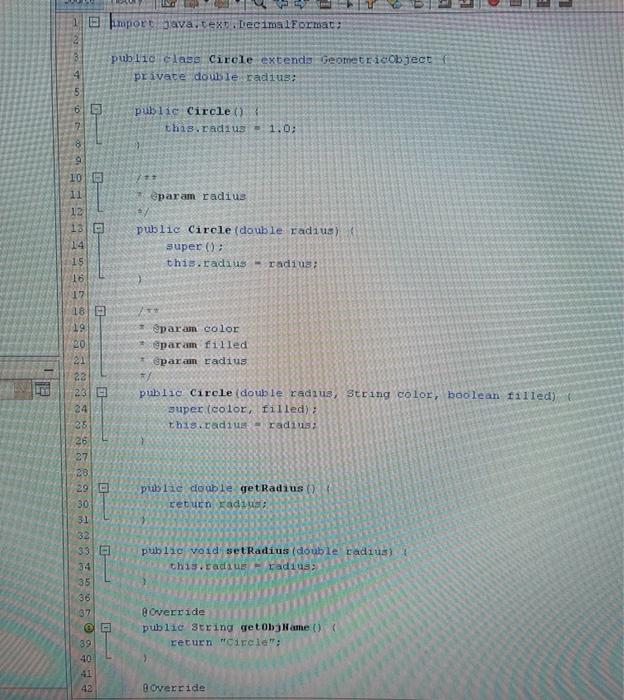
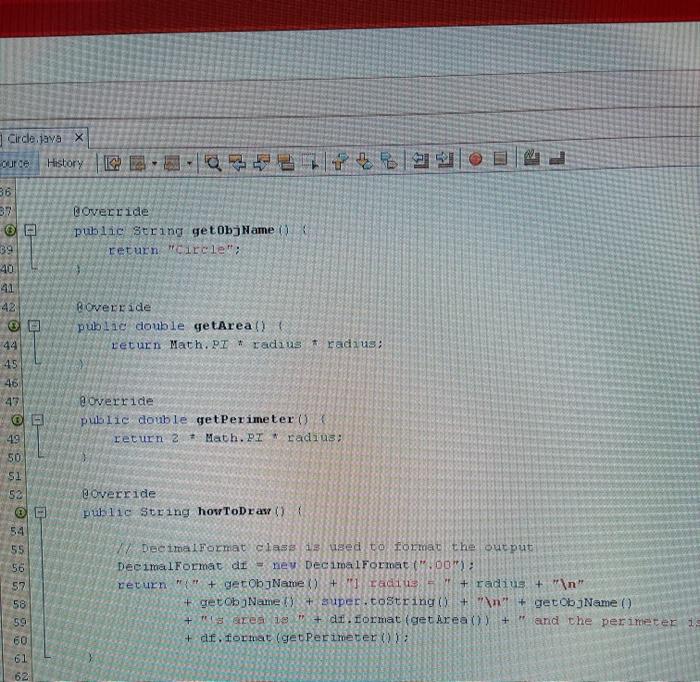
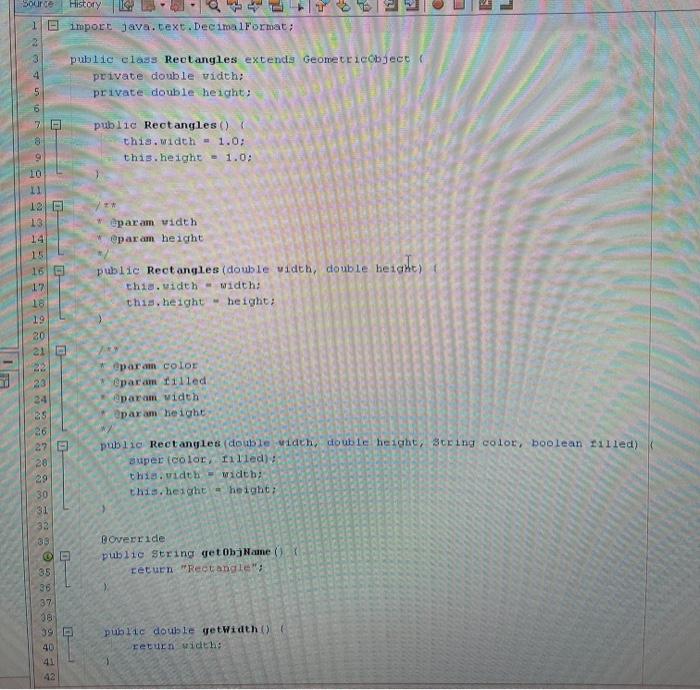
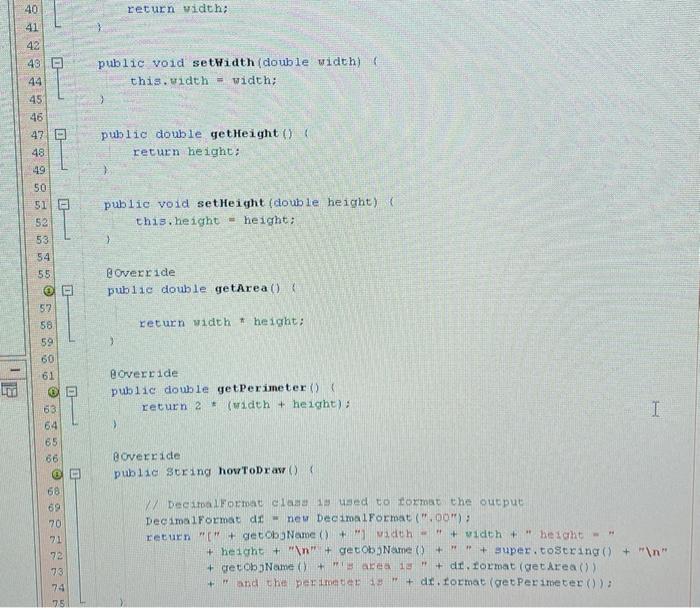
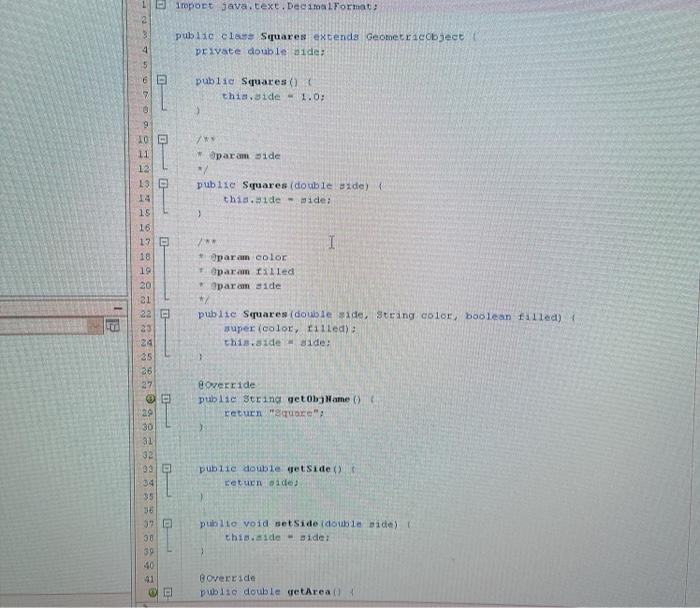
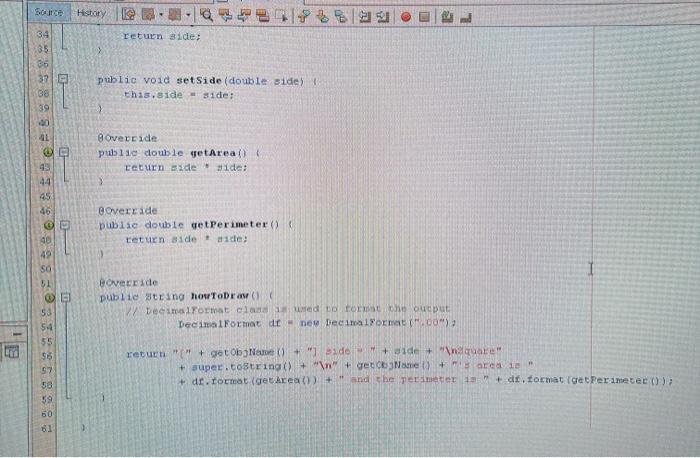
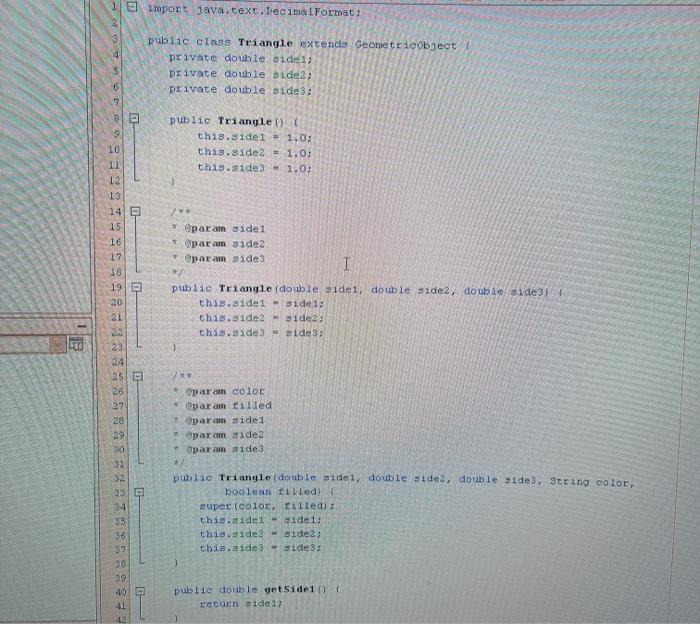
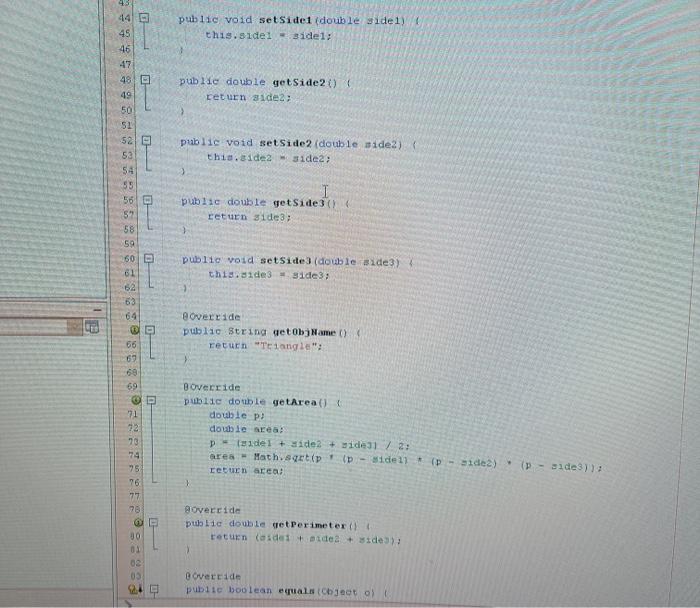
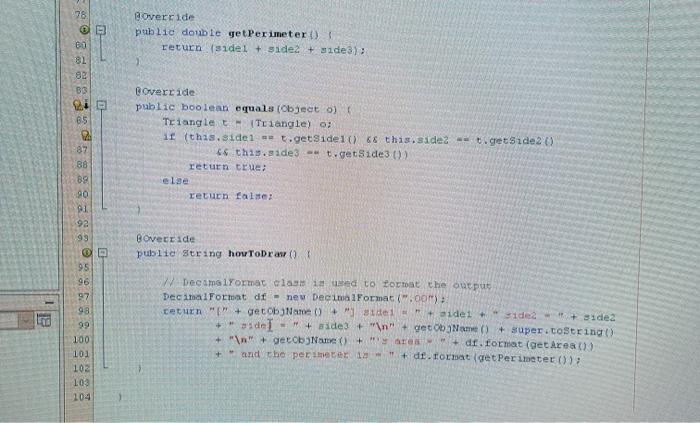
CSC255 - Programming III Assignment 2: Create a Shape GUI Application Total: 100 pts . . Writing codes with suitable documentation comments Each source file MUST include the code documentations (worth this assignment's 10%) - see more information under "Course Information button Assignment 2 will continue to use Assignment I's Circle, Rectangle and Square classes to develop Assignment 2 Must use JavaFX for coding. You have to use the codes we have learned Cannot use any Java GUI Scene builder or Java GUI Designer to create the GUI interface. (If you use any builder and designer, you will receive 0 (zero) credits) Copy codes from each other or from the Internet will receive zero (0). Save all source files from assignment 2 as well as all files from your assignment 1 onto one zip folder and name the file with your initials. For example, syA2 for my assignment 2 . Design and create a graphical (GUI) application using JavaFX that allows the user to choose the shape from the following four choices and enters the values: width and height for Rectangle, side for both Square and Triangle. Also, use the Silder UI component for the radius of Circle. In addition, the GUI includes the check box for filling the shape or not and four radio buttons for choosing color. (Fig. 2) If the user clicks on "Calculate" button, it will display the shape name with the values, shape's color and fill whether or not; area and perimeter. (Fig. 3) If the user clicks on "Clear" button, then clear all contents of the Result and Input Data as well as to set up the default choice back to the "Circle" shape. If the user clicks on "Exit" button for ending the program. Four choices: 1. Circle 2. Rectangle 3. Square 4. Triangle Fig. 1 CSC255 - Programming III Shaw Choo D route 4158 Calc Calculate Cheir Fig. 2 Requirements: Fig. 3 1. Setup the title bar as: "Shape Chooser" 2. Setup the layouts for necessary. 3. The GUI interface must include the following GUI components One combo box: Give the user at least four choices for different shapes (for example, eirele, rectangle, square, triangle, etc.) b Using TitledPane For "Input Data": a square, triangle, etc.) b Using TitledPane For "Input Data": i Four Labels and three Textfields: Descriptive labels and textfields for entering the values for width, height, and side. All textfields for entering values in the right alignment (see Fig. 2) ii One slider for radius values: set up the range between 0.0 to 30.0 and initial radius value is 15.0 iii One check box iv Four radio buttons and ToggleGroup for grouping four radio buttons. Set up the "Black" radio button is selected by default. c Using another TitledPane without collapsible feature for Result: W i four descriptive labels - right-alignment (see Fig. 2) ii four dis-editable textfields for displaying the selected shape and information by invoking the methods you have created from Assignment, the area and perimeter by invoking the method you have created from Assignment 1. i.e "[Rectangle) width = xx.x height = *xx.x" (Display the number with one decimal place) Both of area and perimeter display with two decimal places d Three buttons: Calculate, Clear and Exit buttons e Setup the border CSC255 - Programming III 4. Event handling for comboBox, three buttons, filled check box, slider and three radio buttons or more event handling as necessary. a (ComboBox event) If you select any shape from the combo box or change the different choices from the combo box again, first, clear the contents of all textfields and all results, i.e. If you select the "Square" under the combo box, only be able to enter "Side:"textfield under "Input data:" (See Fig. 3) If you select the "Rectangle" under the comboBox again, first clear al contents of input and results, then only be able to enter "Width" and "Height" (Fig. 2) b (Slider event) Move the slide the value will update onto the label (next to the slider) as well as display the results for "Circle shape only. c (Check box event) change the filled value when the check box is selected or not and pass the Boolean filled value to superclass setFillo method d (Radio button event) If the "Red"radio button is selected, then assign the color value to Color RED. Then, convert the color value to the string, and pass the color string value to super class's setColor(). e (Calculate button event) When the user clicks on "Calculate" button, you must use the Circle, Rectangle, Square and Triangle classes you have created from Assignment I to call each shape's getArea() and get Periemter() methods to display its area and perimeter and toString for displaying its shape: "[Rectangle) width = 12.3 height=34.0. Also, you will call how To Draw method for displaying the "Information." (See Fig. 2) f (Clear button event) Clear button: removing all results, inputs as well as set up "Circle" as the combo box's default choice, unchecked the check box and set up the "Black"radio button as default. Also, set up the slider value to 15.0. d (Exit button event) Exit button: successfully exit the program S. Exception handling if the user enters non-numeric value for any text fields, then you will display the error message in the dialog box. (See Fig. 4). display its area and perimeter and toString( for displaying its shape: **'[Rectangle] width = 12.3 height=34.0. Also, you will call howToDraw() method for displaying the Information:" (See Fig. 2) f (Clear button event) Clear button: removing all results, inputs as well as set up Circle" as the combo box's default choice, unchecked the check box and set up the "Black radio button as default. Also, set up the slider value to 15.0. d (Exit button event) Exit button: successfully exit the program. 5. Exception handling if the user enters non-numeric value for any text fields, then you will display the error message in the dialog box. (See Fig. 4). 6. Do not include any package statement for each source files. (For example, package Assignment2 :) Fig. 4 Elimport java.text.DecimalFormat: public class Circle extends Geometricobject private double radius: 4 60 2 public Circle this.radius 1.0: 8 Sparam radius 10 0 11 12 13 14 15 18 12 181 19 20 public Circle (double dius) super(); this.radius - radius: para color sparam filled sparan radius 22 23 l 24 25 26 27 puls 110 Circle (double radius, String color, boolean filled) super (color, filled): this.tadiuradius: puble double getRadius () return radius: 29 C 30 31 32 33 34 35 36 37 public void setRadius (double radius) this.Eadaus = radius Override public string getName() ( et Circle 89 40 41 42 Boverride X Circle.java curce History B Ha a BBM 22 @ 39 @Override public Suring getObjName() return Circle": 40 41 42 94 Rover ride public double getArea) return Math.PI * radius radius: 45 46 43 override public double getPerimeter() return 2 * Math.PI radius: 49 50 52 override public String howToDraw() 54 55 56 57 58 59 Decimal Format class is used to format the output Decimal Format diney Decimal Format (.00"); return "{" + getObjName() + " radi + radius + " " + getob Name) + super.toString() + " " # getObjName() + seres is " + df. format (get area()) + " and the perimeter 1 + df. format (geoPerimeter 1: 60 61 LE Source History 1 El import java.text.DecimalFormat; public class Rectangles extends Geometricoseco private double width: private double height: 0 7 public Rectangles () this.width = 1.0: this.height - 1.0: 9 10 12 13 14 15 16 17 18 19 param vidth @param height public Rectangles (double width, double height this.width - width: this.height height: 21 para color @param filled param Width param height 24 26 22 20 public Rectangles double width, double height, String color, boolean uled) super color, filled): this.width - width: this.height - height: 30 31 32 30 Override public String getObjame return "Rectangle 35 36 37 38 39 public double yetWidth() return width 40 42 40 return width: public void setWidth (double width) this.width - width; > public double getHeight() return height: } public void setHeight (double height) this.height - height: ) 42 43 44 45 46 47 B 48 49 50 51 52 53 54 55 @ 52 58 59 60 61 OD 63 64 65 66 @Override public double getArea() return width * height; 3 Boverride public double getPerimeter() return 2 (width + height) > I @Override public String howToDraw ) 68 69 70 21 92 78 74 W Decima Format cia 19 used to commit the output Decimal Format dr - new Decimal Format (.00"); return "[+ getobgName()+Mwidth- + width + hecht- + height + " " + getoboName() + " " + super.toString() + " " + cetObaName()+" avea 10" + dr. tormat (get Area()) + and the perimeter + de format (getPerimeter()); 75 B Troport java.text.DecimalFormat: 3 public class Squares extends Geometr acobject private double side; 4 5 6 7 public Squares () this side 1.0; ) paramide publie Squares (double side) this.de ide: 9 10 11 12 13 14 18 16 17 18 19 20 21 I param color Oparam filled param side */ publie Squares (double side, String color, boolean filled) super (color, filled) this.aide ide: 24 25 26 27 override public String net clb jar () { returnare: publie double yet side) return wide 29 30 31 32 33 04 35 36 3 30 39 40 91 public void setside double side) this.side - side Goverride puble double yetArea History return side; 35 32 38 39 20 public void set Side (double side) this.side ide: 8 Overeide public double getArea() return side ide: > 44 45 46 Goverride puble double getPerimeter() return side de 49 so 51 Bovecride publie string horror Decimomat oled tort che output DecimalFormat - new Decimal Yormat":00) 53 54 55 return(" + getob Neo + "1 side + side + inquare + super.tostring() + " " + getName()+ areale + dr. Tormat (gekrea() + " and the perimeter 1 di format Ice Perimeter(); 57 sa 59 60 61 1 l import java.text.Decimal Fortoat: 2 3 public class Triangle extends Geometricobject private double sidel; private double side2; private double side 3: 9 public Triangle() this.sidel - 1.0: this.side2 = 1.05 this.side3 - 1.0: 10 11 para side 1 param side2 param side3 I 12 13 14 15 16 17 18 19 20 21 22 23 34 25 P 26 27 20 publie Triangle (dowole side 1) double side2 double side) this.wide 1 - side 1 this.side2 Side2: this.sade3 Bide 3 1 31 ** eparam color @param filled param side 1 parum Side2 param a ide 3 30 31 32 public Triangle (double sidei, double sided, double side3, String color, boolean til led super (colo Called): this.sidel - Side 1: this.idea-side this.aide 3 - side 3: 3-4 35 36 37 38 39 40 41 42 puble double wetSide1() { return side 1 public void setSide 1 (double side1) this.sidel sidel: puble double getSide2() return ide2; 44 45 46 47 48 49 50 52 52 53 54 55 56 52 58 59 public void setSide2 (double side) this.side2 side2 public double getSide3() { return ide3; 60 D public void setSide 3 (double side 3) this. 1de3 side3; 61 63 64 22 override public string getob Name) return "Tangle" 65 69 69 OP 71 Boverride public double getArea() double pe double area! P (del + side2 + idejl / 2; area = Math.setip (D-sidell (P - side 2) (P - side): returnarea 78 75 76 77 override puolie double set Perimeter (1) return (siden + side + side): 30 01 02 03 Override public boolean equal objeto 78 @Override public double getPerimeter() return (side + side2 + side 3); 60 82 82 B3 2 65 @Override public boolean equals (object) Triangle Triangle) o; 1 (this.sidel - t.getSide1() && this.side- t.getSide 2) 66 this.side 3 - t.getSide3 0)) return true 87 88 89 90 return false; 92 93 Boverride public String howToDraw ) 95 96 97 98 99 100 101 102 103 104 W Dee amalformat claimed to forto the output Decimal Format df = new DecimalFormat (.00) ceturn + getobjName() + "ide1 side 1 + Side + side2 +" del + siden + getName()+ Super.coString() + " " gecobName() + " + df. format (getarea()) + and the perimeter 19+ d.omnat (get Perimeter()); CSC255 - Programming III Assignment 2: Create a Shape GUI Application Total: 100 pts . . Writing codes with suitable documentation comments Each source file MUST include the code documentations (worth this assignment's 10%) - see more information under "Course Information button Assignment 2 will continue to use Assignment I's Circle, Rectangle and Square classes to develop Assignment 2 Must use JavaFX for coding. You have to use the codes we have learned Cannot use any Java GUI Scene builder or Java GUI Designer to create the GUI interface. (If you use any builder and designer, you will receive 0 (zero) credits) Copy codes from each other or from the Internet will receive zero (0). Save all source files from assignment 2 as well as all files from your assignment 1 onto one zip folder and name the file with your initials. For example, syA2 for my assignment 2 . Design and create a graphical (GUI) application using JavaFX that allows the user to choose the shape from the following four choices and enters the values: width and height for Rectangle, side for both Square and Triangle. Also, use the Silder UI component for the radius of Circle. In addition, the GUI includes the check box for filling the shape or not and four radio buttons for choosing color. (Fig. 2) If the user clicks on "Calculate" button, it will display the shape name with the values, shape's color and fill whether or not; area and perimeter. (Fig. 3) If the user clicks on "Clear" button, then clear all contents of the Result and Input Data as well as to set up the default choice back to the "Circle" shape. If the user clicks on "Exit" button for ending the program. Four choices: 1. Circle 2. Rectangle 3. Square 4. Triangle Fig. 1 CSC255 - Programming III Shaw Choo D route 4158 Calc Calculate Cheir Fig. 2 Requirements: Fig. 3 1. Setup the title bar as: "Shape Chooser" 2. Setup the layouts for necessary. 3. The GUI interface must include the following GUI components One combo box: Give the user at least four choices for different shapes (for example, eirele, rectangle, square, triangle, etc.) b Using TitledPane For "Input Data": a square, triangle, etc.) b Using TitledPane For "Input Data": i Four Labels and three Textfields: Descriptive labels and textfields for entering the values for width, height, and side. All textfields for entering values in the right alignment (see Fig. 2) ii One slider for radius values: set up the range between 0.0 to 30.0 and initial radius value is 15.0 iii One check box iv Four radio buttons and ToggleGroup for grouping four radio buttons. Set up the "Black" radio button is selected by default. c Using another TitledPane without collapsible feature for Result: W i four descriptive labels - right-alignment (see Fig. 2) ii four dis-editable textfields for displaying the selected shape and information by invoking the methods you have created from Assignment, the area and perimeter by invoking the method you have created from Assignment 1. i.e "[Rectangle) width = xx.x height = *xx.x" (Display the number with one decimal place) Both of area and perimeter display with two decimal places d Three buttons: Calculate, Clear and Exit buttons e Setup the border CSC255 - Programming III 4. Event handling for comboBox, three buttons, filled check box, slider and three radio buttons or more event handling as necessary. a (ComboBox event) If you select any shape from the combo box or change the different choices from the combo box again, first, clear the contents of all textfields and all results, i.e. If you select the "Square" under the combo box, only be able to enter "Side:"textfield under "Input data:" (See Fig. 3) If you select the "Rectangle" under the comboBox again, first clear al contents of input and results, then only be able to enter "Width" and "Height" (Fig. 2) b (Slider event) Move the slide the value will update onto the label (next to the slider) as well as display the results for "Circle shape only. c (Check box event) change the filled value when the check box is selected or not and pass the Boolean filled value to superclass setFillo method d (Radio button event) If the "Red"radio button is selected, then assign the color value to Color RED. Then, convert the color value to the string, and pass the color string value to super class's setColor(). e (Calculate button event) When the user clicks on "Calculate" button, you must use the Circle, Rectangle, Square and Triangle classes you have created from Assignment I to call each shape's getArea() and get Periemter() methods to display its area and perimeter and toString for displaying its shape: "[Rectangle) width = 12.3 height=34.0. Also, you will call how To Draw method for displaying the "Information." (See Fig. 2) f (Clear button event) Clear button: removing all results, inputs as well as set up "Circle" as the combo box's default choice, unchecked the check box and set up the "Black"radio button as default. Also, set up the slider value to 15.0. d (Exit button event) Exit button: successfully exit the program S. Exception handling if the user enters non-numeric value for any text fields, then you will display the error message in the dialog box. (See Fig. 4). display its area and perimeter and toString( for displaying its shape: **'[Rectangle] width = 12.3 height=34.0. Also, you will call howToDraw() method for displaying the Information:" (See Fig. 2) f (Clear button event) Clear button: removing all results, inputs as well as set up Circle" as the combo box's default choice, unchecked the check box and set up the "Black radio button as default. Also, set up the slider value to 15.0. d (Exit button event) Exit button: successfully exit the program. 5. Exception handling if the user enters non-numeric value for any text fields, then you will display the error message in the dialog box. (See Fig. 4). 6. Do not include any package statement for each source files. (For example, package Assignment2 :) Fig. 4 Elimport java.text.DecimalFormat: public class Circle extends Geometricobject private double radius: 4 60 2 public Circle this.radius 1.0: 8 Sparam radius 10 0 11 12 13 14 15 18 12 181 19 20 public Circle (double dius) super(); this.radius - radius: para color sparam filled sparan radius 22 23 l 24 25 26 27 puls 110 Circle (double radius, String color, boolean filled) super (color, filled): this.tadiuradius: puble double getRadius () return radius: 29 C 30 31 32 33 34 35 36 37 public void setRadius (double radius) this.Eadaus = radius Override public string getName() ( et Circle 89 40 41 42 Boverride X Circle.java curce History B Ha a BBM 22 @ 39 @Override public Suring getObjName() return Circle": 40 41 42 94 Rover ride public double getArea) return Math.PI * radius radius: 45 46 43 override public double getPerimeter() return 2 * Math.PI radius: 49 50 52 override public String howToDraw() 54 55 56 57 58 59 Decimal Format class is used to format the output Decimal Format diney Decimal Format (.00"); return "{" + getObjName() + " radi + radius + " " + getob Name) + super.toString() + " " # getObjName() + seres is " + df. format (get area()) + " and the perimeter 1 + df. format (geoPerimeter 1: 60 61 LE Source History 1 El import java.text.DecimalFormat; public class Rectangles extends Geometricoseco private double width: private double height: 0 7 public Rectangles () this.width = 1.0: this.height - 1.0: 9 10 12 13 14 15 16 17 18 19 param vidth @param height public Rectangles (double width, double height this.width - width: this.height height: 21 para color @param filled param Width param height 24 26 22 20 public Rectangles double width, double height, String color, boolean uled) super color, filled): this.width - width: this.height - height: 30 31 32 30 Override public String getObjame return "Rectangle 35 36 37 38 39 public double yetWidth() return width 40 42 40 return width: public void setWidth (double width) this.width - width; > public double getHeight() return height: } public void setHeight (double height) this.height - height: ) 42 43 44 45 46 47 B 48 49 50 51 52 53 54 55 @ 52 58 59 60 61 OD 63 64 65 66 @Override public double getArea() return width * height; 3 Boverride public double getPerimeter() return 2 (width + height) > I @Override public String howToDraw ) 68 69 70 21 92 78 74 W Decima Format cia 19 used to commit the output Decimal Format dr - new Decimal Format (.00"); return "[+ getobgName()+Mwidth- + width + hecht- + height + " " + getoboName() + " " + super.toString() + " " + cetObaName()+" avea 10" + dr. tormat (get Area()) + and the perimeter + de format (getPerimeter()); 75 B Troport java.text.DecimalFormat: 3 public class Squares extends Geometr acobject private double side; 4 5 6 7 public Squares () this side 1.0; ) paramide publie Squares (double side) this.de ide: 9 10 11 12 13 14 18 16 17 18 19 20 21 I param color Oparam filled param side */ publie Squares (double side, String color, boolean filled) super (color, filled) this.aide ide: 24 25 26 27 override public String net clb jar () { returnare: publie double yet side) return wide 29 30 31 32 33 04 35 36 3 30 39 40 91 public void setside double side) this.side - side Goverride puble double yetArea History return side; 35 32 38 39 20 public void set Side (double side) this.side ide: 8 Overeide public double getArea() return side ide: > 44 45 46 Goverride puble double getPerimeter() return side de 49 so 51 Bovecride publie string horror Decimomat oled tort che output DecimalFormat - new Decimal Yormat":00) 53 54 55 return(" + getob Neo + "1 side + side + inquare + super.tostring() + " " + getName()+ areale + dr. Tormat (gekrea() + " and the perimeter 1 di format Ice Perimeter(); 57 sa 59 60 61 1 l import java.text.Decimal Fortoat: 2 3 public class Triangle extends Geometricobject private double sidel; private double side2; private double side 3: 9 public Triangle() this.sidel - 1.0: this.side2 = 1.05 this.side3 - 1.0: 10 11 para side 1 param side2 param side3 I 12 13 14 15 16 17 18 19 20 21 22 23 34 25 P 26 27 20 publie Triangle (dowole side 1) double side2 double side) this.wide 1 - side 1 this.side2 Side2: this.sade3 Bide 3 1 31 ** eparam color @param filled param side 1 parum Side2 param a ide 3 30 31 32 public Triangle (double sidei, double sided, double side3, String color, boolean til led super (colo Called): this.sidel - Side 1: this.idea-side this.aide 3 - side 3: 3-4 35 36 37 38 39 40 41 42 puble double wetSide1() { return side 1 public void setSide 1 (double side1) this.sidel sidel: puble double getSide2() return ide2; 44 45 46 47 48 49 50 52 52 53 54 55 56 52 58 59 public void setSide2 (double side) this.side2 side2 public double getSide3() { return ide3; 60 D public void setSide 3 (double side 3) this. 1de3 side3; 61 63 64 22 override public string getob Name) return "Tangle" 65 69 69 OP 71 Boverride public double getArea() double pe double area! P (del + side2 + idejl / 2; area = Math.setip (D-sidell (P - side 2) (P - side): returnarea 78 75 76 77 override puolie double set Perimeter (1) return (siden + side + side): 30 01 02 03 Override public boolean equal objeto 78 @Override public double getPerimeter() return (side + side2 + side 3); 60 82 82 B3 2 65 @Override public boolean equals (object) Triangle Triangle) o; 1 (this.sidel - t.getSide1() && this.side- t.getSide 2) 66 this.side 3 - t.getSide3 0)) return true 87 88 89 90 return false; 92 93 Boverride public String howToDraw ) 95 96 97 98 99 100 101 102 103 104 W Dee amalformat claimed to forto the output Decimal Format df = new DecimalFormat (.00) ceturn + getobjName() + "ide1 side 1 + Side + side2 +" del + siden + getName()+ Super.coString() + " " gecobName() + " + df. format (getarea()) + and the perimeter 19+ d.omnat (get Perimeter())
Step by Step Solution
There are 3 Steps involved in it

Get step-by-step solutions from verified subject matter experts
 Study Help