







Question: This code is for Arduino. It requires an .ino file The previous code: //This code uses an interrupt function to operate an emergency stop switch,
This code is for Arduino. It requires an .ino file
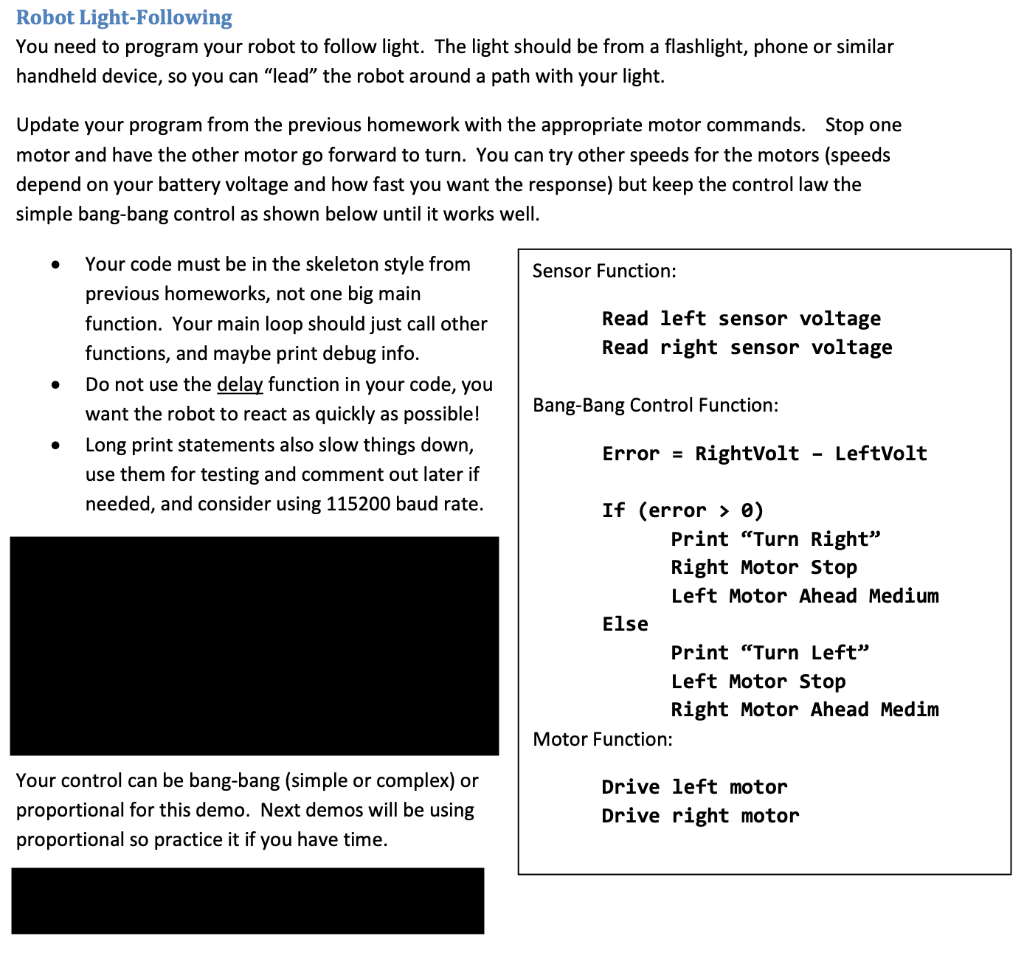
The previous code:
//This code uses an interrupt function to operate an emergency stop switch,
//which stops the motors when activated
// Initialize variables
const byte rightMotorPin = 6;
const byte leftMotorPin = 9;
const byte interruptPin = 2;
volatile int stopMotors = 0;
void setup()
{
// Setup right motor
pinMode(6, OUTPUT); // Initiates right motor pin
pinMode(7, OUTPUT); // Initiates right brake pin
// Setup left motor
pinMode(9, OUTPUT); // Initiates left motor pin
pinMode(8, OUTPUT); // Initiates left brake pin
// Enable pull-up resistor for pin 2
pinMode(2, INPUT_PULLUP);
// Attach interrupt to pin 2
attachInterrupt(digitalPinToInterrupt(2), emergencyStop, CHANGE);
}
void loop()
{
if (stopMotors == 0)
{
// Right motor forward @ full speed
digitalWrite(6, HIGH); // Establishes forward direction of right motor
digitalWrite(7, LOW); // Disengage the right brake
analogWrite(5, 255); // Spins the right motor at full speed
// Left motor forward @ full speed
digitalWrite(9, HIGH); // Establishes forward direction of left motor
digitalWrite(8, LOW); // Disengage the left brake
analogWrite(10, 255); // Spins the left motor at full speed
delay(3000);
digitalWrite(7, HIGH); // Engage the right brake
digitalWrite(8, HIGH); // Engage the left brake
delay(2000);
// Left motor backward @ half speed
digitalWrite(9, LOW); // Establishes backward direction of left motor
digitalWrite(8, LOW); // Disengage the left brake
analogWrite(10, 123); // Spins the left motor at half speed
// Right motor backward @ half speed
digitalWrite(6, LOW); // Establishes backward direction of right motor
digitalWrite(7, LOW); // Disengage the right brake
analogWrite(10, 123); // Spins the right motor at half speed
delay(3000);
digitalWrite(7, HIGH); // Engage the right brake
digitalWrite(8, HIGH); // Engage the left brake
delay(2000);
}
}
void emergencyStop()
{
if (digitalRead(2) == LOW)
{
// Stop the motors and changes the flag
stopMotors = 1;
digitalWrite(7, HIGH); //Engages right brake
digitalWrite(8, HIGH); //Engages left brake
} else {
// Reset the flag to start motors again
stopMotors = 0;
}
}
Robot Light-Following You need to program your robot to follow light. The light should be from a flashlight, phone or similar handheld device, so you can "lead" the robot around a path with your light. Update your program from the previous homework with the appropriate motor commands. Stop one motor and have the other motor go forward to turn. You can try other speeds for the motors (speeds depend on your battery voltage and how fast you want the response) but keep the control law the simple bang-bang control as shown below until it works well. - Your code must be in the skeleton style from previous homeworks, not one big main Sensor Function: function. Your main loop should just call other Read left sensor voltage functions, and maybe print debug info. Read right sensor voltage - Do not use the delay function in your code, you want the robot to react as quickly as possible! Bang-Bang Control Function: - Long print statements also slow things down, Error = RightVolt - LeftVolt use them for testing and comment out later if needed, and consider using 115200 baud rate. If (error > 0 ) Print "Turn Right" Right Motor Stop Left Motor Ahead Medium Else Print "Turn Left" Left Motor Stop Right Motor Ahead Medim Motor Function: Your control can be bang-bang (simple or complex) or Drive left motor proportional for this demo. Next demos will be using Drive right motor proportional so practice it if you have time
Step by Step Solution
There are 3 Steps involved in it

Get step-by-step solutions from verified subject matter experts
 Study Help