







Question: RTP Packet Payload Size 1. If each increment of the RTP timestamp clock (i.e., one unit) represents 1/8,000 of a second, how many seconds
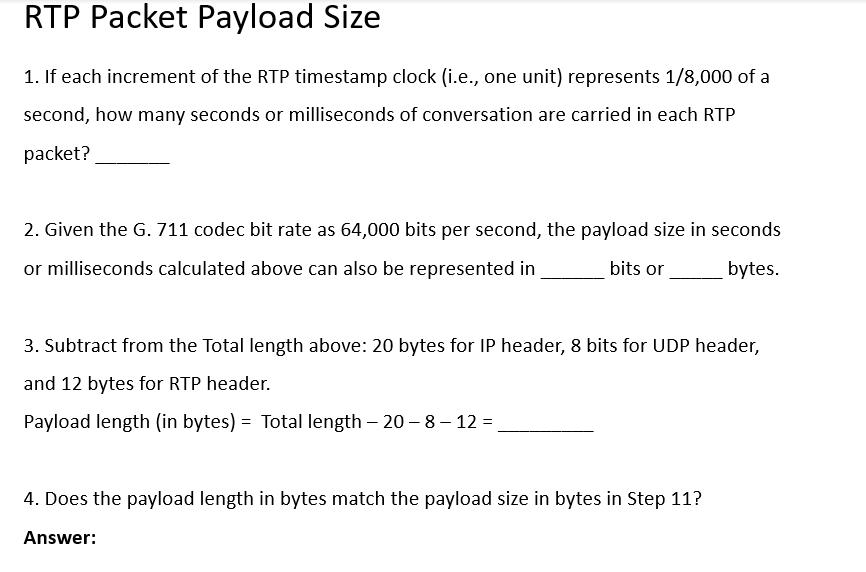
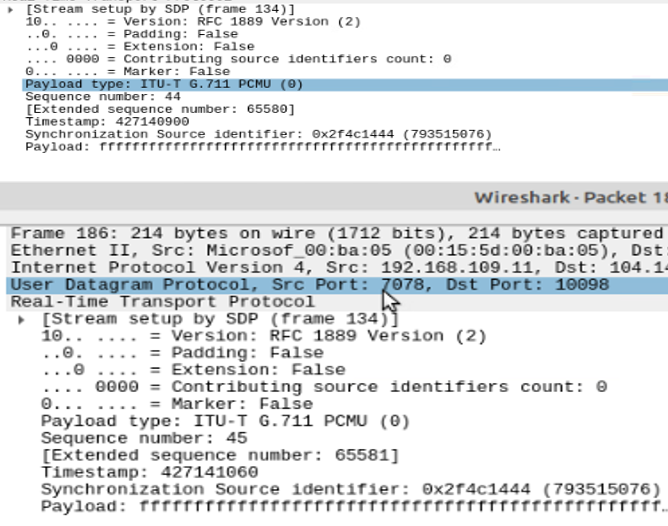
RTP Packet Payload Size 1. If each increment of the RTP timestamp clock (i.e., one unit) represents 1/8,000 of a second, how many seconds or milliseconds of conversation are carried in each RTP packet? 2. Given the G.711 codec bit rate as 64,000 bits per second, the payload size in seconds or milliseconds calculated above can also be represented in bits or bytes. 3. Subtract from the Total length above: 20 bytes for IP header, 8 bits for UDP header, and 12 bytes for RTP header. Payload length (in bytes) = Total length - 20-8-12 = 4. Does the payload length in bytes match the payload size in bytes in Step 11? Answer: [Stream setup by SDP (frame 134)] 10.. = Version: RFC 1889 Version (2) ..e. .... = Padding: False = Extension: False 0000 = Contributing source identifiers count: 0 = Marker: False e... Payload type: ITU-T G.711 PCMU (0) Sequence number: 44 [Extended sequence number: 65580] Timestamp: 427140900 Synchronization Source identifier: 0x2f4c1444 (793515076) Payload: frrrrrrrrrrr rrrrrr... Wireshark - Packet 18 Frame 186: 214 bytes on wire (1712 bits), 214 bytes captured Ethernet II, Src: Microsof_00:ba:05 (00:15:5d: 00:ba:05), Dst Internet Protocol Version 4, Src: 192.168.109.11, Dst: 104.14 User Datagram Protocol, Src Port: 7078, Dst Port: 10098 Real-Time Transport Protocol [Stream setup by SDP (frame 134) 10.. ..e. = Version: RFC 1889 Version (2) = Padding: False = Extension: False 0000 = Contributing source identifiers count: 0 0... ... = Marker: False Payload type: ITU-T G.711 PCMU (0) Sequence number: 45 [Extended sequence number: 65581] Timestamp: 427141060 Synchronization Source identifier: 0x2f4c1444 (793515076) Payload: ffrrrrr rrrrrr rrrrrrrrr rrrrrrr..
Step by Step Solution
There are 3 Steps involved in it

Get step-by-step solutions from verified subject matter experts
 Study Help