







Question: Step 1: Examine our Course Syllabus. Step 2: Examine the example Graphical Syllabus (found in the Resources section of Module 1) Compare the two versions
Step 1: Examine our Course Syllabus. Step 2: Examine the example Graphical Syllabus (found in the Resources section of Module 1)
Compare the two versions of the syllabus, and write a 1-page evaluation document. Limit yourself to 1 well-written page for your evaluation (points will be deducted for overly-verbose evaluations).
Comment on:
Strengths and weaknesses of both approaches
One item for each syllabus that you would change to make that version better, and why you think your change would be an improvement
Which format do you prefer? Why?
course syllabus:
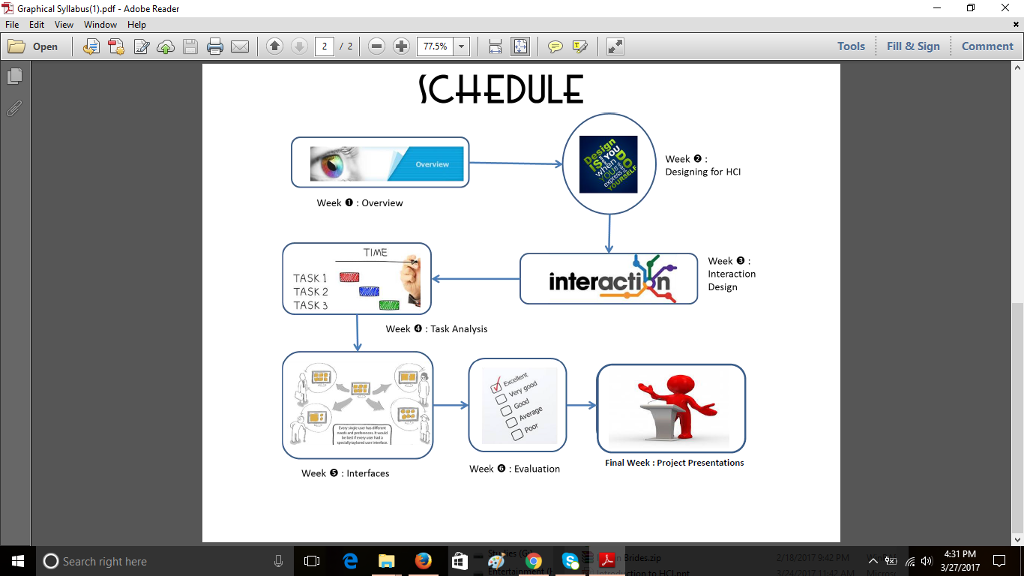
COURSE DESCRIPTION: The purpose of this class is to ground you in the basics of how humans interact with technology, and to introduce you to human-computer interaction (HCI), User Experience (UX) and User-centered Design (UCD). Although the course is broadly called HCI, the concepts presented in the course should also help you understand common Interaction Design themes, and how people use machines (most of which have some aspect of software controlling them). At the end of the course you will be able to cite basic principles that are relevant to human interaction designs and devise a usability engineering plan to accompany development of new human-machine interfaces. In addition to individual homework assignments and two quizzes, a small team project is also required. PRE REQUISITES: None COURSE OBJECTIVES: Students will be introduced to concepts around Human Computer Interaction, User Experience, User Centered Design, and Interaction Design. Topics covered include the usability design life cycle, requirements and task analysis, accessibility, perception, cognition, gamification and augmented reality. COURSE REQUIREMENTS: Students will participate on a team HCI project. They will do software system analysis, design, code generation and reviews. A student (or a project leader) will assure timely delivery of the results before the end of the term. Any software built for the project is expected to be integrated and run without error on a computer in the Rivier University Computer Lab. COURSE TEXTBOOKS: Universal Principles of Design: 125 ways to enhance usability, influence perception, increase appeal, make better design decisions, and teach through design (2010); Willian Lidwell, Kritina Holden & Jill Butler. Rockport Publishers. Designing Interactive Systems, Addison Wesley, Inc., 2nd Edition (2010); Benyon, David. Textbook is available in our CANVAS resources, but also online at Googles book and code depot here I will also assign readings from other online resources and papers throughout the term. ATTENDANCE AND PARTICIPATION Attendance accounts for 5% of the students grade. One class may be missed penalty free, but the students attendance grade is Boolean: two or more absences results in a grade of 0 for this component. There will be material presented in class that is NOT included in the readings; you will only be able to obtain it by attending class. Also, there will be in-class exercises that will help you to understand and practice elements from the topics we cover. Some of the test questions may be drawn from the in-class interactions. Finally, this class will incorporate a number of class discussions and chances to learn from fellow students. You will be expected to participate in discussions and exercises during class. EXAMINATIONS and GRADING: Students are required to complete four homework assignments, two quizzes and a team project report which will count towards their final grade. Grades will not be determined by curves. Letter grades submitted to the Registrars Office are based on the Rivier University Grading system. The conversion from numerical grade to letter grade will be based on the following table: Letter Grade Honor Points Numerical Grade A 4.0 94-100 AB 3.5 90-93 B 3.0 84-89 BC 2.5 80-83 C 2.0 73-79 F 0.0 Below 73 The final grade is made up of your performance on your two HCI critique write-ups, two everyday things evaluations, two quizzes, and one team/individual project report. Weighting is as follows: Assignments Percentage One HCI Critique/Evaluation 15% Two Everyday things Evaluations 20% Team Project 40% VC Funding Pitch 10% Persona + Scenario Presentation 10% Final Project Presentation 20% Two Quizzes 20% Attendance 5% CLASSROOM POLICIES: Several academic policies are common to all graduate courses at Rivier University, covering withdrawal from a course, academic honesty, adjustments for special needs, etc. You will find these common policies at the following web address: http://www.rivier.edu/gradcoursepolicies/. In particular, please thoroughly review policies related to Academic Honesty and Class Attendance. You will also find policies related to special needs here: http://catalog.rivier.edu/content.php?catoid=92&navoid=1273. As your instructor, I require you to have read these policies. In addition to these university-wide policies, in this course I expect that you attend all classes, take an active part in classroom activities, and complete assignments on time since they are a major part of the course requirements. Electronic devices in the classroom can be a distraction to others so I expect that they be turned off or placed in silent mode for the duration of the class unless they are being used for taking notes. Notice to the instructor in advance of any anticipated absence is expected whenever possible. It is the students responsibility to make up any material missed as a result of any absence. Details about homework, schedule, books, learning resources, can be found at the course's Canvas page. Course announcements will be made to the Canvas page and will also go to your Rivier University email address. Late assignments will be assessed a 10% penalty per day (e.g.: One day late, the student can earn a maximum of 90%; Two days late, the student can earn a maximum of 80%, etc.). 24/7 CANVAS TECHNICAL SUPPORT: Canvas technical support is offered on a 24/7 basis. Students have many different options for obtaining support, including phone, online technical library, or Live Chat with a customer service representative. Click the Help button at the top of the Canvas web page for a list of support options. If the Canvas web site is inaccessible, you may use the Canvas Support Hotline at (866) 469-0137. RIVIER EMAIL ADDRESS: It is University policy that all students use their Rivier Email for any and all communications with the University. All notifications from Canvas will also be sent to your Rivier Email address. INSTRUCTOR AVAILABILITY: I will be available on campus before and after class or by appointment. If needed, I may set office hours on CANVAS using the shared meeting tool. Primary means of contact is email. In emergencies I may be contacted by phone at (603) 661.3350. CLASS SCHEDULE: CLASSES: Thursdays, 5:30pm 7:45pm in ED-305 Week Date Subject To-do or Whats Due Text Reading 01 Mar 17 Course overview; Introduction to HCI and Interactive Systems Benyon: Chs. 1-4; Lidwell: pg. 14-17, 56-57,92-93 02 Mar 24 Designing for Human-Centered Interaction ***Everyday evaluation #1 due *** (textual vs. graphical syllabus); Project topic selection due Benyon: Chs. 22-24; Lidwell pg. 18-24, 92,104,154,172,178,188 03 Mar 31 Interaction Design Project Team: VC Funding Pitch & Presentation Benyon: Chs. 5,7,8; Lidwell pg 180-184 04 Apr 07 Task Analysis, Interfaces Quiz 1 ***Everyday evaluation #2 due *** Benyon: Chs. 9, 11 Nov 26 Thanksgiving Holiday Break No Class 05 Apr 14 Devices and Dialogs, Evaluation Project Team: Personas & Scenario Presentation Benyon: Chs. 14, 15; Lidwell pg. 40,48,54, 64,68,120 06 Apr 21 Quality of Service, Gamification, Virtual Reality & Augmented Reality Quiz 2 *** HCI Critique due *** Benyon Ch. 11, 15,19,20; Lidwell pg. 230, 244, 250 07 Apr 28 Project Documentation due by 11:59 pm Project Team: Final Project Presentations Project Documents
graphical syllabus:
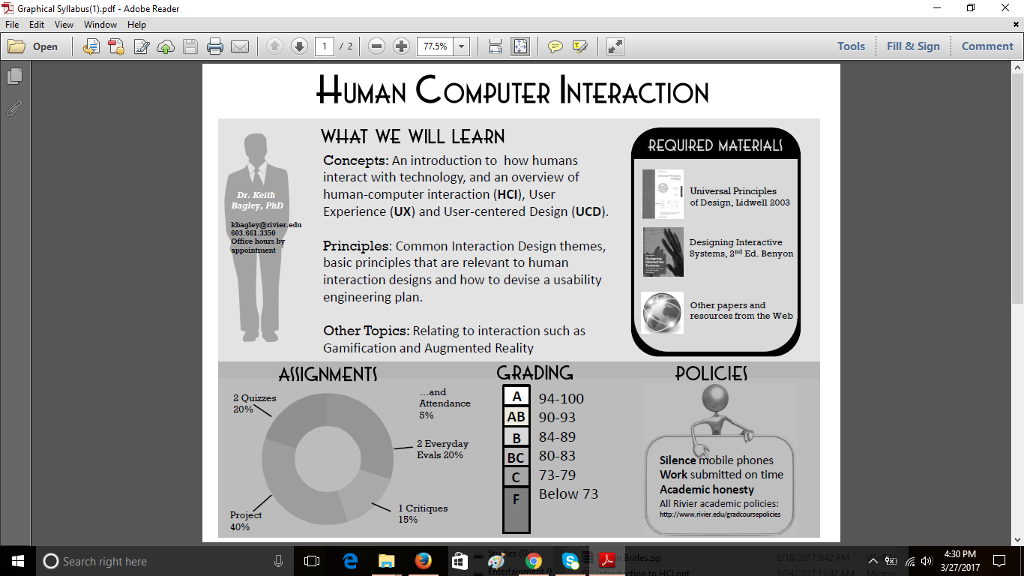
2 Graphical Syllabus pdf Adol Reader be File Edit View Window Help open Search right here 77.5% HUMAN COMPUTER INTERACTION WHAT WE WILL LEARN REQUIRED MATERIAL Concepts: An introduction to how humans interact with technology, and an overview of I Universal Principles human-computer interaction (HCI), User Dr. Keith of Design, Lidwell 2003 Experience (UX) and User-centered Design (UCD). Office hours Principles Common Interaction Design themes Designing Interactive Systems, 2 d Ed. Benyon basic principles that are relevant to human interaction designs and how to devise a usability engineering plan. other papers and resources from the Web Other Topics: Relating to interaction such as Gamification and Augmented Reality GRADING ASSIGNMENTS POLICIES A 94-100 2 Quizzes Attendance 20% AB 90-93 84-89 2 Everyday Evals 20% BC 80-83 Silence mobile phones Work submitted on time C 73-79 Academic honesty F Below 73 All Rivier academic policies: 1 Critiques http/www. 15% 40% Tools Fill & Sign Comment 4:30 PM 2 Graphical Syllabus pdf Adol Reader be File Edit View Window Help open Search right here 77.5% HUMAN COMPUTER INTERACTION WHAT WE WILL LEARN REQUIRED MATERIAL Concepts: An introduction to how humans interact with technology, and an overview of I Universal Principles human-computer interaction (HCI), User Dr. Keith of Design, Lidwell 2003 Experience (UX) and User-centered Design (UCD). Office hours Principles Common Interaction Design themes Designing Interactive Systems, 2 d Ed. Benyon basic principles that are relevant to human interaction designs and how to devise a usability engineering plan. other papers and resources from the Web Other Topics: Relating to interaction such as Gamification and Augmented Reality GRADING ASSIGNMENTS POLICIES A 94-100 2 Quizzes Attendance 20% AB 90-93 84-89 2 Everyday Evals 20% BC 80-83 Silence mobile phones Work submitted on time C 73-79 Academic honesty F Below 73 All Rivier academic policies: 1 Critiques http/www. 15% 40% Tools Fill & Sign Comment 4:30 PM
Step by Step Solution
There are 3 Steps involved in it

Get step-by-step solutions from verified subject matter experts
 Study Help