







Question: Task2: The app will display a UI like the following for Need and Give Scene: Button Textfield Button abc123 Button Textfield Toilet Papers Textfield Button
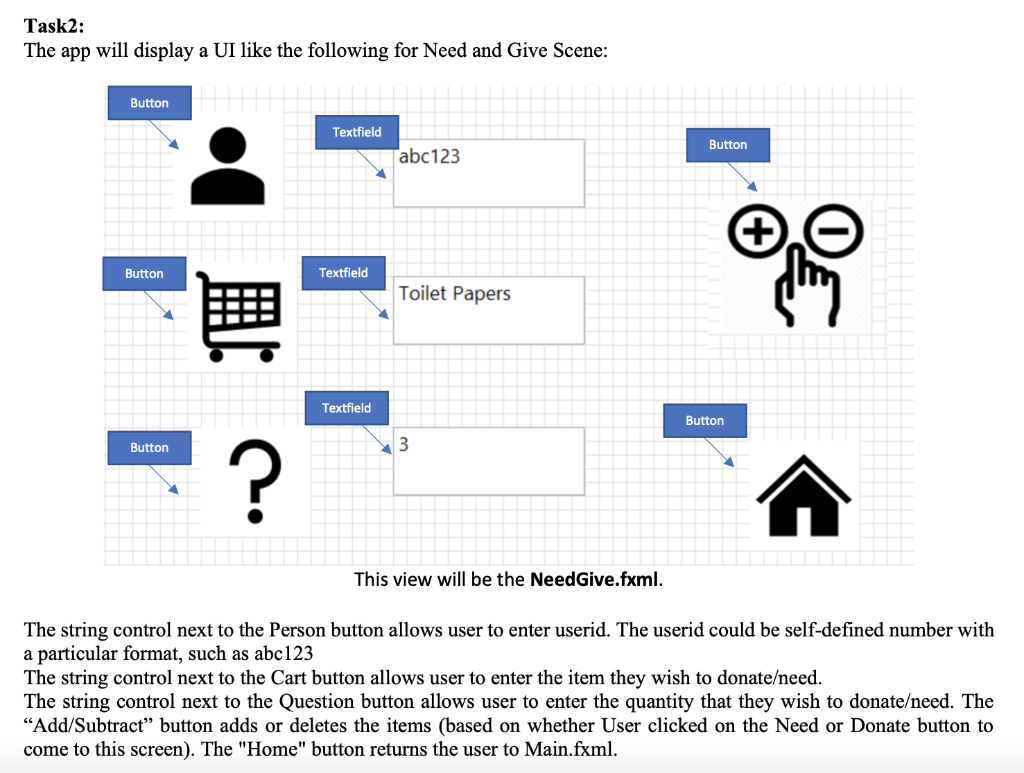
Task2: The app will display a UI like the following for Need and Give Scene: Button Textfield Button abc123 Button Textfield Toilet Papers Textfield Button Button 3 ? This view will be the Need Give.fxml. The string control next to the Person button allows user to enter userid. The userid could be self-defined number with a particular format, such as abc123 The string control next to the Cart button allows user to enter the item they wish to donateeed. The string control next to the Question button allows user to enter the quantity that they wish to donateeed. The Add/Subtract button adds or deletes the items (based on whether User clicked on the Need or Donate button to come to this screen). The "Home" button returns the user to Main.fxml. Task2: The app will display a UI like the following for Need and Give Scene: Button Textfield Button abc123 Button Textfield Toilet Papers Textfield Button Button 3 ? This view will be the Need Give.fxml. The string control next to the Person button allows user to enter userid. The userid could be self-defined number with a particular format, such as abc123 The string control next to the Cart button allows user to enter the item they wish to donateeed. The string control next to the Question button allows user to enter the quantity that they wish to donateeed. The Add/Subtract button adds or deletes the items (based on whether User clicked on the Need or Donate button to come to this screen). The "Home" button returns the user to Main.fxml
Step by Step Solution
There are 3 Steps involved in it

Get step-by-step solutions from verified subject matter experts
 Study Help