







Question: Use the Module 4 Project ERD and the tables created for the midterm project to complete the steps listed below. A . Setting Up Your
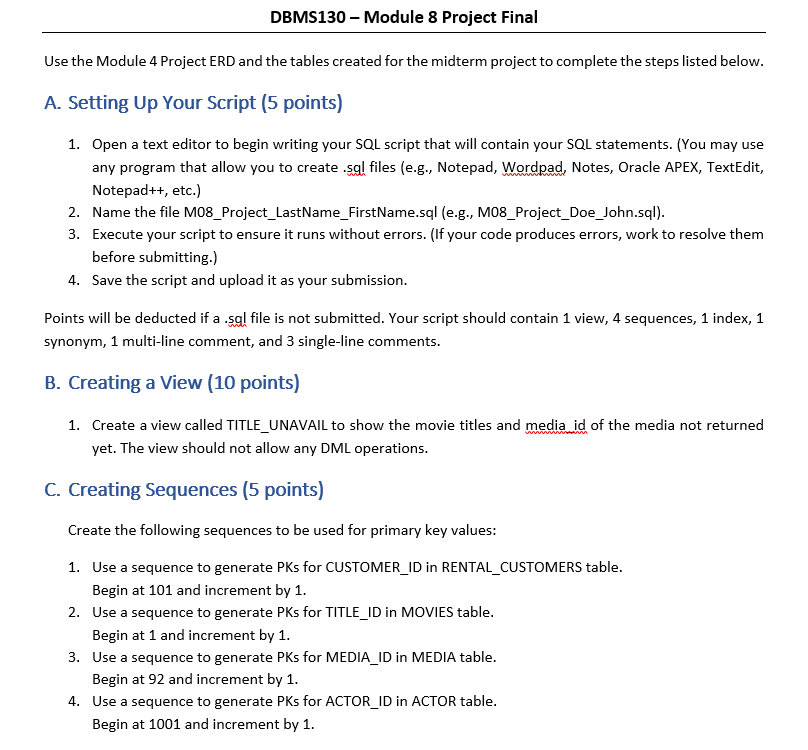
Use the Module Project ERD and the tables created for the midterm project to complete the steps listed below.
A Setting Up Your Script points
Open a text editor to begin writing your SQL script that will contain your SQL statements. You may use any program that allow you to create sgl files eg Notepad, Wordpad, Notes, Oracle APEX, TextEdit, Notepad etc.
Name the file MProjectLastNameFirstName.sql eg MProjectDoeJohn.sql
Execute your script to ensure it runs without errors. If your code produces errors, work to resolve them before submitting.
Save the script and upload it as your submission.
Points will be deducted if a sgl file is not submitted. Your script should contain view, sequences, index, synonym, multiline comment, and singleline comments.
B Creating a View points
Create a view called TITLEUNAVAIL to show the movie titles and media id of the media not returned yet. The view should not allow any DML operations.
C Creating Sequences points
Create the following sequences to be used for primary key values:
Use a sequence to generate PKs for CUSTOMERID in RENTALCUSTOMERS table.
Begin at and increment by
Use a sequence to generate PKs for TITLEID in MOVIES table.
Begin at and increment by
Use a sequence to generate PKs for MEDIAID in MEDIA table.
Begin at and increment by
Use a sequence to generate PKs for ACTORID in ACTOR table.
Begin at and increment by Create an index on the last name column of the Rental Customers table.
E Creating Synonyms points
Create a synonym called TU for the TITLEUNAVAIL view.
F Writing Queries points
Note: You may need to write INSERT statements to add more data to your tables.
Read each of the questions listed in the left column of the table below.
Write the answer to your question andor the required SQL statement in the corresponding cell in the right column that answers the question. Test your statement to confirm the results before submitting.
a To determine the popularity of the movies in the OracleFlix inventory, write a query to display each movie and the number of times it was rented. Sort your results by the count of rentals in descending order.
b OracleFlix will be mailing coupons to the homes of frequent renters. They are printing labels for each customer. Write a query to identify the frequent renters ie customers that have rented more than once Your results should include the customers' first and last name concatenated, address, city, and state. Also include columns name length and address length that display the length of the concatenation of the first and last name and the length of the address. Sort your results by the customers' last names. G Creating Queries points
You have ideas for inventory and rentals reports that could be helpful to the leadership of the OracleFlix company. Develop the queries to support the reports you plan to propose and explain how they would be helpful to leadership.
Note: You may need to write INSERT statements to add more data to your tables.
Your query should include the SQL concepts, keywords, andor clauses in column
Test your statement to confirm the results before submitting and place your final query in the column
Describe the output of your query as if you were presenting it to a client eg what does it mean, how would it be useful to them in column
Save this document once you have added your answers and uploaded it as part of your submission.
begintabularlll
hline begintabularc
Query
Requirements
endtabular & &
hline Query & & Meaning Value of Query Results
At least join & &
GROUP BY &
At least
multiplerow & &
aggregate
function & &
hline Query &
At least & &
subquery & &
At least & &
Column Alias & &
hline
endtabular
Step by Step Solution
There are 3 Steps involved in it
1 Expert Approved Answer
Step: 1 Unlock

Question Has Been Solved by an Expert!
Get step-by-step solutions from verified subject matter experts
Step: 2 Unlock
Step: 3 Unlock
 Study Help