Question: BEGIN ASSINGMENT IM STRUGGLING FOR HRS TASK 1 Assignment Search DuckDuckGo or type a URI Assignment Tasks To help you organize your approach, detailed instructions
 BEGIN ASSINGMENT IM STRUGGLING FOR HRS
TASK 1
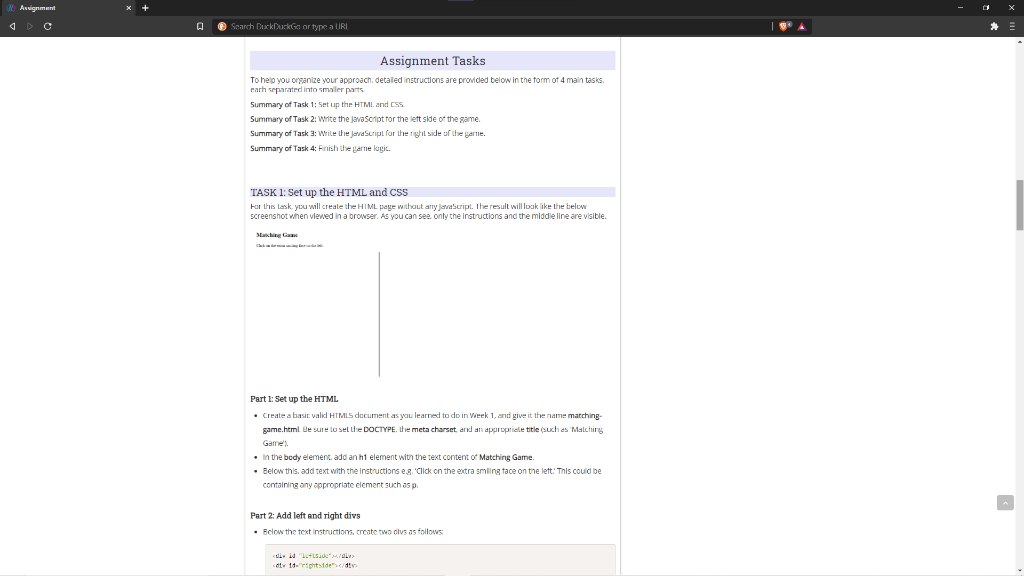
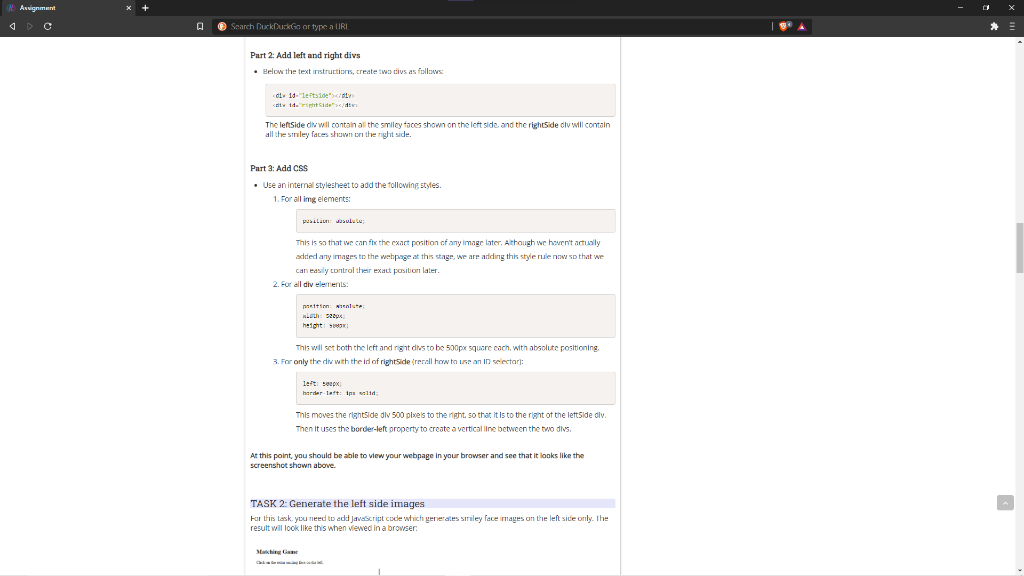
Assignment Search DuckDuckGo or type a URI Assignment Tasks To help you organize your approach, detailed instructions are provided below in the form of 4 main tasks. rarh separated into smaller parts Summary of Task 1: Set up the HTML and CSS. Summary of Task 2: Write the JavaScript for the left side of the game. Summary of Task 2: Write the JavaScript for the right side of the garne. Summary Task 4: Finish the warnelogic TASK 1: Set up the HTML and CSS Karthis task, you will create the HTML page without anyjavaScript. The result will look like the below screenshot when viewed in a browser. As you can see only the instructions and the middle line are visible. Part 1: Set up the HTML Create a basit valid HTML document as you learned to do in Week 1, and give it the name matching game.html Be sure to set the DOCTYPE. the meta charset and an appropriate title (such as Malching Game' . In the body element add an ht element with the text content of Matching Game. . Below this. add text with the instructions eg Click on the extra smiling tace on the left. This could be containing any appropriate element such as p. Part 2: Add left and right divs Below the text instructions, create two divs as follows 14 14. I pit 14, 4: Assignment A @ Search DuckDuckGo or type a URL Part 2: Add left and right divs Below the text instructions, create two is as follows d 11-letid"> The leftSide div will contain all the smiley faces shown on the left side and the right side dlu will contain all the smiley faces shown on the right side. Part 3: Add CSS Use an internal stylesheet to add the following styles. 1. For all ing elements pusila Jasul. This is so that we can ft the exact position of any image later. Although we haven't actually added any images to the webpage at this stage, we are ariding this style rule now so that we can easily control the exact position later 2. For all div elements prettin: en Loth: 32px height: This will set toth the Icft and right dus to be 500px square cach, with absolute positioning 3. For only the div with the id of rightside (rerall how to use an ID selector): left top bardar lattine wild This moves the rightside div 500 pixels to the night so that it is to the right of the left side dlv. Then it uses the border-left property to create a vertical line between the two divs. At this point, you should be able to view your webpage in your browser and see that it looks like the screenshot shown above. TASK 2: Generate the left side images For this task you need to add Javascript code which generales Smiley face images on the left side only. The result will look like this when viewed in a browser Satire Assignment Search DuckDuckGo or type a URI Assignment Tasks To help you organize your approach, detailed instructions are provided below in the form of 4 main tasks. rarh separated into smaller parts Summary of Task 1: Set up the HTML and CSS. Summary of Task 2: Write the JavaScript for the left side of the game. Summary of Task 2: Write the JavaScript for the right side of the garne. Summary Task 4: Finish the warnelogic TASK 1: Set up the HTML and CSS Karthis task, you will create the HTML page without anyjavaScript. The result will look like the below screenshot when viewed in a browser. As you can see only the instructions and the middle line are visible. Part 1: Set up the HTML Create a basit valid HTML document as you learned to do in Week 1, and give it the name matching game.html Be sure to set the DOCTYPE. the meta charset and an appropriate title (such as Malching Game' . In the body element add an ht element with the text content of Matching Game. . Below this. add text with the instructions eg Click on the extra smiling tace on the left. This could be containing any appropriate element such as p. Part 2: Add left and right divs Below the text instructions, create two divs as follows 14 14. I pit 14, 4: Assignment A @ Search DuckDuckGo or type a URL Part 2: Add left and right divs Below the text instructions, create two is as follows d 11-letid"> The leftSide div will contain all the smiley faces shown on the left side and the right side dlu will contain all the smiley faces shown on the right side. Part 3: Add CSS Use an internal stylesheet to add the following styles. 1. For all ing elements pusila Jasul. This is so that we can ft the exact position of any image later. Although we haven't actually added any images to the webpage at this stage, we are ariding this style rule now so that we can easily control the exact position later 2. For all div elements prettin: en Loth: 32px height: This will set toth the Icft and right dus to be 500px square cach, with absolute positioning 3. For only the div with the id of rightside (rerall how to use an ID selector): left top bardar lattine wild This moves the rightside div 500 pixels to the night so that it is to the right of the left side dlv. Then it uses the border-left property to create a vertical line between the two divs. At this point, you should be able to view your webpage in your browser and see that it looks like the screenshot shown above. TASK 2: Generate the left side images For this task you need to add Javascript code which generales Smiley face images on the left side only. The result will look like this when viewed in a browser Satire









 Study Help